• Skip to main content
  • Home
  • Sign Up
  • Blog & Search
  • Privacy Policy
  • Affiliate Disclosure

WORK FROM YOUR LAPTOP

  • Start Here
    • Watch the Video Tutorial
    • FAQs
    • Start Your FREE TRAINING!
  • Blog
  • Meet Eric

Blogroll

Dec 13 2023

How to Build a Website with Wealthy Affiliate In 5 Simple Steps

How to build a website with Wealthy Affiliate

When you first get the idea to start an online business or launch a blog, building the actual website can feel like the biggest mental hurdle. “Do I need to know code?”, “Am I techy enough?”, “Isn’t that stuff complicated?”

Let me show you exactly how easy this process is now using the same training platform I owe all my online success to: Wealthy Affiliate.


5 Steps to Building a Website With Wealthy Affiliate

To build a website with Wealthy Affiliate, go to My Businesses, select a niche, pick an “opportunity” (your focused niche angle), hit Build My Hub, and choose your domain. That’s it. Your website goes live instantly, and WA walks you step-by-step through branding, training, customization, and monetization.

  • It’s beginner-proof: The Hub wizard walks you through every step with zero confusion.
  • Your business plan comes built in: Start with a full strategy of content ideas, build and learn at the same time
  • The websites are fast and secure. WordPress is the global leader for websites for a reason.
  • You get a live domain in minutes. Even on WA’s free starter account, you’re set up from the start
  • Training and support fully included. You’re not in this alone. Help is a click away 24/7.
🔍 Have ChatGPT Summarize This Article

Step 1: Log into Wealthy Affiliate and Go to “My Businesses”

First, if you know nothing about Wealthy Affiliate, understand this: Wealthy Affiliate is a straightforward, affordable platform that teaches online business with a real focus on you actually learning.

I wouldn’t steer you wrong. I’ve done HUNDREDS of reviews of platforms that promise to be “done for you” and reviewed countless online “gurus” who throw every online business scam at you along with the kitchen sink.

Go check out my full Wealthy Affiliate 2026 review here, create your free starter account, and you’ll get me as your personal support coach to guide you every step of the way.

Fair enough?

Now, once inside, definitely respond to my welcome message (you’ll get it around 5 minutes after you enroll) and click around the place to get yourself familiar with it. But the great thing is you don’t need to go hunting through menus. Wealthy Affiliate walks you through the process from the very beginning of your free starter account.

From your WA dashboard, just head to the “My Businesses” tab in the top menu. That’s where your new online empire begins.
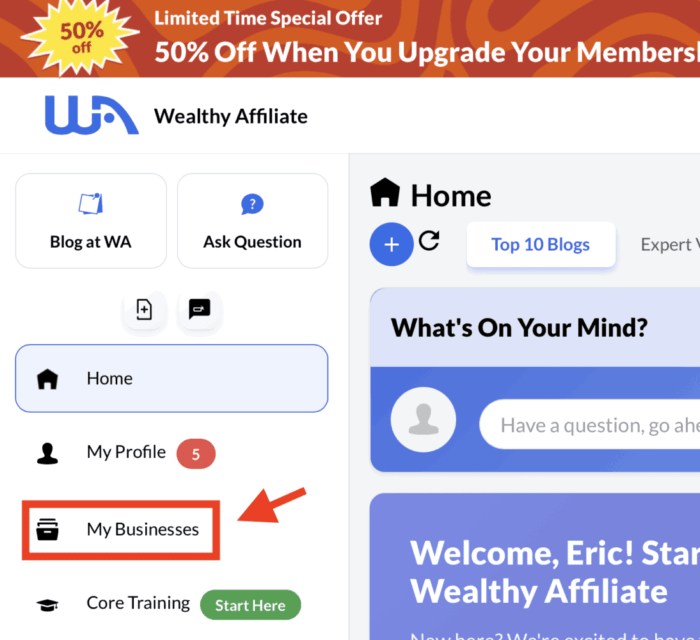
how hard is it to build a website step 1

Step 2: Choose Your Niche (Or Use the Niche Finder Tool)

What do you want your site to be about?

You’ll be prompted to choose a niche, but this isn’t something to spend weeks on. Just choose a passion, interest, or hobby. The real key to choosing a successful niche is choosing one that allows you to connect with your target audience.

So type something you’re interested in (like travel, home workouts, or tiny houses).
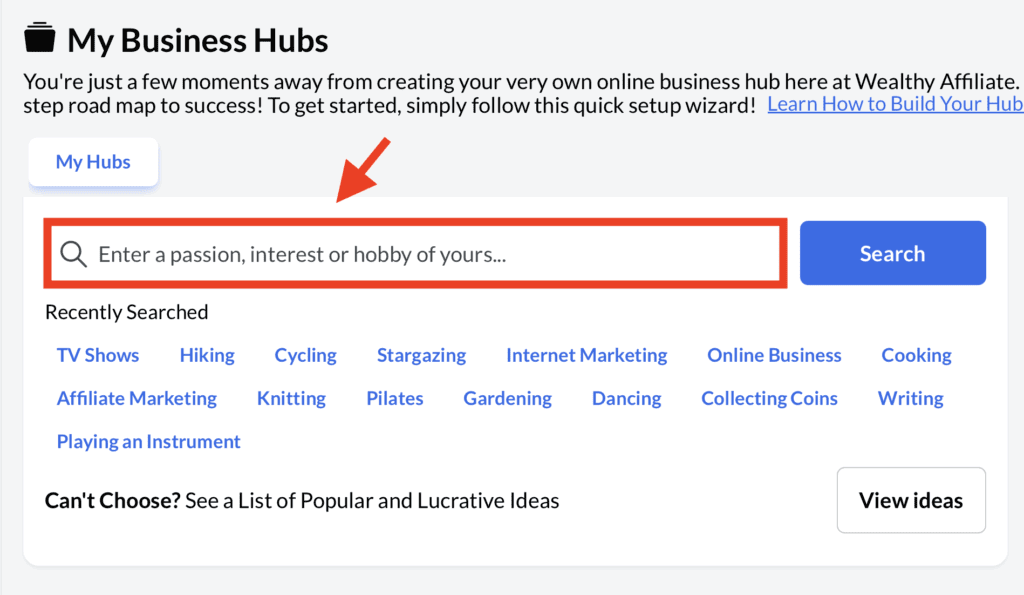
how hard is it to build a website step 2

Don’t overthink this. None of your choices are permanent. You can always go back and change things up later.


Step 3: Pick an “Opportunity” That Dials in Your Focus

This is a newer step that makes the entire process even more refined.

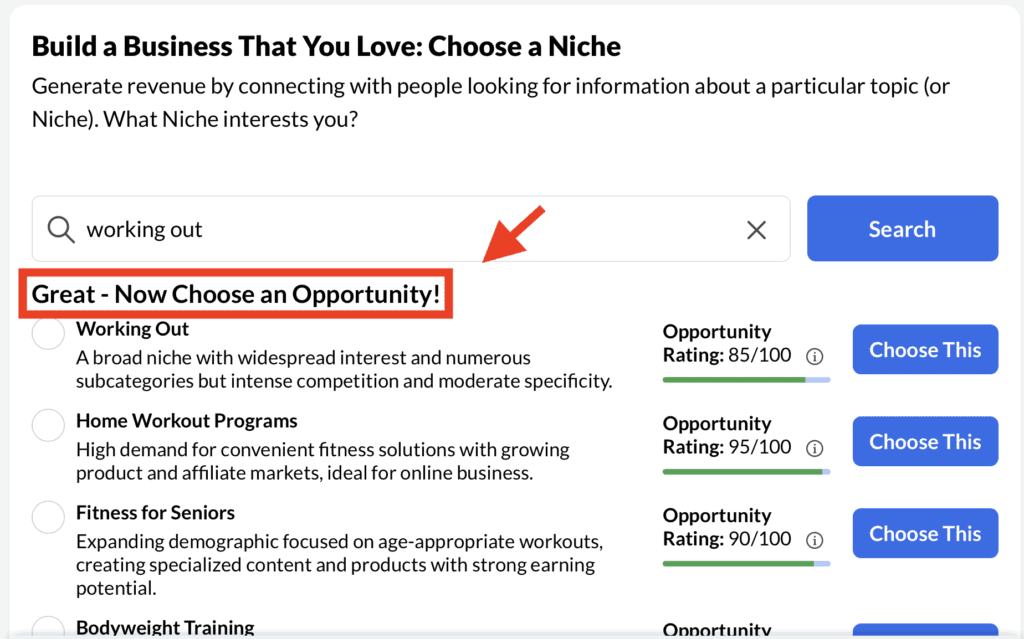
Once you choose a niche, you’ll be prompted to pick an “Opportunity.” Think of this as your angle or specialization within that niche.

So if your niche is “working out,” your opportunity might be:

  • Home workout programs
  • Fitness for seniors
  • Bodyweight training for beginners

This step helps you go from broad and general in scope to way more strategically focused. As you learn how to build high-value blog content you learn that being specialized with your niche will boost conversions because your target audience finds exactly what they’re looking for when arriving at your site.
how hard is it to build a website step 3

Step 4: Click “Finish and Build My Hub”

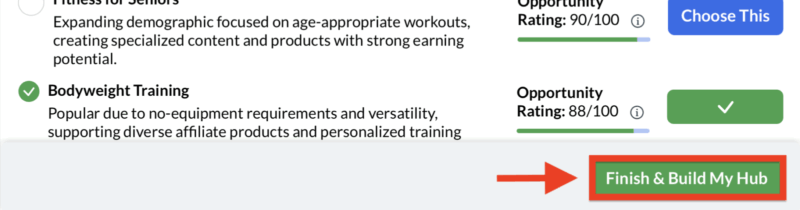
That’s it. Once you’ve made your selections, hit Finish and Build My Hub and let WA do its thing.

In the background, it’s creating your WordPress website, setting up your training dashboard, building out your business plan, and organizing hyper relevant content categories and topic ideas all in one place.

And it happens in seconds.
how hard is it to build a website step 4

Step 5: Choose Your Domain (Free or Custom)

Now it’s time to decide where your new site will live.

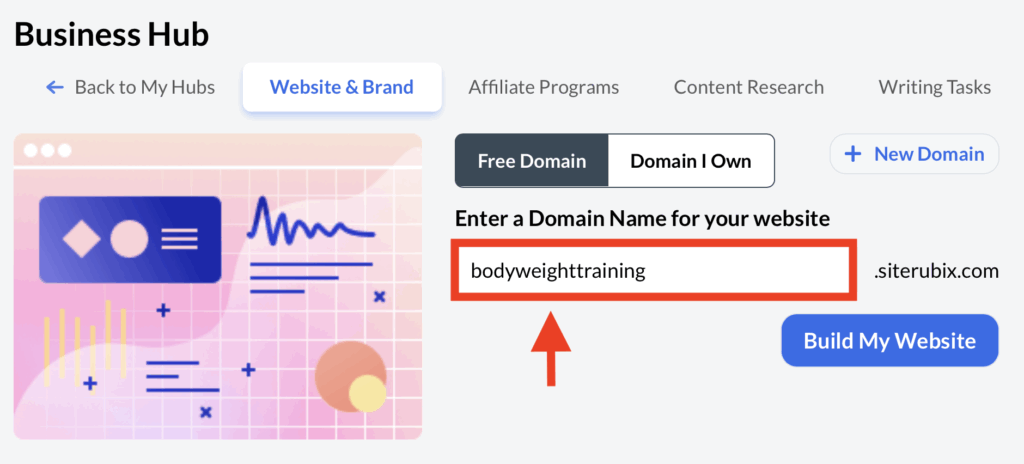
As a free member, you’ll start on a SiteRubix free subdomain (something like bodyweighttraining.siterubix.com), which is perfect for getting your hands dirty without any pressure.

Once you upgrade to Premium, you can move that exact site, content and all, to your own .com domain with one click. (You’ll actually get this free with your upgrade).
how hard is it to build a website step 5

WA handles the domain registration, SSL security, hosting, and email setup. All included.

Work From Your Laptop YouTube Subscribe

What Makes Wealthy Affiliate the Best Place to Build Your Site?

This is a no-brainer. First of all, Wealthy Affiliate is much more than a site builder, it’s a full training platform that shows you how to turn your passion into a real online business.

Plus you get me!

I build all my websites (including this one) at WA. Here are some of the features:

  • ✅ WordPress integration: Fully customizable, scalable, and professional.
  • ✅ Solid speed and functionality: WA’s SiteSpeed Extreme makes your site lightning fast.
  • ✅ Free SSL & top-tier security: No tech stress. Your site is protected 24/7.
  • ✅ GeneratePress theme out of the box: GeneratePress is free, mobile-first, SEO-friendly, and fully customizable. (You can also choose from literally hundreds of fully customizable themes if you want.)
  • ✅ Training that builds your skill set while you grow your brand.
  • ✅ Live support + an insanely helpful global community.
  • ✅ E-commerce ready: Want to sell products? You can do that too.

My Honest Experience with WA Site Building

I’d never built a website before joining Wealthy Affiliate. I’ve been a firefighter since 2002, and website building isn’t exactly a “natural step” that comes after running into burning buildings.

But the straightforward approach inside Wealthy Affiliate’s step by step process is what worked for me. I tend to need things broken down simply. Wealthy Affiliate’s Hub Wizards does exactly that.

And just in case you need a little more help learning WordPress, I literally have HUNDREDS of quick trainings I call “WordPress Wisdoms” inside WA for you to go from newbie to expert with.

Don’t worry. I got you, girl!
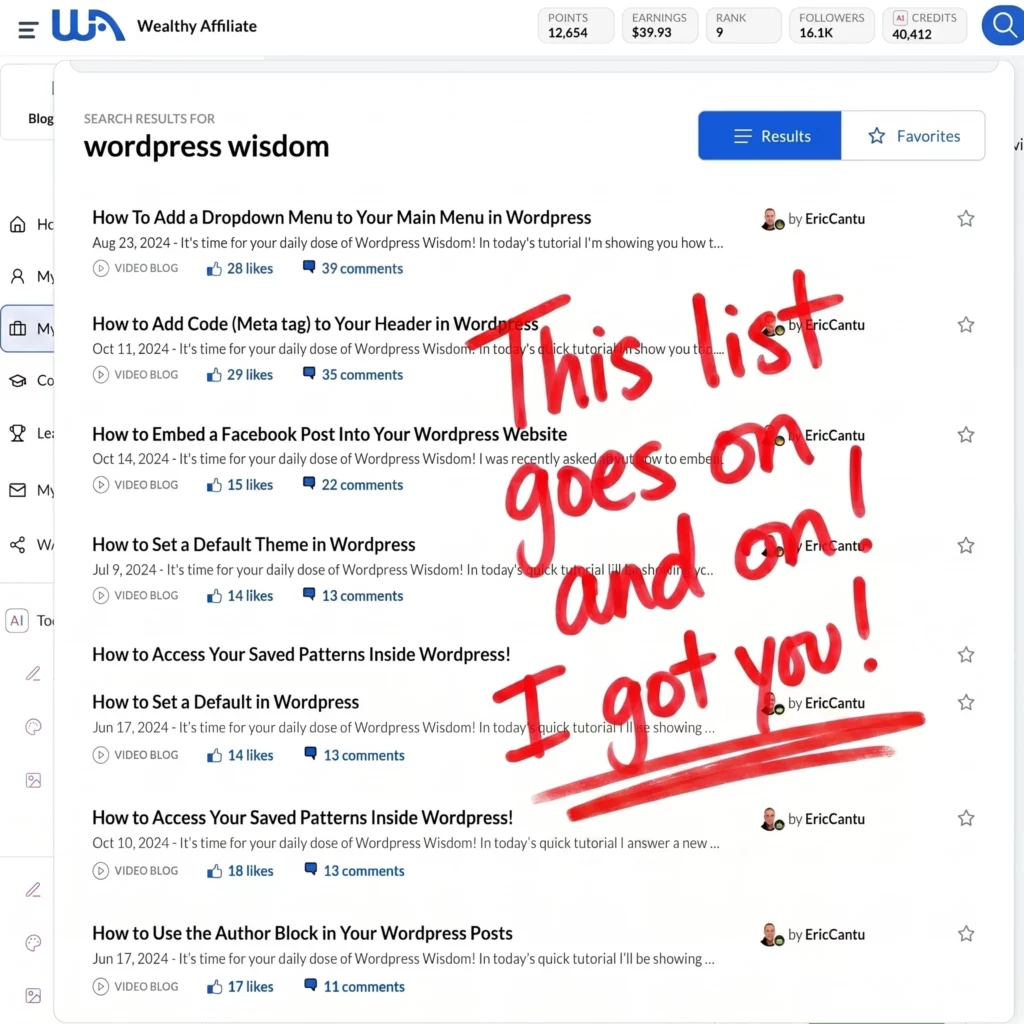
How to build a website with Wealthy Affiliate WordPress Wisdom training

Final Thoughts

You don’t need to be tech-savvy to build a website. You don’t need to have a product. You don’t even need a niche picked out. WA helps you figure it out, guides you through setup, and hands you a live website (plus the tools to grow it).

What do you think? What experience have you had before building a website? Have you always thought WordPress was difficult and opted for more “drag and drop” style website builders? Drop your comments down below! I love hearing your perspective and I always respond.

Trying to make money online and still not seeing results? Create your FREE STARTER ACCOUNT with the same straightforward training I’ve used to create full time revenue online. No matter your experience, this step by step training delivers! Click here and get started NOW!


Frequently Asked Questions

How easy is it to build a website on Wealthy Affiliate?
It’s designed for beginners. You’ll go from niche selection to live site in minutes. The Hub wizard handles the tech, and training fills in the rest.

Can I customize and scale my website?
Absolutely. WA gives you full access to WordPress, so your site can grow with your brand—whether you’re building a blog, store, or content hub.

Is Wealthy Affiliate mobile-friendly and secure?
100%. All websites are mobile-optimized out of the box and protected with SSL, malware protection, and automated backups.


Want More Affiliate Marketing Strategies?

Don’t slow your roll now! Check out the full guides on mastering affiliate marketing!

  • How to Drive Traffic to Your Affiliate LInks
    5 Smart Ways to Drive Traffic to Your Affiliate Links in 2026
  • Why Affiliate Marketing Isn't a Pyramid Scheme
    4 Reasons Why Affiliate Marketing Isn’t a Pyramid Scheme

  • Done For You Businesses Scam Legit
    Are Done For You Online Business Opportunities Legit? (2026 Update)

  • Online Coaching Business Scams Exposed
    11 Online Business Coaching Scams Exposed & How to Avoid Them (2026 Update)

  • Is Affiliate Marketing Still Worth It in 2026?

    Is Affiliate Marketing Still Worth It in 2026?
  • Why You Need to Stop Obsessing Over Analytics
    Why You Need to Stop Obsessing Over Analytics!

Written by Eric Cantu · Categorized: Blogging and Copywriting

Dec 11 2023

How Hard is Email Marketing as a Side Hustle?

How hard is email marketing as a side hustle

Email marketing is a popular approach for many people looking to make money online. But how hard is email marketing really? How does it work and how can you implement it into your affiliate marketing business?

TL;DR: How Hard is Email Marketing as a Side Hustle?

Email marketing can be highly profitable but requires consistent effort in list building, content creation, segmentation, and automation. Done right, it can outperform many other side hustle strategies

  • Build and grow your list – Use lead magnets and clear opt-in forms to attract engaged subscribers.
  • Create engaging campaigns – Focus on strong subject lines, clean design, and mobile-friendly layouts.
  • Segment for better results – Tailor emails to subscriber interests and behaviors for higher conversions.
  • Automate smartly – Set up workflows, A/B test, and integrate with other marketing tools.
  • Monetize effectively – Promote relevant products, offer digital services, and build sales funnels that convert.
🔍 Have ChatGPT Summarize This Article

What’s In This Article? (Quick Jumps)

  • Understanding Email Marketing
  • Getting Started with Platforms & Building Your List
  • How Do I Create An Effective Email Campaign?
  • Automation and Advanced Features
  • Monetizing Your Email Marketing Efforts
  • Growing Your Email List and Scaling
  • Challenges and Solutions in Email Marketing
  • Final Thoughts
  • Frequently Asked Questions

Understanding Email Marketing

Let’s first learn the basics of building an email list, creating effective campaigns, and then move on to advanced features like segmentation and automation.

The reason email marketing has such a unique approach to your online business is because of its focus on that part of your audience that doesn’t convert the first time they visit your website. This can give your online business all new life.

  • What is Email Marketing?:
    • Email marketing involves creating a campaign of messages via email which can be promotional, informative, or educational.
  • How Email Marketing Works:
    • It starts by building a subscriber list with permission to send emails.
    • Most websites will offer something of value to their audience in exchange for their email. This could be a pdf, ebook, or any other digital product.
    • Campaigns like newsletters, product updates, promotional offers, and sales funnels are created and sent to this list.
    • The aim is to create relationships with subscribers and keep them engaged with your brand.
  • Email’s Role in Digital Marketing:
    • It allows for personalized messages and targeting specific groups, making it more effective than some other digital marketing methods, like social media.
    • Email marketing converts at a much higher rate (40 to 1) because of this.

Getting Started with Platforms & Building Your List

Now that we understand the opportunity, let’s talk about choosing a platform and building your email list.

  • Choosing the Right Email Marketing Platform:
    • Consider the features and pricing plans of the email marketing platform to see which is the best fit.
    • Popular platforms include AWeber, Mailchimp, and ConvertKit, each with pros and cons.
    • Factors to consider include budget, email list size, and specific features needed.
    • Many platforms offer free plans for small lists, while others charge based on subscriber count.
  • Building Your Email List:
    • Utilize a high-converting lead magnet or incentive (like a free ebook or course) to exchange for email sign-ups.
    • Use a solid the opt-in form that’s clearly displayed and communicates exactly what subscribers will receive. Be direct.
    • Always make it easy to unsubscribe from your list for legal compliance and maintaining a good reputation. The worst thing that can happen is having your emails be associated with annoying spam that never stops coming.

Related article: Want to craft your first lead magnet to haul in tons of emails and leads? Check out my full guide on creating a high-converting lead magnet with tips and strategies on ebooks, checklists, webinars, and more!

AWeber Pros & Cons

  • Easy to use, especially for beginners.
  • Has a free plan.
  • Good customer support with options for email, live chat, and phone calls.
  • Offers a variety of integrations, meaning it can seamlessly connect to many different applications and services.
  • Limited trigger and segmentation opportunities
  • Counts unsubscribers as billable contacts.
  • Lower deliverability rate compared to some competitors
  • Check my full AWeber review here.

Mailchimp Pros & Cons

  • Drag-and-drop email builder is very user friendly.
  • Offers a free plan.
  • Extensive range of templates and customization options.
  • The free plan has limited features and support options.
  • Higher pricing tiers can be expensive compared to competitors.
  • Some users report challenges with data management and segmentation in larger lists.

Convert Kit Pros & Cons

  • Designed specifically for content creators and bloggers, with features tailored to their needs.
  • Offers powerful automation capabilities with a focus on ease of use.
  • Strong tagging and segmentation features for targeted campaigns.
  • Limited design options for email templates, focusing more on text-based emails.
  • Higher pricing compared to some other platforms, especially for larger subscriber lists.
  • Some find the interface less intuitive compared to competitors, so there’s a bit of a learning curve.

How Do I Create An Effective Email Campaign?

The crucial part of email marketing is obviously getting your audience to open and engage with your emails. Sending an email that gets opened, read, and acted upon isn’t as easy as it seems. Let’s cover some tips on how to create effective email campaigns that will help you get better results.

  • Design Matters: Make sure your email looks professional and attractive. If it looks sketchy, they’ll unsubscribe immediately. Use a clean, simple layout that highlights your message and offers easy actions by subscribers.
  • Be Mobile Friendly: As most people check emails on mobile devices, design your email to be mobile-friendly. Employ a single-column layout with large fonts and clear, easily clickable call-to-action buttons.
  • Attention Getting Subject Lines: The subject line is everything. Your audience won’t open your emails if the subject line is boring. Make it attention-grabbing, persuasive, and relevant. Keep it concise, use action words, and personalize it. Surprisingly, one of the most popular subject lines that almost always gets a click through is “Re:”.
  • Segmenting Your Audience: Increase engagement by segmenting your email list. This means not every recipient in your list is receiving the same emails. Segment based on interests, behaviors, or demographics. Use your email marketing software for segmentation and tailor content to each group’s specific needs and interests.

Automation and Advanced Features

Let’s talk automation. Any chance you have to maximize your time and resources, you should take it. Email marketing automation can be a game-changer. And let’s not forget advanced features like integration with social media and A/B testing.

With automation, you can set up workflows based on specific triggers and then send personalized, highly relevant content to that segmented list based on these unique triggers.

  • Email Automation Workflows: Utilize triggered email series based on subscriber actions or behaviors. You can set up workflows for welcome emails and brand introductions to new subscribers, abandoned cart reminders, and re-engagement emails.
  • A/B Testing: A/B testing lets you compare different email versions to identify which ones are working and which ones aren’t. Test elements such as subject lines, content, images, and CTAs. Analyze results to determine which versions yield better performance, like higher open rates. Make sure when you’re A/B testing to only change one element between your two versions so you can pinpoint your variable.
  • Integrating with Other Digital Marketing Tools: Link your email platform with social media for broader reach and personalized campaigns. Use additional tools like landing page builders and lead magnets to strengthen your digital marketing strategy.

Monetizing Your Email Marketing Efforts

monetizing email marketing

This is the whole reason we do what we do, right? In this section, I’ll discuss some ways you can monetize your email marketing efforts and turn your email list into paying customers.

  • Affiliate Marketing and Sponsored Content:
    • Promote relevant products or services to your list for a commission or fee.
    • Make sure the products or services you promote are relevant to your audience’s interests and your brand values.
    • Be transparent about affiliate relationships. You don’t necessarily have to tell them in the email that you receive commissions for sales, but on the website your email directs them to make sure you have an affiliate disclaimer.
    • Only promote products or services you would actually use yourself.
  • Selling Digital Products and Services:
    • Offer eBooks, courses, coaching services, or other digital products.
    • Focus on providing value and actionable information.
    • Ensure high-quality content in your digital offerings.
  • Creating a Profitable Email Sales Funnel:
    • Develop a series of emails guiding subscribers through a sales process.
    • As they progress through the series of emails, deliver more and more value. This could include free resources and personalized recommendations. By the end of the funnel, offer a product or service they can buy.
  • Your List is Evergreen:
    • Don’t forget about timely email send outs to your list on occasions like Black Friday and other flash sale opportunities.

Growing Your Email List and Scaling

As your email marketing side hustle grows, you’ll need to expand your subscriber base to keep up with demand. Here are some tips for expanding your subscriber base:

Expanding Your Subscriber Base

  • Content is king!: Always focus on creating consistent, high-quality content that resonates with your target audience. This will encourage them to sign up for your email list and share your content with others.
  • Use Great Lead Magnets: Offer incentives for signing up, such as exclusive content, discounts, or freebies.
  • Get Social: Use social media to promote your email list and encourage people to sign up.
  • Partner Up: Collaborate with other businesses or influencers in your niche to reach a wider audience.

While it’s important to grow your subscriber base, it’s equally important to balance quality and growth. Here are some tips for finding the right balance:

Balancing Quality and Growth

  • Trim the Fat: Regularly review your subscriber list to remove inactive or unengaged subscribers.
  • Be Dynamic: Test different strategies to see what works best for your business, rather than just blindly following trends.

Challenges and Solutions in Email Marketing

Email marketing isn’t without its challenges. Let’s discuss some of the common challenges you might face in email marketing and how to overcome them.

  • Don’t Land in the Spam!: To prevent emails from landing in the junk folder, maintain a clean, up-to-date email list and craft content and subject lines that don’t trigger spam filters.
  • Improving Deliverability: Ensure your emails are well-formatted and contain relevant content, sent at optimal times. If you’re delivering your emails at 4 am, guess what, it’s gonna come off as spammy.
  • Trending with Hyper-relevancy: Keep on top of email marketing trends like personalization, which improves open and click-through rates, and segment your list accordingly. Personalized emails have a much higher open rate than generic ones.
  • Mobile Optimization: With the increase in mobile email access, use responsive design and concise content for better mobile optimization.
  • Enhancing Engagement and Conversion: Focus on creating engaging emails with valuable content that drives your recipients to take action. Compelling subject lines, and clear calls-to-action will encourage subscriber action.
  • Testing and Optimizing Emails: Experiment with different subject lines, content, and calls-to-action, and use analytics tools to track performance and make informed adjustments. A/B testing is can be the difference between success and complete failure.

Trying to make money online and still not seeing results? Create your FREE STARTER ACCOUNT with the same straightforward training I’ve used to create full time revenue online. No matter your experience, this step by step training delivers! Click here and get started NOW!


Final Thoughts

Does email marketing take work? Yes. Is it worth it? Yes! Take your affiliate marketing business next level by incorporating a solid email marketing aspect to it. Build your list, deliver on value, get those conversions, and overcome challenges like a boss!

What do you think? Have you incorporated email marketing into your online business yet? What challenges have had? Let me know in the comments section below! I look forward to hearing from you and I always respond.


Frequently Asked Questions

How do I start email marketing as a part-time business?
Begin by choosing a niche and identifying your ideal audience. Offer a lead magnet to grow your email list, and focus on sending valuable, relevant content that builds trust and drives conversions.

Is email marketing more effective than social media for side hustles?
Yes. Email marketing can be up to 40 times more effective than social media for customer acquisition and typically delivers higher conversion rates, making it a stronger choice for monetizing a side hustle.

What can I realistically earn doing email marketing part-time?
Part-time email marketers often earn between $20–$50 per hour, depending on their niche, list size, and the value of the services they provide. With the right strategy, earnings can grow quickly.


Still Hungry for Growth?
Dive Into These Handpicked Articles! ⬇️

  • email automation sequence that converts
    How to Set Up an Email Automation Sequence That Actually Converts
  • How to start a newsletter that works
    How to Start a Newsletter That Works: Easy Tips for Beginners
  • email segmentation 101
    Email Segmentation 101 – Avoid Spam and Boost Conversions
  • creating high converting lead magnets
    Creating High-Converting Lead Magnets
  • Building your first email list
    Build Your First Email List from Zero, Step-by-Step
  • How hard is email marketing as a side hustle
    How Hard is Email Marketing as a Side Hustle?

Written by Eric Cantu · Categorized: Email & List Building

Dec 05 2023

Keala Kanae Business Launch Challenge Review

Keala Kanae's Business Launch Challenge Review

Are you getting ready to take Keala Kanae’s business launch challenge? In this review I want to shed some light on how it works, what it really is, how it ultimately leads to massive upsells, and why, in my opinion, it’s not worth your time. The numbers don’t lie!

Is Keala Kanae’s Business Launch Challenge Legit?

Overall, I found Keala Kanae’s Business Launch Challenge to be lacking in substance. While the curriculum covers the basics of starting a business, there’s little to no actionable advice, the sales approach felt very pushy and salesy, and the finale is a massive $15k price tag.

I’ve reviewed many, many of Keala Kanae’s training platforms and ad campaigns, from the now defunct AWOL Academy to it’s reboot Fullstaq Marketer, to his ads for his Freelance Affiliate Guide and more.

Sadly they all follow the same exact pattern and it’s the same exact complaints that echo in their wake. “I had no idea this would be so EXPENSIVE!”

His Business Launch Challenge is no different. A weekend seminar leading up to, you guessed it, a massive upsell into his Fullstaq Marketer platform and the ultra expensive Fullstaq Elite package at $15k.

Related Article: Check out Keala Kanae’s latest ventures in my full reviews of his Power Code Masterclass and the upsell it leads to Genesis!

Keala Kanae and Fullstaq Marketer

When I was first starting out looking for a training platform to learn affiliate marketing, ads for Keala Kanae’s training were all over my social media. The deeper I got, the more my instincts were telling me it was a bad idea.

Maybe you feel the same way and that’s why you’re here doing your due diligence. If so, I applaud you. After review after review of his platforms, I’ve seen first hand that his tried and true approach doesn’t waiver: low buy-in, massive upsell.

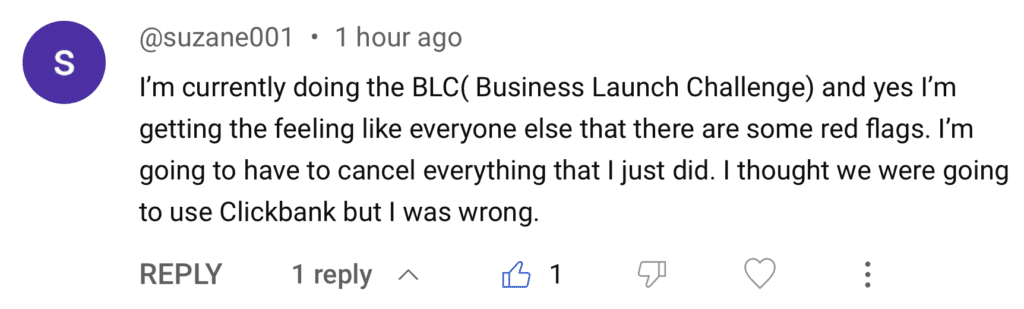
These are the comments I see all over my YouTube review videos of Keala’s training:

Keala Kanae testimonial

All Keala’s recent campaigns revolve around funneling customers to his latest venture, Fullstaq Marketer, a series of courses that aims to teach beginners how to make money online through affiliate marketing.

While Fullstaq Marketer may seem like a great course on the surface, in my opinion it’s filled with the same red flags I’ve talked about in my online business coaching scam articles.

No matter what any “guru” tells you, remember:

  • There is no such thing as a “done for you” business
  • Unrealistic promises of revenue like “15k in 90 days” never pan out
  • The second you start hearing “one on one coaching call” think “pressured sales call” This same tactic is used with both Legendary Marketer and Attraction Marketing Formula.

Business Launch Challenge Overview

  • Weekend Seminar Approach: The Business Launch Challenge covers two and a half days of training, covering business setup, sales funnel creation, and enhancing your online presence.
  • Intro to Affiliate Marketing Basics: The draw for many is the introduction to a reality where they can earn money by simply promoting other people’s products. Yes, affiliate marketing and digital marketing are both extremely lucrative, however the push in this training is to buy and resell Keala’s expensive platform..
  • Module on Sales Funnel Creation: Includes a module on creating sales funnels and converting visitors into customers.
  • Community Engagement: Offers opportunities to interact with other participants for questions and feedback, with a “us against the world” vibe common in multilevel marketing business models.

The Offer and Products, Get Your Wallets Ready

  • Basic Offer with Upsells: Entry to the program costs $39, but it leads to multiple upsells, encouraging additional spending.
  • Expensive Recurring Expenses: Sales funnels, landing pages, paid ads, and more all require substantial monthly spend. These are painted as sure-fire tools to explode your business, but without proper training they can become a money pit very quickly with monthly expenses adding to several hundred dollars per month.
  • The Massive Upsell: The grand finale is a “once in a lifetime” offer to get accepted into his Fullstaq Elite personal coaching program from Keala Kanae himself, also including exclusive access to his Facebook group, and his “done for you” proven system for $15k

Related article: Want to see just how common these upsell and “guru” tactics are? Check out my full review of another well known guru Alex Hormozi and his very similar schemes here!

Keala Kanae red flags testimonial

Even filling out surveys online is better…

You’re not going to break the bank filling out surveys and playing game online, but it’s better than Keala’s nonsense. Check out my Swagbucks review and see how I made $800 playing games online.


Are There Keala Kanae Success Stories?

There are plenty in the Keala Kanae community who will argue that you have to spend money to make money, and this is true. There are success stories who talk about their $1000 commissions. But the fact is affiliate marketing training doesn’t have to be that expensive.

When you spend tens of thousands right out the gate you put yourself in such a hole that you become desperate to make a sale of that same expensive product to someone else. This is where his training ultimately becomes more and more of “buy my product, sell my product” and less about true affiliate marketing.

True affiliate marketing training teaches you how to:

  • Choose your own niche
  • How to build your own websites
  • How to do keyword research to build traffic,
  • And how to monetize your websites and your traffic in many ways.

The bottom line is that if you are ok with spending the kind of money Keala Kanae’s training platforms ask of you, then more power to you. In my experience, this kind of spending right out of the gate leads to the complaints that are so common with Keala Kanae’s training platforms.


Keala Kanae Reviews & Complaints

The main complaints you see throughout Keala Kanae’s training are:

  • Huge upsells
  • Pressured sales tactics
  • Revenue promises that go nowhere
  • Unexpected monthly expenses you’re not prepared for

More than one YouTube commenter has told me about “coaching calls” that they quickly realized were pressured sales calls. Being asked “How bad do you want this?” and then told they could connect them with a loan service to make the big jump. Not cool.

Keala Kanae testimonial

Final Thoughts

If you’re interested in taking Keala Kanae’s Business Challenge, at least know what’s coming: online business basics followed by the big upsell. In my experience, his training leads to more let downs than success stories. Buyer beware.

What do you think? Have you been to Keala Kanae’s Business Challenge? What did you get out of it? Are you a success story? Were you left high and dry? Let me know what you think in the comments section below!

Trying to make money online and still not seeing results? Create your FREE STARTER ACCOUNT with the same straightforward training I’ve used to create full time revenue online. No matter your experience, this step by step training delivers! Click here and get started NOW!


Frequently Asked Questions

What is the Fullstaq Marketer affiliate program and how does it work?
The Fullstaq Marketer affiliate program is a high-ticket online business training platform created by Keala Kanae. It offers digital marketing courses designed to teach entrepreneurs how to build, launch, and scale profitable online businesses. Members can also earn commissions by promoting Fullstaq Marketer’s courses through its affiliate program.

Is Fullstaq Marketer a legitimate program or a scam?
Fullstaq Marketer is a legitimate online education company. Founded by Keala Kanae, it provides real training in affiliate marketing and business growth strategies. However, the program includes multiple high-priced upsells, and users often spend between $9,800 and $15,000 for full access to advanced levels like Fullstaq Elite.

How much does Fullstaq Elite cost and what does it include?
Fullstaq Elite, the premium level of Fullstaq Marketer, typically costs between $9,800 and $15,000. The investment depends on the support and mentorship packages selected. It includes in-depth coaching, business building tools, marketing strategy sessions, and personalized guidance to help scale an online business faster.

Want More Honest Reviews?

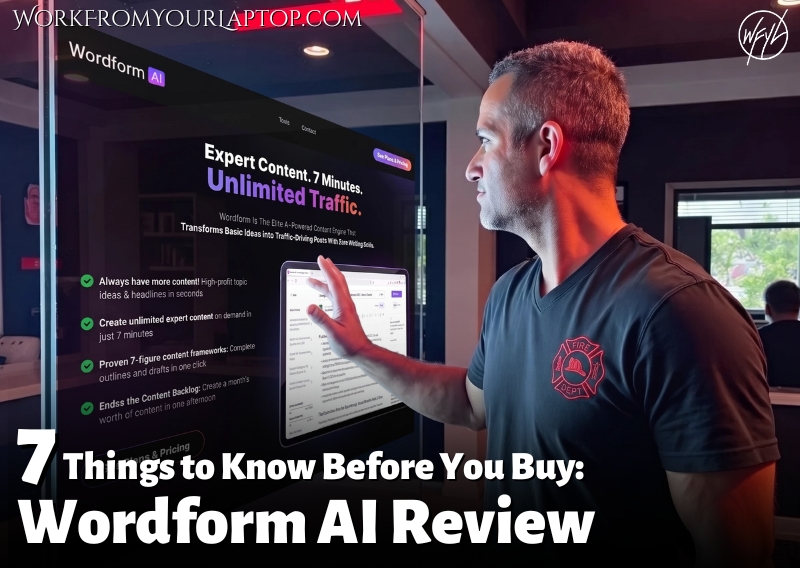
  • Wordform AI review
    Wordform AI Review: What They Don’t Tell You About the $67 Price
  • Cash Tracking System Scam Review
    7 Red Flags That Prove Cash Tracking System Is a Scam
  • Keala Kanae Power Code Masterclass review scam
    Keala Kanae’s Power Code Masterclass Review: The Free Bait Before the $29K Hook
  • Genesis by Inspirean Keala Kanae Scam or Legit Review
    7 Reasons Why Keala Kanae’s Genesis by Inspirean Is a Bad Idea – Honest Review
  • 7 figure accelerator review
    7 Figure Accelerator Review
  • Mastermind.com Review
    Mastermind.com Review: Scam or the Ultimate Knowledge Business Tool?

Written by Eric Cantu · Categorized: Reviews & Comparisons

Dec 03 2023

How Often Should I Blog for My Business?

how often should i blog for my business

As a business owner and blogger, you may be wondering how often you should be blogging to maximize the benefits for SEO (Search Engine Optimization) and ranking. Is there a magic number to aim for? The answer is not one-size-fits-all.

How Often Should I Blog for My Business?

2 to 4 times per week is a solid start. Blogging frequency depends on factors such as your niche, target audience, and content goals. Finding the right blogging frequency will massively impact your traffic, conversions, and ultimately your revenue. Consistency is key.

There’s one golden rule when it comes to affiliate marketing and content creation: Content is king. So when it comes to determining how often you should blog, there are several factors at play. Let’s dive into to why consistent content creation is so important for you and your business and how to determine a schedule you can stick to.

Understanding Blogging for Business

Before diving into the frequency of your blog posts, it’s important to understand the role of blogging in affiliate marketing.

  • Blogging’s Central Role: Blogging is a the most important component of content marketing for a website, essential for attracting and engaging a target audience.
  • Establishing Authority and Brand Awareness: Regularly publishing high-quality blog posts helps establish the blogger as an authority in their niche and builds brand awareness.
  • Importance of Defining Blogging Goals: Before starting a blog, clearly define your objectives, whether it’s to provide informational content, write review articles, or other goals.
  • Understanding the Audience: Knowing the audience’s interests, challenges, and preferences is crucial for creating content that resonates and provides value.
  • Choosing a Niche of Interest: It is so important to choose a niche you are genuinely interested in and have passion for. This makes you relatable and makes the creation of valuable content so much easier.
  • Effective Communication with the Audience: Using language and terminology familiar to the audience helps establish a connection and encourages recurring readership.

Related article: Check out my full 10 step guide to starting a successful blog here!

Determining Blog Post Frequency

So how often should you be publishing your blog posts? The answer is… it depends.

  • A Healthy Start: Blogging 2 to 4 times per week is a good start for any content creator. This allows you to average 8 to 12 posts per month, or around 100 posts per year.
  • Consider Your Competition: There’s nothing wrong with researching what the other guys are doing. Check your competitors’ blogging frequencies to determine your own posting schedule without overwhelming your audience.
  • Prioritizing Quality Over Quantity: Focus on publishing high-quality content that offers value, even if it means posting less frequently. The last thing you want to do is overwhelm your audience with mediocre content.
  • Frequency vs. Content Depth: Consider producing more in-depth content less frequently if you’re struggling to generate high-quality post ideas on the regular. Can’t post 2 to 4 times a week just starting off? How about a solid, in-depth article once a week?
  • Adapting to Your Time Resources: Time is always a factor when it comes to regularly creating content. If time is limited, opt for less frequent but higher quality posts; if time is abundant, consider more frequent postings without compromising quality.

Content creation is the number one key to building your business. No matter if you’re a beginner or master blogger, always focus on publishing and work to not get obsessed over analytics as well.

Creating a Blogging Schedule

As a blogger, consistency is everything. Let’s cover the importance of developing a schedule and sticking to it while still delivering with value.

  • Keeping Their Attention: Maintaining a consistent blogging schedule is crucial for keeping readers engaged and building a loyal following.
  • Be Realistic: Don’t aim so high that you fall flat. Yes, blogging daily would be incredible, but you need to choose a blogging frequency that is manageable; publishing fewer quality posts is preferable to overcommitting and risking burnout.
  • Balancing Blogging and Other Marketing: Ensure that your blogging efforts complement your other marketing activities like social media, a YouTube channel, email marketing, etc.
  • Once Set, Prioritize It: Once you have a balanced schedule in place, do everything in your power to stick to it! Over time your writing will become easier and more efficient. Make consistent writing a part of your daily routine..

SEO and Blogging Frequency

One of the biggest benefits of pushing out content regularly is the impact on your website’s SEO. Not only will you be delivering for your audience but you’ll start ranking much higher, meaning explosive growth potential!

SEO image
  • Fresh Content Attracts Google: Regular posting of fresh content leads to more frequent visits by Google’s crawlers, increasing opportunities to rank in search results. Ranking equals free traffic!
  • Quality Over Quantity in SEO, Too: This mantra doesn’t change. The quality of your content is crucial for SEO. Google’s algorithm can distinguish between informative posts that bring value and those with poor quality or excessive keyword use. Don’t keyword stuff!
  • Do Your Homework: Keyword research is so important. Effective SEO relies on identifying and optimizing content for keywords and phrases relevant to your target audience. What are the searches your audience is making? Create content to be the answer to those searches!
  • Building Backlinks with Regular Posts: Consistently publishing high-quality content can encourage other websites to link back to your site, boosting your backlink profile and SEO. Backlinks build authority!

Coming Up With Content Ideas & Keeping It Fresh

Ok, so you want to create all this content and do it consistently, right? Where do you come up with ideas to write about? How do you keep it fresh? Here are some tips for content creation and management that have worked for me:

  • Go to the People: Don’t try to do this all on your own. Google is your friend! Brainstorm using tools like Google Trends, BuzzSumo, and Reddit, Quora, etc..
  • When People Don’t Cut it, Go Artificial: AI is a SPECTACULAR way to brainstorm content ideas. Tools like ChatGPT, Bard, and others are great at giving you ideas for topic clusters, generating outlines for your content, and much, much more.
  • Preventing Blogger Burnout: Burnout is a real thing. It’s ok to take a break to avoid burnout and maintain productivity and creativity. Consider delegating tasks or even outsourcing certain tasks through platforms like Fiverr.
  • Enhancing Posts with Multimedia: Your audience LOVES video! Embedding YouTube videos is a quick and easy way to keep it fresh and improve your overall user experience.
  • Using Design Tools: Utilize tools like Canva, Adobe Spark, and Piktochart to create high-quality visuals that enhance your blog content. AI is also great at coming up with visuals too. I used ChatGPT for several of the images on this post.

Don’t Sleep on AI For Content Creation

When you need to be more efficient, AI content writers can come to the rescue. In fact, they can improve your blogging frequency by 10x or more! Don’t be afraid of using AI! Google has publicly documented that they will still rank AI written content as long as it gives VALUE. If you don’t jump on the AI train, guess what? Your competition is and you’ll be left behind.

  • AI Content Writing Tools: AI content writers like KoalaWriter and ChatGPT can efficiently produce high-quality, original, and audience-relevant content using natural language processing and machine learning.
  • Caution with AI-Generated Content: Use AI as the tool it’s meant to be. Be cautious with reliance on AI for content creation to ensure it doesn’t lead to plagiarism and that it maintains your brand’s voice and values.
  • Checking for Originality: Utilize AI-powered plagiarism checkers, such as Copyscape or Grammarly, or my favorite Originality.AI to verify the originality of content and avoid duplication.
  • Balanced Use of AI: Integrate AI tools thoughtfully into your content strategy, focusing on delivering value. Don’t just copy and paste. Use AI to build a framework for your content and fill in the rest with your own voice.
  • AI as a Powerful, Strategic Asset: When used correctly, AI can be a massive tool in your tool belt for efficiency. It can explode your productivity and your blogging frequency can shoot through the roof!

Get Bang For Your Buck! Integrate with Social Media and Other Platforms

Once you’re pushing out that content, get the most bang for your buck! Share that content to your socials. That’s where your audience is! And better yet, this gives your content the opportunity to be shared BY your audience. Go viral!

  • Social Media for Blog Promotion: Utilize social media platforms like Facebook, Twitter, LinkedIn, and Instagram to promote your blog and drive traffic to your website.
  • Attention-Grabbing Content: Incorporate eye-catching images and videos in your social media posts to capture audience attention. Your audience loves bright, shiny objects! Give it to them!
  • Using Hashtags: Employ hashtags to increase the discoverability of your blog posts on social media. Platforms like Twitter, Instagram, TikTok, Facebook and more utilize hashtags for categorizing content.
  • Engaging with Followers: Actively respond to comments and messages to engage with your social media followers. This engagement can bring your social media following over to your blog and become website traffic.
  • Scheduling Social Media Posts: Use tools like Hootsuite or Buffer to schedule your social media posts in advance for consistent promotion. Remember, efficiency tools help you keep your focus on pushing out more great blog posts!
  • Repurposing Blog Content: Use tools like Repurpose.IO to repurpose content to multiple platforms easily. Again, more bang for your buck!.
  • Linking Blog and Newsletter: Are you utilizing email marketing? If so, include blog post links in your email newsletter and promote your blog on social media. Find as many ways as possible to get your new content to your audience.
  • Promoting Social Media Profiles: Use your blog to encourage readers to follow your social media and vice versa. When you have regular content flowing to your following both through your website and your social media platforms you have so many hooks in the water you can’t help but get some bites!

Measuring the Success of Your Blog

The whole point of all this is to drive up traffic and drive up engagement, right? In the world of blogging and affiliate marketing, traffic equals revenue! So how do you know if your efforts are actually working for you? Analytics!

  • Traffic and Engagement Tracking: Use tools like Google Analytics to monitor organic traffic, bounce rate, and time on site for insights into visitor count and engagement duration. When you know what’s working, double down on it!
  • Engagement Metrics: Track comments, social shares, and backlinks to measure audience engagement with your blog content. Engagement is a huge metric for how well your audience is responding to your content creation.
  • Data-Driven Frequency Adjustments: Analyze this data to determine the optimal blogging frequency; adjust the frequency based on observed audience interaction.
  • Frequency and Audience Response: Increase blogging frequency if current rates show low traffic or engagement; decrease frequency if high posting rates do not yield significant engagement.

Trying to make money online and still not seeing results? Create your FREE STARTER ACCOUNT with the same straightforward training I’ve used to create full time revenue online. No matter your experience, this step by step training delivers! Click here and get started NOW!

Final Thoughts

There is no one-size-fits-all answer to how often you should be publishing blog posts. 2 to 4 posts per week is a great start. Consider the competition, quality vs. quantity, and available resources when determining blog post frequency. Consistency is key, and sticking to a posting schedule can and will explode your traffic.

What do you think? What strategies have you employed to boost your content creation and productivity? How many blog posts are you currently pushing out to your website? Are you using AI at all? Let me know what you think in the comments section below!

Frequently Asked Questions

What is the best frequency for publishing blog posts to boost SEO?
For optimal SEO results, it’s recommended to publish blog posts at least once per week. However, posting more frequently—such as 2–4 times per week—can significantly improve website traffic, strengthen domain authority, and enhance keyword rankings across search engines.

How many blog posts should a new business blog have at launch?
When launching a new business blog, it’s ideal to publish 5–10 high-quality posts upfront. This gives visitors a strong first impression, showcases your expertise, improves indexing opportunities, and builds initial credibility in your niche.

How does blogging benefit small business marketing efforts?
Blogging helps small businesses increase brand visibility, drive organic traffic, and establish authority within their industry. Consistent, valuable content nurtures audience trust, improves customer engagement, and can directly impact lead generation and long-term revenue growth.

Still Hungry for Growth?
Dive Into These Handpicked Articles! ⬇️

  • How to Drive Traffic to Your Affiliate LInks
    5 Smart Ways to Drive Traffic to Your Affiliate Links in 2026
  • Why Affiliate Marketing Isn't a Pyramid Scheme
    4 Reasons Why Affiliate Marketing Isn’t a Pyramid Scheme
  • how to write an engaging blog post that keeps readers hooked
    How To Write Engaging Blog Posts That Keep Readers Hooked in 2026
  • Done For You Businesses Scam Legit
    Are Done For You Online Business Opportunities Legit? (2026 Update)
  • Online Coaching Business Scams Exposed
    11 Online Business Coaching Scams Exposed & How to Avoid Them (2026 Update)
  • Is Affiliate Marketing Still Worth It in 2026?
    Is Affiliate Marketing Still Worth It in 2026?

Written by Eric Cantu · Categorized: Blogging and Copywriting

Dec 02 2023

What Makes a Bad Landing Page?

What makes a bad landing page

Landing pages are the gateway to your business. They are the first impression that visitors have of your brand, and can make or break your conversion rates. Done wrong, a bad landing page can totally destroy your revenue potential!. So what makes a bad landing page?

What Makes a Bad Landing Page?

A bad landing page is often marked by unclear messaging, poor design, lack of focus, confusing navigation, slow load times, ineffective calls-to-action and an overall disconnect. These issues create a poor user experience, high bounce rates and low conversions.

In this article, I’ll be breaking down the different elements of a landing page and identifying the key mistakes that can make it ineffective. By the end, you’ll know how to avoid these mistakes to create a landing page that converts!

Defining a Bad Landing Page

As someone who has spent a lot of time creating landing pages, I can tell you that there are a few things that can make a landing page bad. Here are some of the most common issues that you should avoid:

1. Lack of Clear Focus

One of the biggest mistakes that people make when creating a landing page is not having a clear focus. Your landing page should be designed to achieve a very specific goal, whether that’s to get people to sign up for a newsletter, enroll into a course, or buy a product. If your landing page is cluttered with too much information or distractions, your visitors won’t know what to do and will likely leave.

2. Poor Design and Layout

The design and layout of your landing page are crucial. If your landing page is poorly designed or just overall wonky, your visitors will assume that your product or service is also of poor quality. Think clean and professional with your design. This immediately builds trust with your visitors and makes them more likely to take action. Do you want to go with a static page or a blogroll?

3. Lack of Directional Cues

Piggybacking on the idea of poor design and layout, it’s important to remember that visual elements not only need to be high quality and relevant, but actually guide the visitor’s attention towards key areas of the landing page. This can include arrows, images looking towards the CTA, strategic use of colors, and layout designs to naturally lead the eye towards conversion points.

Without these cues, visitors might miss crucial information that can make or break their decision to take action and convert.

Related article: Check out my full 10 step guide to starting a successful blog here!

Avoid These Conversion Killers!

What makes a bad landing page image

When it comes to making an effective landing page, there are a few common conversion killers that can really hurt your chances of converting visitors. Here are three of the most common conversion killers that you should avoid at all costs:

4. Ineffective Headline and Text

Your headline and text are the most important parts of your landing page. They’re there to reach out from the screen and grab your visitor’s attention and hold it. They need to clearly communicate value to your audience. If you’re not doing a good job with this, it will definitely be reflected in your bounce rate.

Headlines should be clear, bold, concise, and attention-grabbing. Text should be easy to read and communicate the benefits of your product or service.

5. Confusing Calls-to-Action

Your call-to-action (CTA) is one of the most important elements of your landing page. It literally tells your visitors what you want them to do next. If your CTA is unclear or confusing, it can kill your conversions.

Don’t overthink this. Make sure your CTA is clear and straightforward. Use action-oriented language that tells your visitors exactly what they need to do next. For example, instead of “Submit,” use “Download Now” or “Sign Up Today.” “Get Started Free” is a favorite of mine.

6. Slow Loading Times

We live in a world of microscopic attention spans. Because of this, slow loading times can be a major conversion killer. If your landing page takes even a few seconds too long to load, your visitors are likely to get frustrated and leave before they even have a chance to see your offer.

To avoid this, make sure your landing page is optimized for fast load times. This means using optimized images, minifying your code, and leveraging browser caching to improve slow page speeds.

Related Article at WorkFromYourLaptop.com!

Landing pages can be standalone pages or lead your visitors directly into your website. Check out “How Hard is it to Build a Website?” and see how quickly you can have your site up with my go-to website builder!

Don’t Kill Your Audience With User Experience Pitfalls!

When it comes to creating a landing page, user experience is everything. Neglecting the user experience will definitely lead to a bad landing page that fails to convert visitors into customers.

7. Overwhelming the User

Overwhelming the user with too much information can also lead to a bad user experience. It’s important to get right to the point. As I’ve already mentioned, users have a very short attention span online, and if they can’t find what they’re looking for quickly, they’ll leave your page in their rearview mirror.

8. Too Many Form Fields

Again, keep things simple for your audience. Visitors are less likely to fill out a long form, especially if they’re not sure what they’re going to get in return.

Keep your form fields to a minimum. Only ask for the information you really need, and make sure your visitors know what they’re going to get in return for filling out the form. Eliminate all the extra steps between your visitor and that conversion!

9. Neglecting Mobile Optimization

In today’s world, if you’re not optimizing for mobile, you’re shooting yourself in the foot. Mobile optimization is a must-have for any landing page and any website in general. A mobile-friendly landing page should load quickly, have a responsive design, and be easy to navigate on a small screen.

How Clear is Your Content and Messaging?

It seems obvious to say, but it’s all about content. Too often people just overthink this area. Get this wrong and your conversions will plummet.

10. Irrelevant Content

One of the biggest mistakes that you can make is to have irrelevant content on your landing page. Trim the fat! Get to the point! If you don’t. have a direct answer to the topic or question at hand at the very top of your landing page when your audience arrives, guess what? They’re not going to stick around to search for the answer. They’re just going to hit the back button and leave.

11. Missing or Weak Value Proposition

A value proposition is a statement that clearly explains the unique benefit that your product or service offers to the customer. It’s basically you telling your audience how this product or service will solve their problem.

To create a strong value proposition, you need to understand your target audience’s pain points, desires, and motivations. Use this information to craft a message that resonates with them and highlights the benefits of your product or service.

12. Lack of Social Proof

Social proof is a powerful tool that builds trust, credibility, and authority with your visitors. When we see a group of others enjoying the benefits of something it can instantly trigger our FOMO response (fear of missing out). If your landing page doesn’t have customer testimonials, reviews, or case studies, the visitor may not trust your brand.

Use relevant customer reviews along with ratings or endorsements from industry experts (TrustPilot, for example). Make sure the social proof highlights the relevance of the product to your audience’s needs.

Related Article at WorkFromYourLaptop.com!

The easiest way to be highly relevant and relatable to your audience is to have the same interests and pain points as they do. Check out my article “What Does it Mean to Find Your Niche?” to find out just how important choosing a niche based on actual interests is to your business!

The Most Common Visual and Aesthetic Mistakes

When it comes to landing pages, they practically lead with color and aesthetics. Let’s make sure your visuals and branding are on point.

13. Inconsistent Branding

As a marketer, you may not think of your branding when it comes to aesthetics. You want to make sure that your brand is consistent across all your marketing channels, including your landing pages. If your landing page looks completely different from your website or social media pages, it can create confusion for the visitor. “Is this the right page? Am I in the right spot?” Make sure that your landing page has the same logo, color scheme, and visual style as the rest of your brand.

14. Poor Use of Images and Videos

Images and YouTube videos especially can be a great way to grab a visitor’s attention and convey your message quickly. However, using low-quality or irrelevant images and videos will have the opposite effect. Make sure that your images and videos are high-quality and relevant to your message. Don’t use stock photos that look fake or overly staged. Instead, when possible use real images of your product or service in action.

15. Inadequate Use of Whitespace

No one wants to arrive at a wall of text. Let your content breathe! What is whitespace? This is the area between paragraphs and other elements on a page.

Inadequate use of whitespace can make a page feel cluttered, overwhelming, and off putting. Make sure that your landing page has enough whitespace to create a sense of balance, letting the content breathe and allowing visual cues to draw attention to important elements.

Let’s Get Technical: Technical and Functional Issues to Avoid

It’s not just about the visuals. Every website has to remain functional. Here are some common mistakes to avoid:

16. Failing to Optimize for SEO

One of the biggest mistakes you can make is to ignore SEO when designing your landing page. Yes, SEO takes some time to show its effects, but If your page isn’t optimized for search engines, it will be very difficult for potential customers to find it.

Make sure you use relevant keywords in your page title, meta description, url, and throughout the content. Also, ensure that your page loads quickly, as page speed is a ranking factor for search engines.

17. Not Enough Attention to Tracking and Analytics

This is an easy one to overlook. I’m not an analytics guy, but when you’ve created a landing page you’re definitely going to want to check its stats to see where it’s doing well and where it’s falling short.

Without proper tracking and analytics, you won’t know how many visitors are coming to your page, how long they’re staying, or what actions they’re taking. Make sure you have Google Analytics or another tracking tool installed on your page, and that you’re tracking the right metrics, such as bounce rate, conversion rate, and average time on page.

18. Too Many Pop-Ups

Pop-ups and other intrusive elements can be a major turn-off for visitors. While they can be effective in some cases, they can also be annoying and distracting. If you must use pop-ups, make sure they’re relevant and not intrusive. Also, ensure that they’re easy to close, and that they don’t interfere with the user experience.

I think a good exit pop can work well (like the one on this site), but if you’re getting in the way of your audience’s user experience, then the pop up is working more against you than for you. Also consider having certain popups only show themselves on certain devices, and orient them accordingly to make the most out of a smart device’s screen or a full desktop’s.

Missteps on Marketing Strategies

If you want to create a bad landing page, there are several strategic and marketing missteps you can take to make sure that happens.

19. Not Aligning with Traffic Source

One of the biggest mistakes you can make is not aligning your landing page with your traffic source. What do I mean by that? If someone clicks on an ad that promises one thing and then lands on a page that delivers something completely different, they’re going to leave your site pretty quickly.

To avoid this, make sure your landing page aligns with the ad that brought them there. Use the same language, offer, and imagery to create a seamless experience for the user.

20. Ignoring A/B Testing

Another mistake is ignoring A/B testing. A/B testing is essential for conversion rate optimization, and if you’re not doing it, you’re completely missing out on valuable metrics that will help you improve your landing page. You can a/b test different headlines against each other, images, and calls to action to see what resonates best with your audience. The numbers don’t lie! You might be surprised by what works and what doesn’t.

For my YouTube channel, I always a/b test the thumbnails with Tubebuddy. Sometimes a thumbnail you swear is going to work great just doesn’t. Without a/b testing you’ll never know.

21. Overlooking the Importance of Trust

Last but not least, it all comes down to trust. If your audience doesn’t trust you, you’re never going to convert them. If your landing page looks sketchy or unprofessional, people will get bad vibes and bolt! Make sure your landing page is well-designed, easy to read, and free of errors. Use testimonials, social proof, and trust badges to build credibility and trust with your audience.

Trying to make money online and still not seeing results? Create your FREE STARTER ACCOUNT with the same straightforward training I’ve used to create full time revenue online. No matter your experience, this step by step training delivers! Click here and get started NOW!

Final Thoughts

Creating a landing page that converts depends on your ability to communicate value to your audience. Use this checklist of common mistakes to avoid to perfect your landing page and turn it into a gateway for continual conversions and consistent revenue for your business.

How do you feel? Have you had mixed success building a landing page? What were the biggest eye-openers from my list? Let me know in the comments section below!

Frequently Asked Questions

What are common design mistakes that hurt landing page performance?
Common landing page design errors include cluttered layouts, poor visual hierarchy, confusing navigation, inconsistent branding, and ineffective use of colors and typography. These mistakes create a frustrating user experience, lower trust, and ultimately reduce conversion rates.

How does poor content quality affect a landing page’s success?
Low-quality landing page content leads to higher bounce rates, lower SEO rankings, and fewer conversions. Effective landing page copy must be engaging, relevant, keyword-optimized, and aligned with the visitor’s search intent to keep users engaged and drive action.

Why is having a clear call-to-action (CTA) critical for landing page conversions?
A clear and compelling CTA guides users toward the desired action, such as making a purchase or signing up. Without a strong CTA, users often leave the page confused, resulting in lost leads, lower engagement, and reduced landing page effectiveness.

Still Hungry for Growth?
Dive Into These Handpicked Articles! ⬇️

  • how to write an engaging blog post that keeps readers hooked
    How To Write Engaging Blog Posts That Keep Readers Hooked in 2026
  • Choosing the right blogging platform 2025
    Choosing The Right Blogging Platform in 2025
  • How to Start a Successful Blog Featured Image
    10 Simple Steps to Starting a Successful Blog
  • Common Beginner Blogging Mistakes
    16 Beginner Blogging Mistakes And How To Avoid Them
  • how to create a strong personal brand as a blogger
    How To Create A Strong Personal Brand As A Blogger
  • how to write a blog for affiliate marketing
    How To Write a Blog For Affiliate Marketing

Written by Eric Cantu · Categorized: Blogging and Copywriting

  • « Go to Previous Page
  • Page 1
  • Interim pages omitted …
  • Page 19
  • Page 20
  • Page 21
  • Page 22
  • Page 23
  • Interim pages omitted …
  • Page 29
  • Go to Next Page »
  • Home
  • Sign Up
  • Blog & Search
  • Privacy Policy
  • Affiliate Disclosure

Copyright © 2026 · Work From Your Laptop · Eric J. Cantu · All Rights Reserved