• Skip to main content
  • Home
  • Sign Up
  • Blog & Search
  • Privacy Policy
  • Affiliate Disclosure

WORK FROM YOUR LAPTOP

  • Start Here
    • Watch the Video Tutorial
    • FAQs
    • Start Your FREE TRAINING!
  • Blog
  • Meet Eric

Blogroll

Nov 27 2023

KoalaWriter Review

KoalaWriter review

In this KoalaWriter review I’m going to show you the true power of this AI writer and why it may be the best I’ve seen to date. With no need for complicated prompts, an excellent user interface, and a game-changing bulk mode feature, I’m going to show you why KoalaWriter is the real deal if you’re a blog writer and content creator.

Is KoalaWriter Legit?

Yes. Powered by ChatGPT, combining SERP analysis with real-time data to create content that ranks, integrating a game-changing bulk mode feature for writing several articles at once, all with a great, customizable user interface, KoalaWriter is the real deal.


Key Takeaways

  • KoalaWriter stands out for its integration of advanced GPT-3.5 and GPT-4 technology, which allows the creation of high-quality, SEO-optimized content.
  • Compared to traditional content creation methods, KoalaWriter significantly speeds up the writing process, exploding your writing productivity and enabling the production of a large volume of articles in a short time frame using its BULK MODE feature (Check out the case study later in this article showing $15k results in under a year!).
  • The platform is customizable and user-friendly interface, making it easy to use for writers of all skill levels, no prompt engineering knowledge needed.
  • KoalaWriter offers a free trial and affordable options for monthly subscription, making it a financially accessible tool for content creators.
  • As with all AI writers, even though KoalaWriter can produce content that ranks well on its own, users may need to edit the content to address issues of repetition specifically, and ensure content is accurate and in their own voice

Understanding KoalaWriter

At the start of the ChatGPT craze I wrote an article about ChatGPT revolutionizing blogging. It’s almost hard to believe just how quickly these AI tools are getting better, faster, and more efficient right before our very eyes.

Think about it, the more content you can create, the more potential visits to your website, and the more revenue you can build from those visits.

This is where KoalaWriter comes in. KoalaWriter is an AI-powered content creation platform that honestly feels like a game-changer in the way it produces high quality, engaging written content.

As someone who has tried over 20 AI writing tools, I have to say that KoalaWriter has the best GPT-3.5 and GPT-4 output while remaining very inexpensive.

In this review, I’ll dive into everything KoalaWriter can do, dissecting its features, performance, and overall value. By the end, I think you’ll agree that this is a must have for any blogger or content creator.

Related article: ChatGPT is always getting better and better! Check out my full guide on creating the perfect prompt for GPT-5!


How Does KoalaWriter Work?

  • User-Friendly Interface: KoalaWriter’s user interface feels modern and advanced, setting the stage for a top-tier writing experience.
  • Powered by GPT Tech: It uses the latest GPT technology for streamlining content creation, making it one of the top AI writing tools available.
  • Ready-to-Publish Content: No joke, these articles are almost ready to publish right out of the box. These are high-quality, SEO-optimized blog posts, and with minor editing will be in your voice.
  • Bulk Mode Feature: You can create double digit SEO optimized articles in the time it takes other AI writers to create 2! True game changer.
  • Style and Grammar Assistance: KoalaWriter offers machine learning-powered suggestions to refine writing style, grammar, and syntax.

So, what sets KoalaWriter apart from other AI writing tools on the market? While generating one or maybe two articles with ChatGPT might take around 30 minutes, you can get around 25 solid, SEO optimized articles from KoalaWriter in the same timeframe!

In the following sections, I’ll take a closer look at KoalaWriter’s pricing, key features, and how it stacks up against other AI writing tools.


How Much Does KoalaWriter Cost?

First off, KoalaWriter has a free trial that allows you to try out the tool and generate up to 5,000 words of output. This is a great way to test out the tool and see if it’s a good fit first before you buy.

Click here to try KoalaWriter free!

If you decide to upgrade to a paid plan, KoalaWriter offers several monthly subscription plans ranging from extremely affordable to more robust depending on your needs:

Essentials $9/month

  • Options to create content using GPT-3.5 & GPT-4
  • Real-time search results integration
  • AI-Powered SEO Optimization
  • Bulk writing mode
  • Live Amazon data for affiliate articles
  • KoalaWriter: 15,000 words per month
  • KoalaChat (using GPT-3.5 & Claude): 250 messages per month
  • Google Sheets Integration
  • API Access

Starter $25/month

  • Everything in Essentials
  • KoalaWriter: 45,000 words per month
  • KoalaChat: 500 messages per month

Professional $49/month

  • Everything in Essentials
  • KoalaWriter: 100,000 words per month
  • KoalaChat: 1,000 messages per month

Boost $99/month

  • Everything in Essentials
  • KoalaWriter: 250,000 words per month
  • KoalaChat: 2,500 messages per month

Growth $179/month

  • Everything in Essentials
  • KoalaWriter: 500,000 words per month
  • KoalaChat: 5,000 messages per month

Elite $350/month

  • Everything in Essentials
  • KoalaWriter: 1,000,000 words per month
  • KoalaChat: 10,000 messages per month

The amount of words for each plan is based on GPT-3.5. If you enable GPT-4 then that article will count 5x towards your usage. In other words a 1000 word article created with GPT-4 would count as 5,000 words. In my experience with KoalaWriter, all that’s needed for a very high quality, SEO optimized article is GPT-3.5.

Looking for power usage tiers of membership? Koala has even higher usage tiers available at $750/month, $1250/month, and $2000/month. For the full pricing details of all tiers of membership you can click here.

Related article: Check out my full review on the very closely related Wordform AI and see why I couldn’t promote it with a clear conscience after my research!


Key Features of KoalaWriter

koalawriter interface 2
  • KoalaWriter’s outline editor option creates an outline before the article is written. This lets you restructure and tweak it without eating into your word count—pretty handy for keeping things organized.
  • SEO Optimization is spectacular. It uses real-time search data and AI powered optimization of your content for search engine rankings as it creates it. It can also help you with keyword usage and more, helping you get more traffic to your website.
  • It has customizable outputs so you can add custom prompts to tailor the article to your needs. For example you could ask KoalaWriter to not use technical jargon, or to write a review in a positive or negative light.
  • The editor is simple, intuitive, very user-friendly, and designed to help you create content quickly and easily. You can also edit your content in real-time, which means you can see the changes you make as you make them.
  • Fact checking and anti-plagiarism features are built into KoalaWriter, making sure your work stays unique and accurate.
  • KoalaWriter is regularly updated. In the weeks since I’ve been using it, it’s actually updated several times. And if you need help their support team is top-notch.
  • KoalaWriter has a BULK MODE feature! This is a big one. You can literally enter 10, 20, 30 keywords for it to write individual articles for in the background and they’ll even save to your WordPress drafts when it’s done! (More on bulk mode further below!)
  • They offer a refund if you’re not happy with it. Using KoalaWriter is risk free and has a free trial option that allows you to try it first to see if it’s a good fit

How to Use KoalaWriter, Step by Step

KoalaWriter’s user interface is very easy to navigate.

First, name your project (optional) and choose which version of GPT you’d like it to use to create your content. In my experience, the default GPT-3.5 is all you need for high-quality, SEO optimized content.
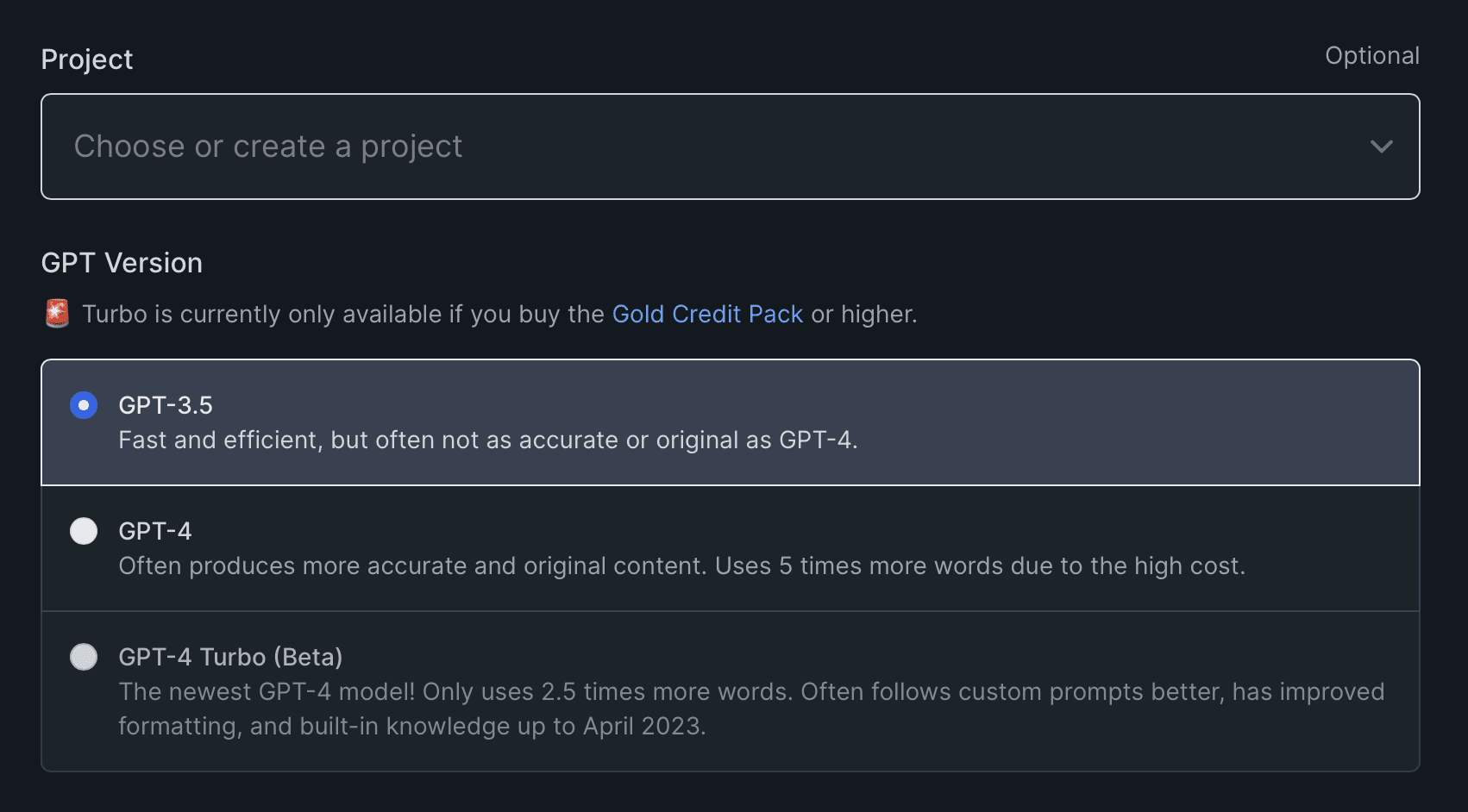
koalawriter GPT options

Next, choose your article type. You can choose to have it write a blog post, an Amazon product roundup review, an Amazon single product review, turn any YouTube video into a blog post, or have it rewrite or rephrase another blog post.

One of the first features that drew me in to KoalaWriter was the ability to place any YouTube video’s url into KoalaWriter and have it push out an entire detailed article in minutes. Think of the endless content ideas here!

koalawriter article types

Now it’s time to enter your target keyword and choose your level of SEO optimization. Choose the “AI-Powered” SEO Optimization option and KoalaWriter will analyze the top ranking pages for the keyword you selected and extract up to 100 relevant and related keywords to use in the article.
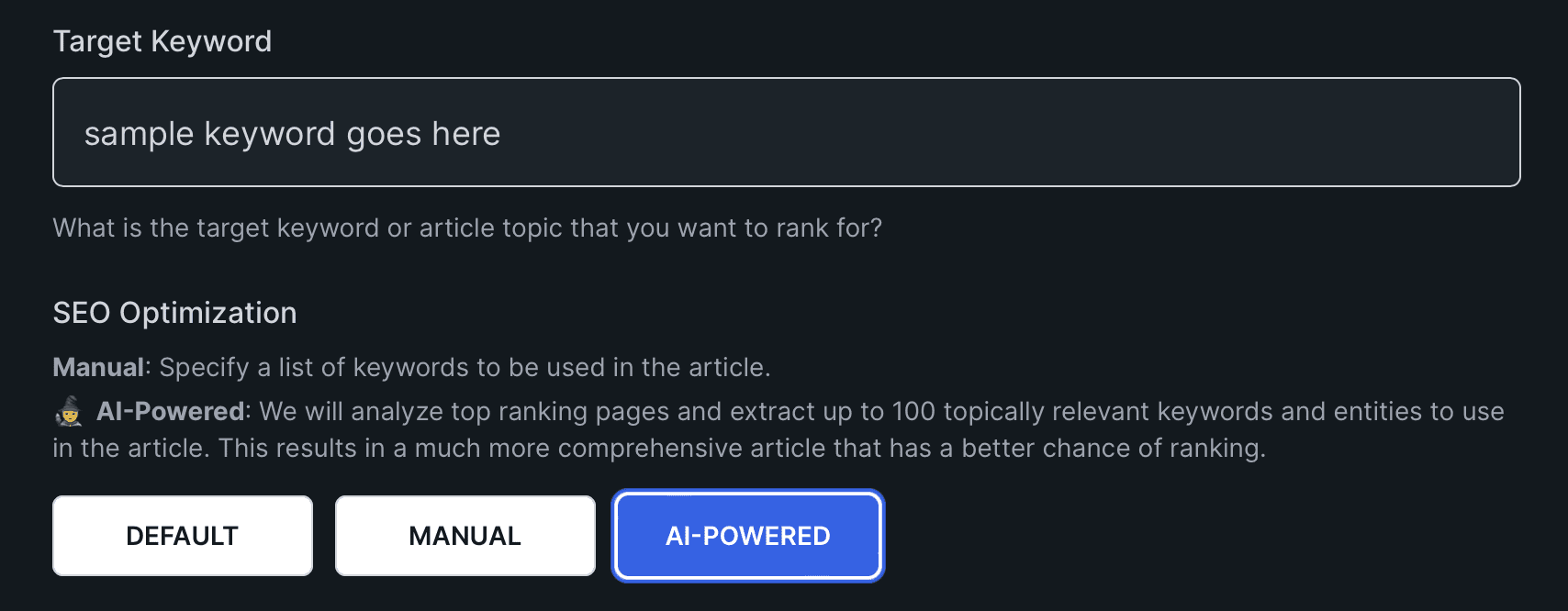
koalawriter keyword and SEO optimization features

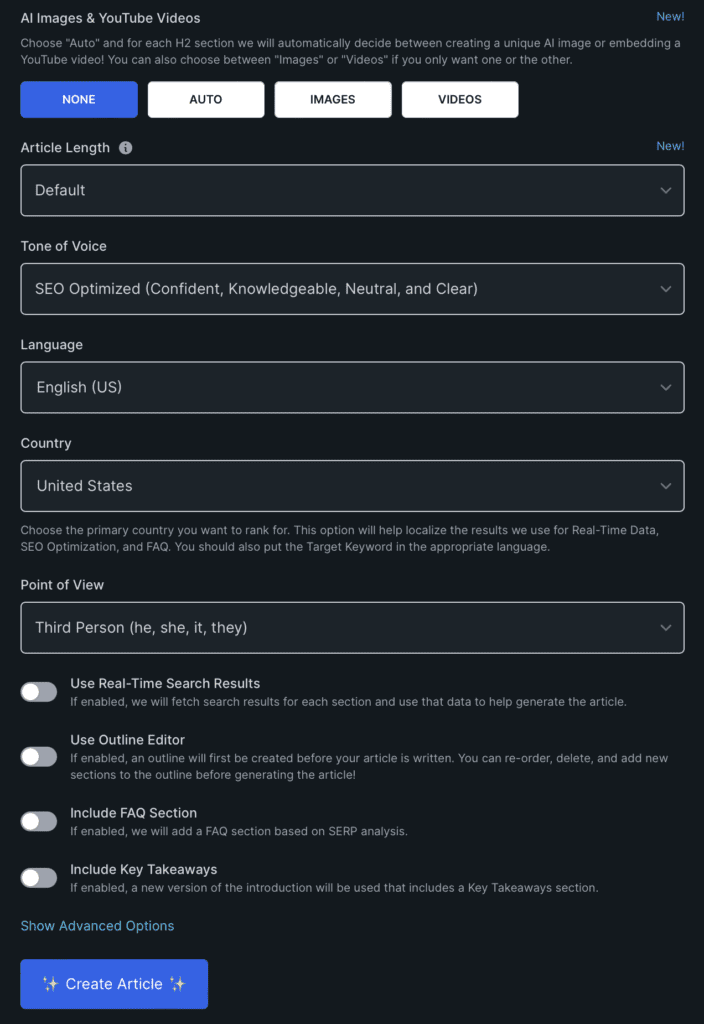
Want to add AI images or relevant YouTube videos? You can choose the type of image, its resolution, and number of images to include. You can do the same for video or you can let KoalaWriter choose the right combination of each for you.

koalawriter images and YouTube videos

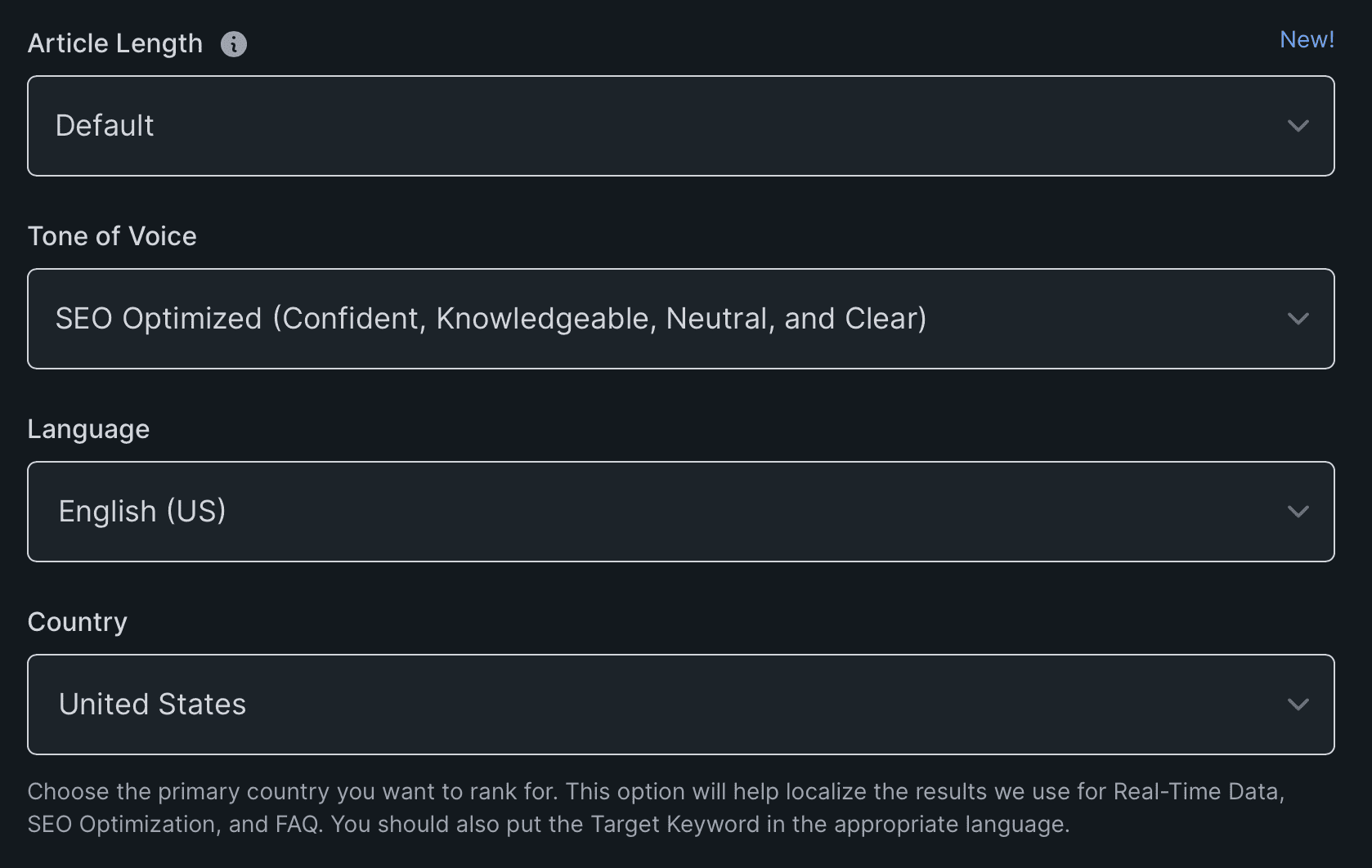
Choose the length of your article and SEO optimization options. You have several drop down menus with options to choose from.

Article length options:

  • Default
  • Custom number of sections
  • Shorter (2-3 sections, 450-900 words)
  • Short (3-5 sections, 900-1350 words)
  • Medium (5-7 sections, 1350-1870 words)
  • Long form (7-10 sections, 1900-2440 words)
  • Longer (10-12 sections, 2350-2940 words)

Tone of voice options:

  • SEO Optimized (Confident, Knowledgable, Neutral, and Clear)
  • Excited
  • Professional
  • Friendly
  • Formal
  • Casual
  • Humorous
  • Custom
more koalawriter options

Last, choose your point of view (first, second, or third person), and toggle several more features on or off. Features include using real-time search results, creating an outline first, including a FAQ section, and including a key takeaways section as well.

There are also advanced options for available for adding custom prompts to fully tailor your content as your own.
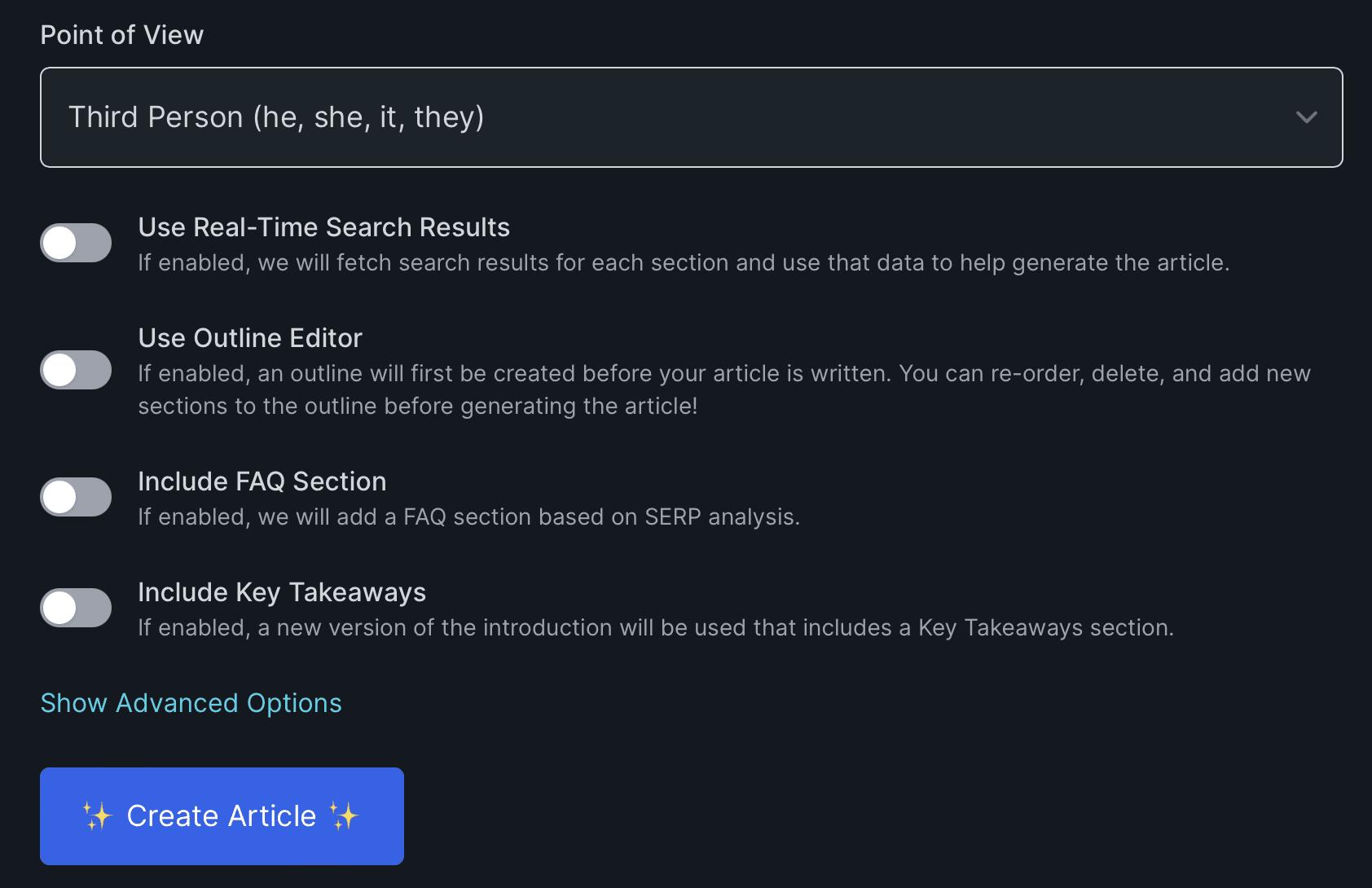
koalawriter advanced features

KoalaWriter’s Bulk Mode – A True Game Changer!

I think the best way to show this in action is to see it visually. I found this YouTube video showing just how easy mass content creation can be using KoalaWriter. Watch it below!

And check out this KoalaWriter case study using the bulk mode feature! Total game changer!

KoalaWriter case study

KoalaWriter vs ChatGPT

It’s true that KoalaWriter uses ChatGPT technology to create its content, but there’s something about the way KoalaWriter delivers that content that makes it special.

For me I feel it’s the ability to live-scrape from the web that’s a huge plus. It also adds to the already solid SEO optimization, allowing it to use related keywords and create hyper-relevant content based on the top search results.

Finally, the bulk mode option puts it over the top. You can create 20-30 articles in the time ChatGPT takes to create one or two.


KoalaWriter Pros and Cons

Pros:

  • Free trial along with affordable membership options
  • Easy to use interface, highly intuitive
  • Spectacular SEO optimization
  • Bulk mode for creating articles and content 20x faster
  • Content is publish-ready
  • Ability to turn YouTube videos into long form articles with just a url
  • Does live scraping and uses real-time results

Cons:

  • Repetition can sometimes occur where parts of one section will be repeated in another. I always choose a length slightly longer than I need and with a few simple deletions I’m good to go.
  • AI-generated content may not always be perfect, always double check for accuracy

Trying to make money online and still not seeing results? Create your FREE STARTER ACCOUNT with the same straightforward training I’ve used to create full time revenue online. No matter your experience, this step by step training delivers! Click here and get started NOW!


Final Thoughts

KoalaWriter is the best AI powered content creator I’ve found online. Easy to use, affordable, customizable, creating content 20x faster than ChatGPT, and SEO ready out of the box, this is a must-have for all content creators.

What’s been your experience in the past with AI content writers? Have you used ChatGPT in the past for content writing? Let me know what you think in the comments section below!


Frequently Asked Questions

Is KoalaWriter a reliable writing tool?
Absolutely! It uses the latest GPT-3.5 and GPT-4 technology to generate high-quality content quickly that is SEO optimized and publish-ready. Always double check AI content for accuracy and minor revisions..

What are the features of KoalaWriter?
Some of its key features include GPT-3.5 and GPT-4 technology, affordable pricing, easy-to-use interface, bulk mode for creating high volume content, turning any YouTube video into a long form article with just a url, and much more.

How does KoalaWriter compare to Writesonic and ZimmWriter?
While Writesonic and ZimmWriter are also popular AI writing tools, KoalaWriter stands out for its affordability, accuracy, and ease of use. With KoalaWriter, you can write high-quality content quickly and efficiently, without having to spend a fortune on expensive software. Plus, its GPT-3.5 and GPT-4 technology ensures that your content is accurate and engaging.


Want More Honest Reviews?

  • Wordform AI review
    Wordform AI Review: What They Don’t Tell You About the $67 Price

  • Cash Tracking System Scam Review
    7 Red Flags That Prove Cash Tracking System Is a Scam

  • Keala Kanae Power Code Masterclass review scam
    Keala Kanae’s Power Code Masterclass Review: The Free Bait Before the $29K Hook

  • Genesis by Inspirean Keala Kanae Scam or Legit Review
    7 Reasons Why Keala Kanae’s Genesis by Inspirean Is a Bad Idea – Honest Review

  • 7 figure accelerator review
    7 Figure Accelerator Review
  • Mastermind.com Review
    Mastermind.com Review: Scam or the Ultimate Knowledge Business Tool?

Written by Eric Cantu · Categorized: Reviews & Comparisons

Nov 25 2023

Mediavine Review

mediavine review how much money can you make on mediavine

One of the most lucrative ways to monetize your website is to add Mediavine. What is Mediavine? In this Mediavine review I’ll cover all the advertising management service’s pros, cons, requirements, and more so you can cash in on this lucrative way to make money with your website.

How Much Money Can You Make On Mediavine?

Your earnings on Mediavine can vary, but it’s known for being lucrative. Earnings could go from a few hundred to over $20,000 a month, depending on your site’s traffic and content niche. It’s a standout choice for publishers aiming for a serious boost in ad revenue.

Key Takeaways

  • Mediavine slaps relevant ads on your site and provides a full-service ad management platform. Don’t worry! These ads aren’t intrusive! They’re optimized for performance and viewability, potentially increasing revenue for publishers with high-traffic websites..
  • Site requirements for Mediavine are strict: publishers must meet a minimum requirement of 50,000 sessions per month to apply
  • With competitive RPM rates, publishers can significantly increase their earnings. Mediavine is known for higher revenue potential compared to other ad networks
  • Mediavine stands out for its high-quality, optimized ads and superior support. It provides better customization and potentially higher earnings than popular networks like AdSense and Ezoic.
  • Mediavine has a strong community, a dedicated Facebook group and annual conferences, offering education and networking opportunities for bloggers and content creators.

What Is Mediavine?

Making money online isn’t something that just happens. You have to work for it and not leave any money left on the table. Monetizing your website traffic with relevant ads is one such way.

Mediavine is a full-service ad management platform that offers a range of services, including ad optimization, custom ad placement, and audience targeting. With Mediavine, content creators and website builders can earn more money from their website traffic and maintain a high-quality user experience.

  • Mediavine: The Ad Network for Bloggers: Started in 2004, it’s now a top choice for bloggers and website owners looking to monetize their sites.
  • How Mediavine Works: It places ads on your site, and you earn money every time a visitor clicks on these ads. Plus, Mediavine handles all the ad tech stuff.
  • Focusing on Content: With Mediavine, you can focus on creating awesome content while it takes care of the ad management and revenue generation.
  • Quality Over Quantity: What sets Mediavine apart? It’s picky about who it works with, ensuring ads get good exposure by only partnering with sites that have enough traffic.
  • Support That Makes a Difference: Unlike other ad networks, Mediavine offers top-notch support, helping you to optimize your site for the best revenue without making it look like an ad dump.

The ads placed on your site aren’t intrusive! Mediavine has a reputation for maintaining a great user experience on your site!

What are some pros and cons of using Mediavine?

Pros:

  • High-quality ads that are relevant to the publisher’s audience
  • Good revenue potential, with some publishers earning over $20,000 per month
  • Excellent support and resources for publishers

Cons:

  • Traffic requirements may be too high for some publishers
  • Mediavine takes a commission on ad revenue, which can reduce earnings
  • Ads may affect website performance if not optimized properly

What Are Mediavine’s Requirements?

  • Mediavine’s Entry Bar: To join Mediavine, your site needs at least 50,000 monthly sessions. Less than that? Well, it’s a no-go. Yes that’s a lot, but it’s so worth it! Make it your goal and then cash in!
  • Not Just About Traffic: Mediavine digs deeper. If they’re going to accept you they want original, top-notch content that grabs your audience’s attention and keeps them hooked.
  • Play by the Rules: Your site’s gotta be clean – no explicit or illegal stuff. Mediavine’s content policies are pretty strict on that.
  • Application Process: Ready to roll? Fill out their form with all the deets about you and your site. They’ll take a few days to give it a thumbs up or down.
  • The Payoff: Get accepted, and it’s not just congratulations – it’s the start of your website turning into a serious moneymaker. Cha-ching!!!

Mediavine’s Services

mediavine review

As a blogger or content creator, you want to create a professional and responsive website that attracts high-value ads. This is where Mediavine comes in to help. They offer a range of services that help you manage and optimize your ads for maximum ad performance and viewability.

  • Smart Ad Management: Mediavine helps tailor ads to fit your site’s content and audience, using a clever script that boosts ad performance and, in turn, your revenue.
  • Grow.me & More: Their Grow.me tool is ace for boosting your site’s interaction – think saving articles, sharing content, and more. Plus, they’ve got cool tools to amp up your SEO and sync with Google Analytics.
  • Learn & Connect: Dive into Mediavine’s world of learning with their Facebook group and the Teal Talk podcast, all about mastering ad management.
  • Mediavine Exchange: This platform is a matchmaking service for advertisers and content creators, offering a variety of ad formats to help you rake in more dough from your site.
  • Diverse Ad Options: Whether it’s display, video, or native ads, Mediavine Exchange has a buffet of choices to help boost your site’s earning potential. Everyone loves a good buffet, right?

Show Me the Money! Just How Lucrative is Mediavine?

I’m gonna be honest. What put Mediavine on the map for me was when I saw fellow affiliate marketers talking about their monthly earnings for their websites. Earnings could go from a few hundred to over $20,000 a month, depending on your site’s traffic and content niche. This was way, way, way more than the dollars and cents I’d seen people earning from Google Adsense.

Potential Earnings and RPM

Mediavine offers a competitive RPM (revenue per thousand impressions) to its publishers. According to their website, the average RPM for their publishers is around $30 per 1,000 visitors. Trust me, this is solid. This, of course, will vary depending on your niche, traffic, and other factors.

Based on my personal experience and research, Mediavine provides a high RPM compared to other ad networks.

Payment Terms and Loyalty Bonus

  • With Mediavine you’ll receive your earnings 65 days after the end of the month in which they were earned. This is called net-65. For example, if you earn $500 in January, you’ll receive your payment on April 5th.
  • A nice touch Mediavine adds is a loyalty bonus to publishers who have been with them for a certain amount of time. This bonus is paid out annually and increases based on the number of years you’ve been with Mediavine.

Comparing Mediavine with Other Ad Networks

Not all ad networks are the same. Let’s compare Mediavine with other popular ad networks like AdSense, Ezoic, and AdThrive.

Mediavine vs AdSense

  • AdSense is probably the most popular ad network out there, and many bloggers start with it.
  • Mediavine offers much, much higher revenue per 1000 visitors than AdSense.
  • While AdSense is easy to set up and use, it’s just not the best user experience and not worth the trouble if you have lower traffic numbers. When I first started trying out ad networks, I had Adsense on for about a week or two before I turned it off.

Mediavine vs Ezoic

  • Ezoic is another popular ad network that offers a lot of features for bloggers. However, I found that Mediavine again outperforms Ezoic in terms of revenue.
  • Mediavine offers a higher revenue share to publishers and also provides better optimization options.
  • Ezoic has a bit of a learning curve and can be quite complicated to set up and use.

Mediavine vs AdThrive

  • AdThrive is a premium ad network also known for its high revenue share and great support.
  • AdThrive offers similar revenue share and support, but Mediavine provides better customization and optimization options.
  • AdThrive can be expensive to join, and has a potentially stricter traffic requirement: 100,000 page views per month.
  • Mediavine is more accessible and, in my opinion, provides better value for money.

The Mediavine Community

For many, it’s the Mediavine community that makes it a standout amongst other ad networks. The community is made up of thousands of bloggers who are all working towards the same goal: making their websites successful.

When you surround yourself with other like minded, entrepreneurial minded people in an online community, it can absolutely boost your inspiration and productivity.

  • Mediavine connects its members through their Facebook group community.
  • Members ask questions, share their successes, and connect with other members of the community.
  • It’s great both for new bloggers who are just starting out and need some guidance, as well as for experienced bloggers who want to share their knowledge.

Mediavine also hosts an annual conference called “Mediavine Live”. This is an opportunity for bloggers to actually meet each other in person, attend workshops, and learn from industry experts.

What is the Future of Mediavine?

  • Mediavine’s Resilience: It weathered the pandemic storm like a champ, coming out with a 60% revenue boost when other industries were taking hits.
  • Future-Proofing Ad Tech: They’re not just sitting pretty; Mediavine’s working on making ad tech better and more sustainable for publishers, especially with third-party cookies exiting stage left.
  • Ready for Cookie Changes: No sweat over the end of third-party cookies here—Mediavine’s ahead of the game with their first-party data solution to keep the cash flowing.
  • Introducing Trellis: Check out their new WordPress theme, Trellis. It’s built for speed, SEO, and making your ads look good, all wrapped up in a Mediavine bow.
  • A Theme with Monetization in Mind: While it’s new territory for me, Trellis could be a winning pick if you’re looking to build a website with a focus on traffic and ads right from the get-go.

Trying to make money online and still not seeing results? Create your FREE STARTER ACCOUNT with the same straightforward training I’ve used to create full time revenue online. No matter your experience, this step by step training delivers! Click here and get started NOW!

Final Thoughts

If you can meet the requirements, I highly recommend Mediavine. With its user-friendly interface, advanced reporting system, and lucrative revenue potential, Mediavine is a great choice for content creators looking to explode their website revenue.

What do you think? How close are you to meeting Medicine’s requirements? Have you used Google Adsense in the past? Let me know what you think in the comments section below!

Frequently Asked Questions

How much money can you make on Mediavine?

The answer is that it varies depending on a number of factors. Some bloggers have reported making over $20,000 per month, while others make a few hundred dollars per month. The amount of money you make on Mediavine depends on your website traffic, niche, ad placement, and other factors.

What are the cons of using Mediavine?

One of the biggest cons is that they have a high traffic requirement. You need to have at least 50,000 sessions per month to be eligible for Mediavine. Another con is that they prohibit other ads on your site. This means that you can’t use other ad networks in conjunction with Mediavine.

What is Mediavine used for?

Mediavine is an ad network that helps bloggers and website owners monetize their content. They offer high-quality ads that are tailored to your website’s niche and audience. Mediavine is used by bloggers and website owners who want to earn money through display advertising.

How long does Mediavine review take?

The Mediavine review process can take anywhere from a few days to a few weeks. The review process involves a manual review of your website to ensure that it meets their requirements. This includes checking your website traffic, ad placement, and content.

What is the difference between Mediavine and AdThrive?

The main difference between the two is their traffic requirement. AdThrive requires a minimum of 100,000 pageviews per month, while Mediavine requires a minimum of 50,000 sessions per month. Another difference is that AdThrive offers more reporting options than Mediavine.

What is the Mediavine dashboard like?

The Mediavine dashboard is easy to use and provides you with all the information you need to manage your ads. The dashboard includes information about your earnings, ad performance, and website traffic. You can also customize your ad settings and view your payment history.

Related Articles

    Written by Eric Cantu · Categorized: Reviews & Comparisons

    Nov 21 2023

    Do I Get Paid If Someone Visits my Website?

    do i get paid if someone visits my website

    “Do I get paid if someone visits my website?” This is a common question among website owners looking to monetize their online presence. Building websites and affiliate marketing is how I feed my travel addiction. This is one of the most underrated and ultra lucrative ways to make money online and ANYONE can do it.

    Do I Get Paid If Someone Visits My Website?

    It depends on the monetization strategy you choose for your website. From monetizing your website traffic with ads to earning through affiliate marketing conversions, there are several ways to make money from a website, and each strategy has its pros and cons.


    Key Takeaways

    • More Than One Way to Skin a Cat: There are several ways to monetize a website, including ads, affiliate marketing, social media, sponsored content, and selling products/services. Each method has its own pros and cons.
    • Generating Traffic and Conversions: Success in website monetization hinges on attracting traffic and achieving conversions. Effective methods include SEO, social media marketing, and paid advertising. Optimizing landing pages and using compelling CTAs are crucial for boosting conversions.
    • Content Creation is Crucial: Consistently producing high-quality content is vital. Choose a niche you’re passionate about, create content that answers your audience’s questions, hits on their pain points, and prioritize quality over quantity for better engagement and loyalty.
    • Affiliate Marketing as a Key Strategy: Affiliate marketing is a straightforward way to monetize a website. It involves earning commissions by connecting your audience to the products and services they’re already searching for online.
    • Diverse Monetization Strategies: Exploring various monetization strategies like selling ad space, using services like Google AdSense or Mediavine, and offering products or services directly can enhance revenue. Email marketing and retargeting are also effective in re-engaging visitors and boosting conversions.

    Understanding Website Monetization

    Understanding website monetization is the key part to making money from your website. And it definitely doesn’t just happen by accident.

    Generating traffic and conversions is only one part of the equation. You also need to have a clear understanding of how to monetize your website traffic. This involves choosing the right monetization strategy, optimizing your website for revenue, creating a solid link strategy, and implementing strategies to increase your earnings.

    In this article I’ll cover how to monetize your website via:

    • Selling ad space
    • Earning from conversions
    • Using social media
    • Affiliate marketing and sponsored content
    • Selling products and services directly

    Generating Traffic and Conversions

    When it comes to making money from your website, generating traffic and conversions are two essential components. Understand this: without traffic, there will be no one to convert, and without conversions, there will be no income.

    Traffic Equals Revenue

    Traffic is the lifeblood of any website, and there are many ways to generate it. Here are some effective methods:

    • Search Engine Optimization (SEO): SEO is the process of optimizing your website to rank higher in search engine results pages (SERPs). This is done through keyword research and creating content that is the answer to your target audience’s searches. Make your focus delivering real value with your audience in mind. By ranking higher in SERPs, you will attract more organic traffic to your website.
    • Social Media Marketing: Social media platforms like Facebook, Twitter, and Instagram are great for promoting your website and driving traffic. By creating engaging content and sharing it on social media, you can attract more visitors to your website. This is where your audience can make your content go viral! Ever considered starting a YouTube channel? Youtube played a HUGE role in my success online and it was easy to do!
    • Paid Advertising: Paid advertising can be an effective way to drive traffic to your website. Platforms like Google Ads, Facebook Ads, and LinkedIn Ads allow you to target specific audiences and drive traffic to your website. Warning!: Don’t jump into paid ads or PPC if you’re just starting out! When you don’t know what converts organically your PPC venture can quickly become a money pit!

    Conversions

    Conversions are the actions that visitors take on your website that generate revenue. Here are some strategies for increasing your conversion percentage and building up your website revenue!

    • Optimize Your Landing Pages: Landing pages are the pages that visitors land on when they click on your ads or search engine results. By optimizing your landing pages, you can increase the chances of visitors taking the desired action, such as making a purchase or filling out a form.
    • Use Calls-to-Action (CTAs): CTAs are buttons or links that encourage visitors to take a specific action, such as “Buy Now” or “Sign Up.” By using clear and compelling CTAs, you can increase the chances of visitors taking the desired action. Ever wondered what makes calls to action so effective?
    • Track Your Conversions: Tracking your conversions using tools like Google Analytics can help you understand which pages and campaigns are generating the most revenue. By analyzing this data, you can make informed decisions about how to optimize your website and campaigns for maximum conversions.

    Content is King!

    As a website builder, I know that consistent content creation is crucial for attracting visitors and generating revenue. As I mentioned earlier, traffic is the lifeblood of any website, and the only way you get traffic is by creating CONTENT!

    • Pick a Niche You Love: Choose a niche that sparks your passion. Being part of your own target audience adds authenticity and keeps readers coming back.
    • Relatability Leads to Loyalty: Your genuine interest in the niche builds relatability and credibility, making your audience more engaged and eager for your content.
    • Quality Over Quantity: Focus on creating detailed tutorials and blog posts. High-quality content attracts visitors who are likely to interact more and share your work.
    • Address Reader Concerns: Understand and address the main concerns and pain points of your readers. By doing this, you provide valuable solutions they are actively seeking.
    • Target Audience’s Questions: As a content creator, focus on the key questions and challenges within your niche. Solving these directly can build a loyal and engaged audience.

    Tried and True: Affiliate Marketing

    In my opinion, when it comes to monetizing your website, the most straightforward, sure-fire way to do it is through affiliate marketing.

    how affiliate marketing works
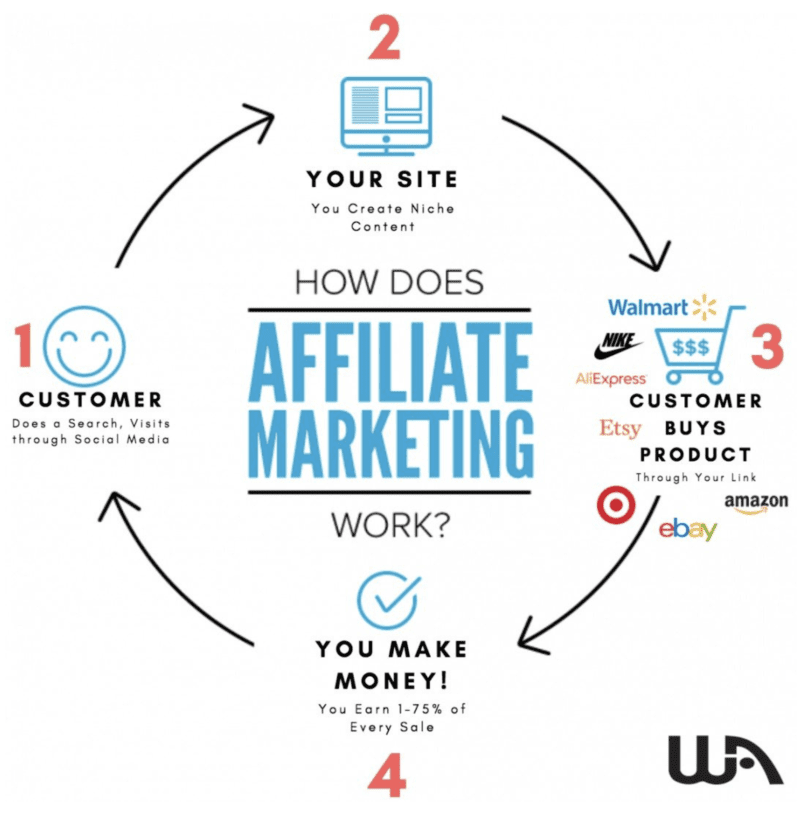
    • Affiliate Marketing Basics: It’s about linking your audience to products they’re already searching for online. You’re connecting them to what they need, often without realizing it.
    • Earn as They Shop: Every time someone buys a product through your referral, you earn a commission. It’s a retailer’s way of saying thanks for the referral.
    • Everyday Examples: Ever read a review before buying something? Of course you have! Those ‘Top 10’ articles with ‘Buy Now’ buttons are examples of affiliate marketing in action.
    • Clicks to Cash: Click an affiliate link, buy the product, and the article’s writer earns a commission. They’ve successfully converted a reader into a customer.
    • Getting Started is Simple: Join an affiliate program, grab your unique link, and start sharing it on your website. Each purchase made through your link can mean cash in your pocket.

    But beware of the scammers out there! There are so many online business coaching scams that promise the world and don’t deliver!


    Can Sponsored Content Bring Your Website Consistent Revenue?

    How about sponsored content?

    • Sponsored Content 101: It’s like a collab where advertisers pay you to create and share content that promotes their brand. Think of it as getting paid to share cool stuff.
    • Connect with the Right Sponsors: The key? Team up with a company or influencer who vibes with your audience and shares your voice. It’s all about staying relevant and genuine to your brand.
    • Diving into Sponsorships: To get into the sponsored content game, link up with a sponsor who’ll pay you for creating cool, promotional content—blogs, videos, social posts, you name it.
    • Keep It Transparent: Honesty’s the best policy. Always let your readers know about your sponsorships. It’s all about keeping that trust game strong.
    • Choose What You Believe In: Whether it’s affiliate marketing or sponsored content, stick to promoting stuff you’d use yourself. Keep your credibility intact by staying true to what you and your audience love. Never promote something just for a high commission!

    Selling Ad Space and Display Ads

    What if you just want to monetize your traffic itself, without the need for promotions or even conversions? There are several solid ways to do that with display ads.

    Google AdSense

    One of the most popular ways to sell ad space is through Google AdSense. AdSense is a program that allows you to display ads on your website and earn money when visitors click on them. AdSense is easy to set up and manage, and it can be a great way to earn passive income from your website.

    The one complaint from using Google AdSense is that it doesn’t exactly pay you very well. You’ll need a lot of traffic to earn a substantial amount of money from their ads. But then again it’s all passive income, right? You’re not not really working for it, so why not?

    Another option is to sell ad space directly to advertisers. This can be a bit more work, but it can also be more profitable. You can reach out to companies in your niche and offer them ad space on your website. You can also use an ad network like AdRoll to connect with advertisers and sell ad space.

    Mediavine

    Another popular ad management service that is much more lucrative is Mediavine. Users who use Mediavine to monetize their website traffic can earn thousands in revenue per month.

    Not everyone will qualify to even be eligible for Mediavine however. You have to have quite a bit of traffic. But once you get that traffic, it’s well worth the work it took to get there.

    To be eligible to use Mediavine, first you must have the following:

    • 50,000 sessions in the previous 30 days (per Google Analytics)
    • Good standing with Google AdSense.
    • Original content in ANY niche as a lifestyle publisher.
    • Long-form, engaging content.

    When it comes to display ads, it’s important to strike a balance between monetization and user experience. Too many ads can be distracting and annoying for visitors, which can lead to a high bounce rate. On the other hand, too few ads can limit your earning potential.

    Overall, selling ad space and displaying ads can be a great way to monetize your website. Whether you choose to sell ad space directly or use an ad network, it’s important to find the right balance between monetization and user experience.


    Selling Products and Services

    As a website owner, selling products and services is a great way to monetize your website. There are several ways to do this, such as setting up an ecommerce store, selling digital products, dropshipping, or selling merchandise.

    • Ecommerce Store Essentials: Got physical products? Set up an online store using platforms like Shopify or WooCommerce, offering easy management, payment processing, and shipping features.
    • Dropshipping vs Affiliate Marketing: Dropshipping’s a bit trickier than affiliate marketing. It involves more steps, like ensuring products reach customers, which can be a handful. Still, it may be a solid way for you to be a lucrative middle man.
    • Digital Products as an Easier Option: No physical products? No problem. Selling digital goods like ebooks, courses, or software is a smoother ride. You can create your own or sell others’ as an affiliate.
    • User-Friendly Selling Platforms: Use platforms like Gumroad or SendOwl to easily hawk your digital wares on your website. They’re designed to simplify the selling process.

    Email Marketing and Retargeting

    Email marketing and retargeting are great ways to re-engage visitors who initially didn’t purchase your products or services. It allows you to make sure there’s no money left on the table!

    • Email Marketing Basics: It’s all about sending promotional emails to folks who’ve signed up. Use it to bond with subscribers, plug your stuff, and get more website visits. It’s really easy to implement too! Most of your audience will give up their email in exchange for a free pdf filled with goodies!
    • Retargeting Magic: Ever visited a site and then seen ads for it elsewhere? That’s retargeting—catching folks who didn’t buy the first time and giving them a nudge on other sites or via personalized messages.
    • Tools of the Trade: Platforms like Mailchimp and Aweber are the go-to for crafting and blasting out those email campaigns. Plus, Mailchimp’s got retargeting ads to reel in past website visitors.
    • Mastering Email and Retargeting: To ace these tactics, you need a solid email list and a sharp picture of who you’re talking to. Tailor those emails to match subscriber interests for more impact. It’s all about connecting with your audience!

    Final Thoughts

    To maximize your website revenue, you need to experiment with multiple monetization strategies. From ads to affiliate marketing, dropshipping, e-commerce and email marketing, there is no limit to the number of ways you can earn full time revenue from a website.

    What do you think? Have you tried building and monetizing niche websites before? What was your biggest hurdle? Let me know in the comments section below!

    Trying to make money online and still not seeing results? Create your FREE STARTER ACCOUNT with the same straightforward training I’ve used to create full time revenue online. No matter your experience, this step by step training delivers! Click here and get started NOW!


    Frequently Asked Questions

    How much can website owners earn through AdSense?

    The amount a website owner can earn through AdSense varies depending on a number of factors, such as the niche of the website and the amount of traffic it receives. Generally, website owners can expect to earn anywhere from a few cents to several dollars per click on AdSense ads. Mediavine is a more lucrative option for earning money from ads in my opinion, but it has much higher traffic requirements.

    What are some ways to make money from internet traffic?

    There are many ways for website owners to make money from internet traffic. Some popular methods include affiliate marketing, sponsored content, and selling products or services directly through the website.

    What are some secret websites to make money from?

    There are no secret websites to make money from. However, there are many legitimate websites and platforms that offer opportunities for website owners to earn money, such as Amazon Associates, ClickBank, and Commission Junction.

    What is the process for website owners to get paid?

    The process for website owners to get paid varies depending on the method of monetization. For example, AdSense payments are typically made through direct deposit or check, while affiliate marketing payments may be made through PayPal or other payment platforms.

    How difficult is it to make money from a website?

    Making money from a website can be challenging, especially in the early stages. However, with consistent effort and a solid strategy, it is possible for website owners to earn a steady income from their website.

    What is the minimum number of website visits required to earn money?

    There is no set minimum number of website visits required to earn money. However, website owners generally need a significant amount of traffic in order to generate a meaningful income from their website.


    Want More Content Like This?

    • how to write an engaging blog post that keeps readers hooked
      How To Write Engaging Blog Posts That Keep Readers Hooked in 2026
    • Choosing the right blogging platform 2025
      Choosing The Right Blogging Platform in 2025
    • How to Start a Successful Blog Featured Image
      10 Simple Steps to Starting a Successful Blog
    • Common Beginner Blogging Mistakes
      16 Beginner Blogging Mistakes And How To Avoid Them
    • how to create a strong personal brand as a blogger
      How To Create A Strong Personal Brand As A Blogger
    • how to write a blog for affiliate marketing
      How To Write a Blog For Affiliate Marketing

    Written by Eric Cantu · Categorized: Affiliate Marketing Strategies

    Nov 11 2023

    Mastering YouTube Keyword Research: A Simple Guide

    YouTube Keyword Research

    Want to rank your YouTube videos higher without spending a dime? The secret lies in effective YouTube keyword research. Here’s a simplified guide to mastering it using YouTube’s built-in tools without needing any outside keyword research tool.

    How Do You Research Keywords On YouTube?

    You don’t need keyword research tools to rank on YouTube. Start utilizing YouTube’s built in autocomplete and YouTube Studio analytics to give you spectacular topics people are searching for and start ranking at the top of YouTube searches FREE!

    Key Takeaways

    • Importance of Keyword Research: Effective YouTube keyword research is vital for channel growth, increasing watch time, gaining subscribers, and earning ad revenue. By understanding viewer search queries, you can create content that meets their needs and improve your rankings.
    • YouTube’s Built-in Tools for Research: Utilize YouTube’s autocomplete feature and YouTube Studio analytics for keyword research. These built in tools provide the best insights into what your audience is searching for, helping you create relevant content without needing external tools.
    • Content Creation Opportunities: YouTube’s autocomplete offers endless content ideas, especially when exploring niche-specific searches. This feature helps identify what your target audience is actively searching for, allowing you to create highly relevant and engaging videos.
    • Analyzing Competition and View Counts: Before choosing a keyword, examine the view counts and quality of existing videos on the topic. High view counts indicate popular topics, while analyzing competitors’ content can reveal gaps or opportunities for better videos.
    • Tailored Keyword Insights with YouTube Analytics: YouTube Analytics offers detailed search term data that led viewers to your videos. Analyzing this data provides specific keyword ideas for new content, ensuring relevancy and increased chances of ranking higher.

    Watch the full tutorial below to learn YouTube keyword research (and don’t forget to subscribe to my channel). Here are the chapters for quick and easy video navigation:

    0:00 Intro and Class Outline
    2:41 Why Keyword Research Matters
    4:22 Why You Don’t Need a Keyword Tool to get Massive Views
    5:31 The Best Tool for Keyword Research on YouTube Is…
    6:30 Endless Topics No Matter the Niche
    6:45 Very Important Keyword Research Principle to Understand
    7:15 Step 1: Using YouTube Autocomplete for Topic Ideas
    8:36 Step 2: Looking at View Count, Watching the Competition
    10:49 YouTube Analytics Delivers Keywords Tailored for Your Channel
    13:20 Landing 1, 2, 3 at the Top of YouTube by Using Analytics Keywords
    15:42 What Have We Learned? / Conclusion

    Why Keyword Research Matters:

    • It’s the foundation for channel growth, increasing watch time, gaining subscribers, and earning YouTube ad revenue.
    • When viewers search on YouTube, they want answers. By understanding their search queries, you can tailor your content to fit their needs.
    • Keyword research helps in creating content that matches the real and current searches being made by your actual target audience.
    • Understanding your audience’s needs is the number 1 way to landing top ranking in YouTube search results.

    YouTube’s Powerful Built-in Tools:

    With YouTube, in my opinion, it’s easier to rank than it is on Google. There are a ton of keyword research tools out there for ranking on Google, but by using YouTube’s built in tools, you can rank just as easy and without paying a dime.

    Most YouTube keyword tools like Tubebuddy and VidIQ get their data from YouTube itself anyway. So instead of spending on external tools, use YouTube’s built-in analytics. It offers insights into potential traffic, search volume, ranking probability, and competitor metrics.

    Remember, the best keyword research tool for YouTube is YouTube itself!

    • YouTube Autocomplete: As you type a query in the search bar, YouTube suggests popular searches based on what actual members of your target audience are actively looking for.
    • YouTube Analytics: Found within your YouTube Studio account, this tool provides great insights into your channel’s performance, revealing plenty of keyword ideas your audience is actively searching for. Navigate to YouTube Studio and select Analytics to access insights on video performance, audience preferences, and trending topics.

    Infinite Topics to Create Content Around, No Matter Your Niche

    The more you dive into YouTube’s autocomplete the more you see topic after topic you can create content around.

    Let’s say your YouTube niche is based on fitness and home workouts. YouTube autocomplete gives you a number of great searches your target audience is actively making by simply typing in a sample search that’s relevant to your niche.

    YouTube autocomplete

    The best part about these topics is that they are actual searches being made by your actual target audience. This is relevancy 101! Deep diving further into these topics will reveal even more honed in searches as well!

    Looking at View Count & Watching the Competition

    Once you’ve found a keyword you want to create your video around, click on it to see what videos your competition has already put out there. The first thing you’re going to look at is view count

    • If the top ranking videos have a very high view count, there’s potential here. This means the topic is popular
    • If the top ranking videos have a very low view count then this is an unpopular search. Don’t waste your time if your audience isn’t there.
    • Watch 2-3 videos. Ask yourself, “Can I do better than this? Are there topics and questions that aren’t covered in these videos that I could cover better?”

    Using YouTube Analytics for Keyword Research

    Accessible through YouTube Studio, YouTube offers GREAT metrics for your YouTube channel and can offer up tailored searches made by your audience for you to deep dive into. By analyzing these metrics, you can spot keyword opportunities and adjust your content to match audience preferences.

    1. From YouTube Studio click on “Analytics”
    2. Click on any video you’d like to deep dive into for personalized keyword topic ideas
    3. Now click on “Reach”
    4. Scroll down to the “YouTube Search Terms” section

    These are the literal search terms that brought your audience to your video. This is YouTube hand feeding you what has worked in the past along with ideas for keywords you could make new videos around.

    Next click on “See More” and take a look at the full listing of keyword searches your audience has made to arrive at your video. See any that are more relevant to related topics as opposed to exactly what your video is about? These are the keywords you should create new content around!

    Final Thoughts

    Utilizing YouTube’s built-in tools for keyword research can significantly enhance your channel’s growth, rankings, and revenue. With Autocomplete and Analytics you’re equipped to create content that resonates with your audience and drives channel success.

    What’s your experience been ranking on YouTube? How have you done YouTube keyword research in the past? Let me know what you think in the comments section below!

    Frequently Asked Questions

    How Effective is YouTube Autocomplete for Keyword Research?

    YouTube Autocomplete is highly effective for keyword research. It mirrors actual searches made by your audience, providing direct insight into current trends and topics. This real-time data is invaluable for developing content that aligns with what your viewers are actively searching for on the platform.

    Can I Rely Solely on YouTube’s Built-in Tools for Keyword Research?

    Absolutely, YouTube’s built-in tools, such as Autocomplete and Analytics, are adequate for thorough keyword research. They offer in-depth insights into what your audience is looking for, allowing you to create relevant and engaging content without the need for external tools.

    What Makes YouTube’s Analytics Tool Useful for Content Creators?

    YouTube Analytics is a powerful tool for content creators because it gives detailed information about video performance and audience preferences. The tool’s ability to reveal specific search terms that lead viewers to your videos is particularly useful for tailoring your content strategy to meet audience needs.

    How Can I Identify Popular Topics in My Niche on YouTube?

    To identify popular topics in your niche on YouTube, start by typing related keywords into the search bar to utilize the Autocomplete feature. Additionally, examining the view counts and content quality of the top-ranking videos in your niche can provide insights into what topics are currently resonating with viewers.

    Is It Necessary to Use External Keyword Tools for YouTube?

    While external keyword tools can provide additional insights, they are not necessary for effective YouTube keyword research. YouTube’s own tools are sufficient, offering creators the necessary data to focus on content relevancy and engaging their audience effectively.

    How Do I Use YouTube Analytics to Improve My Video Rankings?

    To improve your video rankings, utilize YouTube Analytics in your YouTube Studio. Pay special attention to the “YouTube Search Terms” under the “Reach” tab. These terms are what current viewers are using to find your videos, providing a clear direction for the kind of keywords that are effective in attracting your target audience.

    What’s the Best Strategy for Using Keywords Identified Through YouTube Analytics?

    The best strategy is to create new content centered around the keywords identified in your YouTube Analytics. This ensures that your upcoming videos are aligned with what your audience is already searching for, increasing the relevance and potential engagement of your content.

    Related Articles

      Written by Eric Cantu · Categorized: YouTube & Video Marketing

      Nov 01 2023

      Pictory Review

      Pictory Review

      Let’s dive into the world of AI and YouTube automation with this Pictory review. Get ready to learn how to grow your channel and generate revenue without showing your face, using your voice or even producing your own content!

      Is Pictory Any Good?

      Pictory’s user interface is easy to navigate and allows you to create a high quality YouTube video start to finish using solid AI. No need to show your face or use your voice. You can even create a video based on someone else’s content! All done in minutes.

      This YouTube automation tutorial is a game-changer! Not only are you about to discover the massive opportunity you have with AI and automation, but you’ll also see how seamless it is to create engaging and valuable content for your YouTube audience using Pictory.

      Let’s jump right in!

      The YouTube Automation Opportunity

      • The Big Opportunity: YouTube has drastically lowered their monetization requirements, making it easier than ever to earn money from your channel.
      • How Automated Is It?: With AI, you won’t need to show your face, use your voice, or create the content yourself. You can generate videos based on free-to-use articles and other content sources.
      • Finding Legal Content: Utilize Google’s “Advanced Search” feature to find “free to use or share” content, ensuring you avoid copyright infringement.
      • Tools for Success: With platforms like the Pictory, you can create videos by converting scripts to visuals. This tool offers free trials, various templates and aspect ratios, and discounts on a premium version.

      Earning Potential

      Thanks to YouTube automation and AI, you can generate significant revenue without using your voice or showing your face. (I’ll show you how you to do without even creating content yourself.)

      There are numerous successful examples out there. Take, for instance, a particular YouTube channel called Bright Side. This channel has a whopping 44.5 million subscribers.

      According to SocialBlade, their estimated monthly earnings range from $32,000 to $500,000! Just imagine the massive opportunities with such a profitable platform.

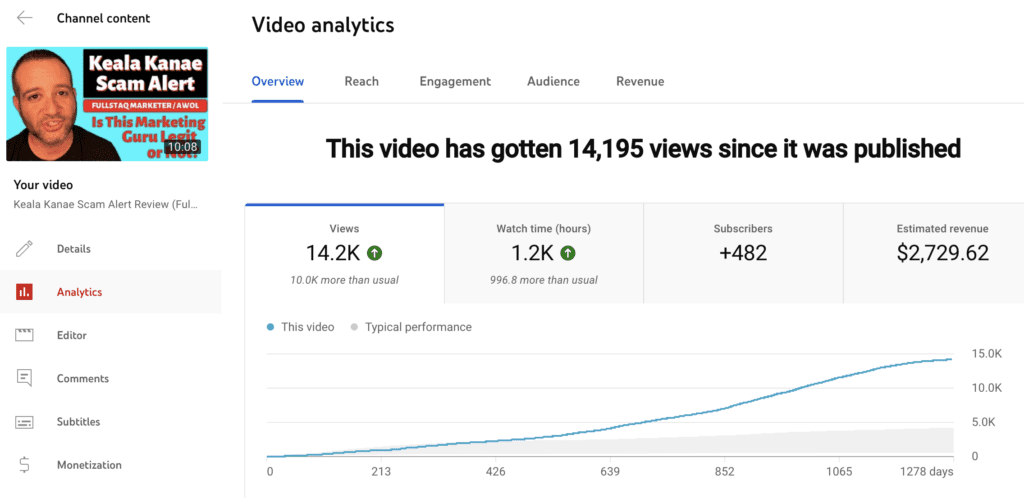
      YouTube is simply a massive revenue opportunity. A single video can earn you thousands.. I have a 10-minute video with 14,000+ views which has made over $2,700 in ad revenue alone. The potential is real, and AI-powered YouTube automation can make the whole process much easier.

      YouTube video analytics screenshot

      Automation Perks

      • Curating video clips: AI can help generate video clips based on what people are watching, without any need for manual searching.
      • Customizable templates: The automation tool offers various pre-made templates that you can choose to make your content visually appealing.
      • Multiple-platform compatibility: Choose aspect ratios optimized for YouTube, TikTok, or Instagram Reels, allowing for content repurposing and expanding your following across platforms.

      Do you love AI automation? Check these out!

      Check out my article on Top 10 AI Content Automation Tools along with my Descript Review and check out how these AI tools can completely change how you create content!

      Legal Steps for Content Use

      Before we dive into Pictory, if you’re using content that’s not your own for automating your YouTube channel, it’s essential to ensure you’re legally allowed to do so. One key step to follow when sourcing content from articles found on Google is to adjust your search settings. Here’s what you need to do:

      1. Go to Google Advanced Search: Click on your Google settings and select “Advanced Search.”
      2. Choose Usage Rights: Under “usage rights,” choose the “free to use or share” option and click on “Apply.” This way, your search results will only include content that you are permitted to use and share.
      3. Tweak the Content: Although you’re using free-to-use content, it’s a good idea to tweak it a bit to add your own unique spin. You can use AI tools like chat GPT to help with rephrasing content, so it’s more personalized and safe to use.

      By following these steps, you can create engaging and automated content for your YouTube channel while ensuring you’re using materials legally and ethically.

      Steps to Use Pictory for YouTube Automation

      pictory logo

      It’s honestly as easy as these 10 steps to grow your channel, generate substantial revenue, and do it all without showing your face or sharing your voice! (Watch the video at the top of this post to see this whole process in action.)

      1. Find and choose free to use content: Go to Google’s Advanced Search and select usage rights as “free to use or share.” This will give you a list of articles and content that you can legally use for your videos.
      2. Copy and paste the content: Once you find an article or content you want to use, copy the text and get ready to input it into a video creation tool.
      3. Choose a video creation tool: There are many tools available online for creating videos. For this tutorial, I will use a free tool called Pick 3. You may choose any suitable tool for your needs.
      4. Input the text: Paste the copied text into the relevant section of your chosen video creation tool.
      5. Clean up the content: Remove any irrelevant captions and format the text as required.
      6. Select a template: Depending on the tool you are using, select a template that best fits your content and desired look for the video.
      7. Choose an aspect ratio: Pick the appropriate aspect ratio for the platform you’re creating content for (e.g., 16×9 for YouTube).
      8. Create the video storyboard: The AI will automatically generate scenes and slides based on the content you provided.
      9. Customize your video: Some tools give you the option to modify the scenes, such as changing the visuals and modifying the text.
      10. Finalize your video: Once you’re satisfied with your video, export it and upload it to YouTube.

      Do this over and over, start accumulating massive views, and your channel will be churning out videos and building that YouTube ad revenue in no time!

      What Are the Disadvantages of Pictory AI?

      I feel that Pictory’s AI can help you create videos from articles on just about every topic. However, if you’re looking to create a very specific how-to style video, for example, the AI may be limited.

      For broader topics like the example I use in the video above (“Why is the sky blue?”) Pictory works like a champ.

      Get Your 20% Discount Off Pictory With My Discount Code!

      Follow my link here and use my discount code “WFYL” at checkout for a 20% discount!

      📌 TL;DR Is Pictory Worth It?

      • Pictory’s User-Friendly Interface: Pictory provides a user-friendly interface that simplifies AI-driven video creation for YouTube, eliminating the need for on-camera presence or voiceovers.
      • Automated YouTube Content Creation: Pictory enables the creation of high-quality YouTube videos using AI. This automation allows for generating videos based on existing content, streamlining the content creation process.
      • Sourcing Legal Content: Utilizing tools like Google’s “Advanced Search” feature to find “free to use or share” content ensures legal and ethical use of materials for video creation.
      • Wide Range of Tools and Features: Pictory offers diverse tools, including customizable templates and various aspect ratios, catering to different platforms like YouTube, TikTok, and Instagram Reels.
      • Monetization and Revenue Potential: Leveraging YouTube automation and AI with platforms like Pictory can lead to significant revenue generation. Success stories, such as the Bright Side YouTube channel, demonstrate the substantial financial opportunities available through YouTube.

      Trying to make money online and still not seeing results? Create your FREE STARTER ACCOUNT with the same straightforward training I’ve used to create full time revenue online. No matter your experience, this step by step training delivers! Click here and get started NOW!

      Final Thoughts

      It’s never been easier to create content for a YouTube channel using AI. With Pictory AI you don’t have to show your face, use your voice, or even come up with the content. Rinse and repeat this process and see how far you can grow on YouTube.

      Have you ever used AI before for creating video content? Have you used other platforms like Pictory that didn’t work for you? Let me know how you like working with Pictory AI in the comments section below! I always look forward to hearing what you have to say and I always respond.

      Want More Honest Reviews?

      • Wordform AI review
        Wordform AI Review: What They Don’t Tell You About the $67 Price
      • Cash Tracking System Scam Review
        7 Red Flags That Prove Cash Tracking System Is a Scam
      • Keala Kanae Power Code Masterclass review scam
        Keala Kanae’s Power Code Masterclass Review: The Free Bait Before the $29K Hook
      • Genesis by Inspirean Keala Kanae Scam or Legit Review
        7 Reasons Why Keala Kanae’s Genesis by Inspirean Is a Bad Idea – Honest Review
      • 7 figure accelerator review
        7 Figure Accelerator Review
      • Mastermind.com Review
        Mastermind.com Review: Scam or the Ultimate Knowledge Business Tool?

      Written by Eric Cantu · Categorized: Reviews & Comparisons

      • « Go to Previous Page
      • Page 1
      • Interim pages omitted …
      • Page 20
      • Page 21
      • Page 22
      • Page 23
      • Page 24
      • Interim pages omitted …
      • Page 29
      • Go to Next Page »
      • Home
      • Sign Up
      • Blog & Search
      • Privacy Policy
      • Affiliate Disclosure

      Copyright © 2026 · Work From Your Laptop · Eric J. Cantu · All Rights Reserved