• Skip to main content
  • Home
  • Sign Up
  • Blog & Search
  • Privacy Policy
  • Affiliate Disclosure

WORK FROM YOUR LAPTOP

  • Start Here
    • Watch the Video Tutorial
    • FAQs
    • Start Your FREE TRAINING!
  • Blog
  • Meet Eric

Blogroll

May 27 2026

AI Vs Human Writers: Who Writes Better Content?

AI Vs Human Writers: Who Writes Better Content?

At what point does AI just take over? It keeps getting better, and if you’re a content creator you may be wondering if including your voice in your own content even matters. The answer might surprise you.


TL;DR: Does AI or Human Writing Produce Better Content?

Neither AI nor human writers win on their own. Human-led content with real, first-hand experience outranks purely AI content on Google. The smartest strategy in 2026 is using both together.

  • Google’s March 2026 update made first-hand experience the #1 ranking factor – AI can’t fake that
  • Purely AI content without a human voice is losing ground fast in search results
  • The winning formula is AI for speed and structure + your voice and stories for trust and depth
  • E-E-A-T isn’t optional anymore – it’s the price of admission for ranking in 2026
  • Bloggers who master the human-AI combo are pulling ahead of everyone doing it one way or the other
🔍 Have ChatGPT Summarize This Article

What’s In This Article

  • Why AI vs. Human Writers Matters Right Now
  • My Experience with This Exact Debate
  • The Core Strategy: How to Use AI and Human Writing Together
  • Common Pitfalls & What to Avoid
  • Your Next Steps
  • Final Thoughts
  • Frequently Asked Questions

Why AI vs. Human Writers Matters Right Now

Google’s updates have made first-hand experience the top ranking signal, not just good writing. Sites using only AI content without real human experience are losing rankings fast. Bloggers who get this are building real authority. Those who don’t are watching their traffic dry up.

Ok, so we’re literally in the future. What used to be a hypothetical debate is now our reality. And if you’re a content creator, this debate could very well affect your business..

Google’s March 2026 core update shook things up in a big way. (Don’t they all?). It feels like every other year there’s a Google core update and every beginner blogger thinks the world is ending. This particular one dealt with AI vs human writing.

Sites that had real humans writing from real experience? They held their rankings or moved up. Sites that were pumping out AI content with no personal stories or original insight? A lot of them dropped hard.

So what does that mean for you?

If you’re publishing AI content with zero personal touch, you’re shooting yourself in the foot. But, on the flip side of this coin, if you’re refusing to use AI at all, then you’re working way too hard and falling way behind your competitors who aren’t.

The answer is a balance somewhere in the middle. And it’s simpler than you think.

Related article: I use AI every single day. Using it right will explode your productivity. Check out my full guide on the best AI Tools for Content Creation!


My Experience with This Exact Debate

My pet peeve as an expert trainer inside Wealthy Affiliate is when new members post to their WA blog (which should be like a progress journal where they share their wins, etc.) and just paste AI slop without batting an eye.

Suddenly, what used to be never ending shares of progress and questions has become a very weird area at times where some new members are not only pasting AI slop, but then commenting with AI too. it’s gotten better lately, but I feel like the angry old man telling AI to get off his lawn.

AI fatigue is a real thing. If your audience arrives at your content and senses immediately that it’s pasted AI, they’re going to hit the back button. As they make their exit, you’ve lost any chance of connecting with them.

I don’t mean to be the bearer of bad news here, but in the world of affiliate marketing, your connection with your audience is EVERYTHING. Lose that and you’re out of business.

It’s not about abandoning AI, it’s about having balance, allowing it to do all the heavy lifting, and then weaving your own voice into your content seamlessly. Period.

Do this right and your rankings will go up, your content production goes through the roof, and your traffic and revenue will explode.


The Core Strategy: How to Use AI and Human Writing Together

The best content strategy isn’t picking AI or human writing, it’s about balancing both. AI handles research, drafts, and structure. The human writer adds real experience, personality, and original insight. Together, they hit Google’s E-E-A-T standards and give readers something worth staying on the page for.

What AI Writers Actually Do Well

Let’s give credit where it’s due. AI is genuinely great at many things.

  • Speed – AI can write a solid 1,500-word draft in under a minute
  • Research – Ask AI to find the top questions people have about a topic and spits them out instantly
  • Consistency – It doesn’t get tired, doesn’t have off days, and doesn’t lose the plot (most of the time)
  • Structure – AI is really good at organizing information so it’s easy to read and scan

Use AI to build your outline, pull together your key questions, and write a first draft of each section. That’s your starting point, but not your final product.

Pro Tip: Most bloggers use AI to write the whole article and just clean it up a little. Don’t do that. Treat every AI draft like a rough sketch. The bones are there, but you have to put the meat on them. Add at least two personal stories or real examples. That one habit alone will make your content better than most of what’s out there.


What Human Writers Still Do Better

Here’s what the “AI is taking over” crowd keeps missing. There are things AI flat out cannot do very well just yet.

  • Real experience – You’ve actually done the thing you’re writing about. AI is pulling from stuff that was written in the past. Google can tell the difference (and so can your audience), and it rewards the real thing.
  • Human connection – People connect with people. A specific story, a moment of honesty, a little humor, those are human moves that AI just doesn’t land the same way.
  • Real opinions – AI tends to play it safe. It sits in the middle. You can take a clear stance, call something a waste of time, and actually help your reader make a decision.
  • Trust signals – Your author bio, your publishing history, your name tied to a topic over time, Google’s 2026 updates show this stuff now affects your rankings directly.

For every article you publish, include at least one specific first-person example (preferably 2-3) that proves you’ve actually done what you’re writing about. (Don’t have experience in the area? Then at the very least relate the experiences of others in a relatable way.)

Pro Tip: After Google’s March 2026 update, the sites that dropped the hardest were the ones that had cleaned out all their personal examples to make their content sound more “professional.” Don’t make that trade. The messy, real human story is what ranks.

Work From Your Laptop YouTube Subscribe

The 5-Step System I Use for Every Article

This is exactly how I put together every piece of content on this site.

Step 1 – Research and outline (AI) I give AI the topic and ask it to find the main questions people are asking, pull related keywords, and build an outline. Takes about five minutes instead of thirty. Inside Wealthy Affiliate, the Hubs feature starts you out with 100 topic ideas, keyword ready, all highly relevant to your niche right out of the box. AI is great for this!

Step 2 – First draft (AI) AI writes a first draft of based on the outline. It’s usually pretty accurate and easy to follow. But it’s also pretty generic and filled with AI tells. That’s ok for now.

Step 3 – The human layer (me) This is a very important step. I go through each section and ask myself: “What do I actually know about this from doing it?” and then I add that. A story. A result I got. A mistake I made. Something real.

Step 4 – Voice pass (me) Personally, this is the MOST important step. AI writes in a very AI tone. I go through and make every section sound like me. I add my voice and rewrite anything that doesn’t sound like me. Contractions. Short sentences. My actual opinion.

Step 5 – E-E-A-T check (me) Before I hit publish, I make sure the article shows real experience, explains the “why” behind every tip, and doesn’t make any claims I can’t back up. If I’ve done steps 1-4 right, then step 5 is basically done and it’s just a review. During this last step I add my CTAs, linking, etc.

Build this five-step system into your workflow. It takes a little practice, but once it clicks, both your speed and your quality go up at the same time.

Pro Tip: Most bloggers skip Step 3 and wonder why their AI content isn’t ranking. That human layer isn’t a bonus anymore, it’s literally where your ranking power comes from and the easiest part to do cuz, guess what, you’re human!


Common Pitfalls & What to Avoid

The biggest content mistakes come from two extremes, leaning too hard on AI with no human experience added, or avoiding AI altogether and burning out. Both hurt your rankings, your time, and your authority.

These common mistakes come straight from what I see bloggers asking about on Reddit and in blogging communities every single week.


Pitfall #1 – Hitting Publish on Raw AI Content

This is the most common one. You generate a draft, skim it, fix a couple sentences, and publish. It looks fine. But there are no real stories, no specific examples, no personality. Spoiler alert: Not only is Google getting really good at spotting that, but so is your human audience.

Workaround: Before you publish anything make sure you can point to 2-3 real, personal examples.

Related article: Check out my full review of Wordform AI here. It promises to use AI that is “undetectable”. See why I couldn’t promote it with a clear conscience after my research.


Pitfall #2 – Ignoring Your Author Page

Google now looks at who wrote the content, not just the content itself. If your author bio is vague, outdated, or doesn’t exist, you’re giving up ranking power. After the March 2026 update, your author page is basically part of your SEO infrastructure. Don’t overthink it, just make it your own.

Workaround: Build a real author page. List your actual experience, your credentials, and the topics you cover. Make sure your name is linked consistently on every article you publish.


Pitfall #3 – Using AI for Money or Health Topics Without Backing It Up

Topics like health, money, and legal advice are held to a higher standard by Google. AI-generated content on these topics with no verified expertise behind it is a problem.

Workaround: Write these sections yourself from real experience, or clearly state where your information is coming from. Your credibility is on the line here.


Pitfall #4 – Writing for Google Instead of People

Stuffing keywords, writing low value content that reads like a bulleted outline, answering “what” but never “why”, all this tanks your engagement. When people bounce fast, your rankings follow. This goes back to what I’m always telling my students inside Wealthy Affiliate. Stop writing AI book reports and start being relatable to your audience!

Workaround: Read your content out loud before you publish. If it sounds like a robot wrote it, rewrite it until it sounds like you’re talking to a friend. Would you ask AI to write a get well card to a loved one?


Pitfall #5 – Thinking AI Knows Your Topic Better Than You Do

I see new bloggers fall into this one all the time. They figure AI has read everything on the internet, so it must know more than them.Trust me, AI gets plenty of things wrong and will sound confident as ever when it writes it. If you don’t know enough to catch the mistakes, they’ll end up in your published article.

Workaround: Only write about things you know well enough to fact-check. Your knowledge is your edge. Don’t give it away.


Your Next Steps

The bloggers winning right now aren’t the ones who use AI the most. And they’re not the ones who refuse to touch it. They’re the ones who’ve figured out how to use both and make it look natural.

Here’s what I want you to do this week: Take your next article idea and run it through the five-step system I laid out above. Don’t aim for perfect. Just try it once. Write the AI draft, then sit down and ask yourself, “Where does my real experience live in this topic?” Add that in. See how the article feels when it has both structure and a real human voice behind it.

Keep this up and watch your numbers over the next couple months. I’d bet you’ll see people staying on your pages longer, leaving more comments, and coming back more often.

The two groups that are going to struggle going forward are the “AI does everything” crowd and the “I’ll never use AI” crowd. Both are leaving money and rankings on the table. You don’t have to pick a side. You just have to get good at working with both.

One more thing, don’t put off building your author presence. Your author page, your byline, your history of publishing on your topic over time, that’s part of your SEO now. It’s not about bragging. It’s about showing Google there’s a real, credible human behind your content.


Final Thoughts

The most important thing you can do today: go to your best article and add a section or two where you share something real from your own experience and in your own words. That one move tells Google a real human with real knowledge wrote this.

What do you think? Are you already mixing AI and human writing in your content or does the whole thing still feel a little overwhelming? Have you noticed your rankings shift lately and wondered if your content style had anything to do with it? Drop your thoughts in the comments. I read every single one and I always reply.

AI vs Human Writers Which is Better Infographic

Trying to make money online and still not seeing results? Create your FREE STARTER ACCOUNT with the same straightforward training I’ve used to create full time revenue online. No matter your experience, this step by step training delivers! Click here and get started NOW!


Frequently Asked Questions

Does Google penalize AI-written content? Google doesn’t go after AI content automatically. It goes after low-quality content that doesn’t help people, no matter how it was written. AI content with real experience and expert insight behind it can rank just fine.

Can readers tell when content was written by AI? Absolutely yes. When content has no personal stories, no specific details, and a flat tone, people feel it, even if they can’t name it. That disconnect hurts your time-on-page and your trust.

What’s the smartest way to use AI for blogging without hurting SEO? Use AI for outlines, first drafts, and pulling together research. Then add your personal experience, rewrite it in your own voice, and make sure your content proves you actually know what you’re talking about.


Want More on AI & Automation Tools?

Don’t stop your momentum now! AI tools are the tools that will make the most difference in building your business. Check out these articles and multiply your work by 10x!

  • AI Vs Human Writers: Who Writes Better Content?
    AI Vs Human Writers: Who Writes Better Content?
  • how to write the perfect chatGPT 5 Prompt
    How to Write the Perfect ChatGPT-5 Prompt

  • How I Use ChatGPT to Get More Traffic to My Blog
    How I Use ChatGPT to Get More Traffic From My Existing Blog Posts

  • Why I Replaced Google With ChatGPT and Why You Should Too
    Why I Replaced Google With ChatGPT (And You Should Too)
  • Top AI Tools for Content Creation
    Top 10 AI Content Creation Tools in 2025: Honest Reviews from Real Users

  • How I Use ChatGPT for Content Creation and SEO
    How I Use ChatGPT to Automate Content Creation, SEO, and Affiliate Marketing

Written by Eric Cantu · Categorized: AI & Automation Tools

May 26 2026

Why You Need to Stop Obsessing Over Analytics!

You’re building your new online business, and you want to see if your hard work is paying off. But if the very first thing you’re doing every single morning is spending an hour checking your traffic stats, we need to have a serious talk.

TL;DR: How Do I Stop Obsessing Over Website Analytics and Grow My Traffic?

To stop obsessing over analytics, shift your focus from tracking data to executing high-impact tasks like consistent content creation, updating old posts, and expanding targeted keyword research to build sustainable search traffic.

  • Ditch the Hourly Checks: Limit your analytics viewing to once a week or even once a month.
  • Feed the Engine: Spend 80% of your time writing fresh, valuable content for your audience.
  • Build the Guardrails: Stick to a strict publishing schedule so idle time doesn’t turn into stat-staring time.
  • Fix What You Have: Double down on internal links and content updates to score easy traffic wins.
🔍 Have ChatGPT Summarize This Article

What’s In This Article (Quick Jumps)

  • Why Over-Analyzing Your Traffic Matters Right Now
  • My Experience with the Analytics Addiction Trap
  • The 4-Pillar Core Strategy to Replace Stat-Staring
  • Common Pitfalls & What to Avoid
  • Your Next Step
  • Final Thoughts
  • Frequently Asked Questions

Why Over-Analyzing Your Traffic Hurts Your Business

Constantly checking analytics slows business growth because it wastes valuable time that should be spent on content production, schedule consistency, and search optimization. These are the only activities that actually drive new traffic.

We happen to find ourselves living in a time where we have more online business tools than ever before. But because of that, more than ever before, new online marketers find them checking the score every 5 minutes instead of playing the game.

If you can master your focus starting now, your upside will be massive. While everyone else is panicking over daily fluctuations, you’ll be building your library of content. Shift your focus away from the numbers and put it back into content creation.

That’s what the search engines love. Don’t get lost in paralysis by analysis!

Related article: The first step to successful content creation is choosing your niche. Check out my full guide on how to choose your niche as a micro influncer and start building on a strong foundation!


My Experience with the Analytics Addiction

Thankfully, I’m not an analytics guy. Never have been. But as an expert trainer at Wealthy Affiliate, I see the analytics addiction firsthand almost every single day. I feel like I’m constantly coaching my students, “Stop. Checking. Your Analytics!”

Look, I get it. It’s totally natural when you’re starting out to want to see results. But if you’re planting a garden and digging up the seeds every single morning to see if they’re growing roots yet, you’re gonna kill that plant. You have to water it, trust the process, and give it time to grow in the dark.

Having a relationship with Google Analytics is important. But as a new online marketer, you have to tell yourself that this new tool will be a huge asset later down the road. The time you’re spending watching the real-time tracker for your site would be much better spent creating content!

Remember:

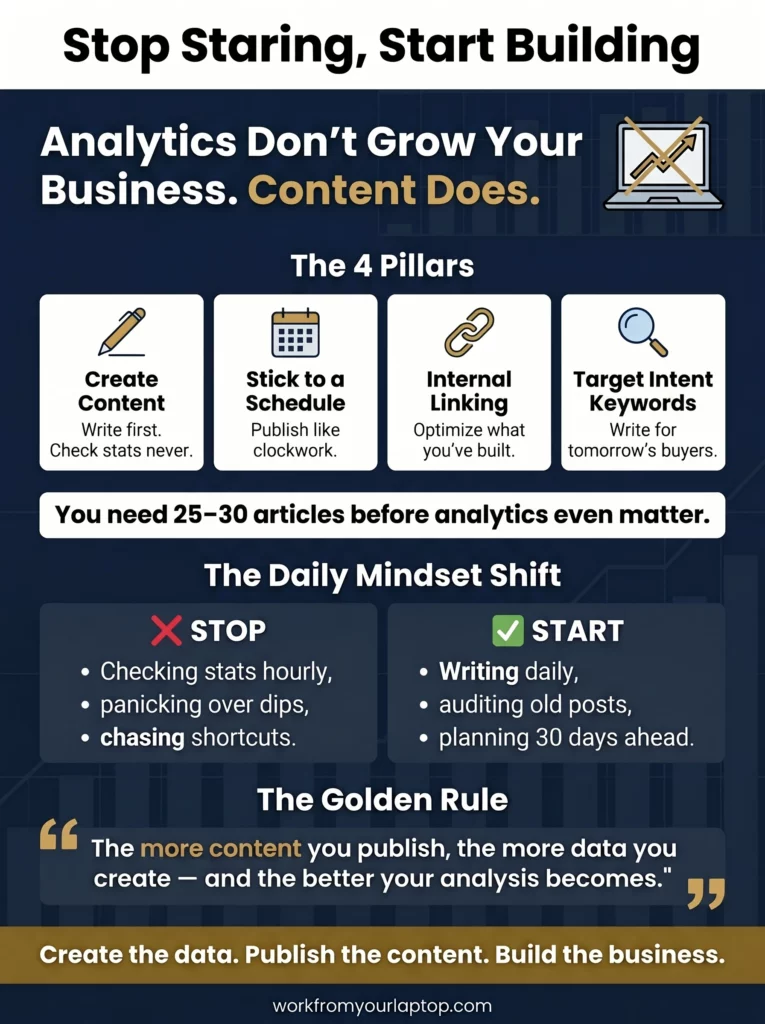
  • Analysis comes from data.
  • The more data you provide via publishing great, new content, the better the analysis.
  • Checking your stats fifteen times a day doesn’t bring a single new person to your website. It steals the creative energy you should’ve been using to write your next big post.
  • You can spend a week obsessing over a 10% drop in traffic, meanwhile your competitors are publishing high-quality guides and stealing your future rankings.

The 4-Pillar Core Strategy to Replace Stat-Staring

Replacing an obsession with analytics means prioritizing raw content production, enforcing a strict publishing schedule, optimizing current content through internal linking, and focusing on high-intent search terms for future articles.

Let’s talk about 4 pillars to replacing your obsession with analytics that will massively help your business.

Pillar 1: Pure Content Creation (The Engine)

Your website runs on content, plain and simple. Every single article you publish is like throwing a hook in the water. And, guess what, the fish are BITING! You have to keep throwing hooks out there! This means writing high-value, helpful content that answers your target audience’s questions and pain points.

  • Action Item: If your addiction is deep, set a daily word count goal, even if it’s just 500 words, and don’t let yourself look at a single data chart until that writing is totally finished.
  • Pro Tip: Write your first drafts in a plain Google Doc or text editor with your web browser completely closed. This keeps you away from your site’s dashboard and stops you from tweaking old settings.

Pillar 2: Creating a Content Schedule (The Guardrail)

Idle time is the absolute biggest enemy of a new online marketer. When you finish a task and don’t know what to do next, your hand automatically moves to check your traffic stats or earnings. Creating a strict content calendar acts as your guardrail.

  • Action Item: Map out your next 30 days of content in advance. Write down the exact titles and keywords you intend to target, then assign a specific due date to every single one.
  • Pro Tip: Treat your publishing schedule like a job with a strict boss. If a post is due on Thursday at 9:00 AM, it goes live on Thursday at 9:00 AM, whether you feel like your traffic looks good that week or not.

Pillar 3: Internal Linking & Auditing (The Optimization)

If you absolutely need to spend time inside your website’s dashboard, don’t waste it looking at traffic graphs. Instead, use that energy to optimize what you’ve already built. Strategic internal linking helps search engines crawl your site much better and keeps readers on your pages longer.

  • Action Item: Go back to your top five most important articles and make sure they link out to your newer, smaller posts using relevant, descriptive anchor text.
  • Pro Tip: Most people forget to update their older posts, but spending just an hour a week refreshing outdated facts and fixing broken links can double your organic search rankings without writing a single new article.

Pillar 4: High-Intent Keyword Expansion (The Pipeline)

Instead of worrying about how many people visited your site yesterday, focus on how you’re going to attract buyers tomorrow. This means shifting your keyword research toward high-intent search terms. Think about the exact phrases people type in when they are ready to buy a product, solve a specific problem, or take action.

  • Action Item: Find 5 to 10 long-tail keywords that include specific action words like “best,” “how to fix,” or “vs”that are directly related to your niche.
  • Pro Tip: Don’t just target high-volume terms that everyone else is fighting over. Go after small, low-competition keywords with clear commercial intent and you’ll find traffic and conversions faster.

You don’t have to do this alone! There are great AI tools out there to use! Be direct and ask your AI tool of choice to help you out with each of these pillars and your jaw will drop at how awesome the suggestions are it throws back at you.

Trust me, your schedule will be full and time much better spent than staring at analytics.


Most Common Pitfalls When You’re Obsessed with Analytics

Avoiding analytics obsession means recognizing that daily data dips are usually normal noise, third-party SEO tools offer mere estimates, and ignoring old content or using shady traffic shortcuts will ruin a brand.

Let’s talk about the most common hurdles you’ll find when you’re obsessing over analytics.

  • Panicking Over Daily Traffic Dips: Traffic naturally goes up and down based on the day of the week, holidays, and even the weather.
    • The Workaround: Only view your traffic data using a 30-day moving average to see the real trend line instead of daily drama.
  • Trusting Third-Party Tools Blindly: Software tools like Ahrefs or Semrush show estimates, not your actual traffic. Obsessing over their metrics can make you change things that aren’t even broken.
    • The Workaround: Use Google Search Console as your source of truth, and treat third-party scores as rough guides, not absolute facts.
  • Ignoring the Content You Already Built: It’s easy to get so focused on the future that you let your older pages decay and lose their spots in search results.
    • The Workaround: Set a hard rule that for every three new articles you publish, you must spend time auditing and improving one old post.
  • Buying Fake or Cheap Traffic Fixes: When stats look low, gurus will try to sell you sketchy traffic bots or weird click packages to boost your numbers. This is a total scam that will get your site banned.
    • The Workaround: Focus strictly on organic traffic methods. If a strategy sounds like a shortcut or a “gray hat” trick, stay away from it. We’re building a long-term asset here.
  • Changing Your SEO Strategy Every Single Week: If you try a new tactic and change it four days later because your stats didn’t jump, you’ll never see what actually works. SEO takes months to show results.
    • The Workaround: Pick a proven content strategy and commit to it for at least 90 days before you allow yourself to judge the results.
Work From Your Laptop YouTube Subscribe

Your Next Steps

Now that you know why checking your stats is holding you back, it’s time to take action. The very first thing you need to do right now is close your analytics tabs.

Go ahead.
I’ll wait.

If you have an analytics app on your phone, delete it right now. Give yourself permission to step away so you can finally get back to building your business.

Tomorrow morning, when you sit down at your computer, your only goal is to open up your calendar and plan your next week of articles. Don’t look at who came to your site yesterday. Focus entirely on who’s going to find your site next month because of the hard work you’re putting in today.

A Wealthy Affiliate member asked me, “But Eric, I check Google Search Console to find keyword queries so I can plan my upcoming articles and clicks and impressions are on that same page!”

Wealthy Affiliate member comment

Then don’t check GSC daily! Write down your keyword queries every couple of weeks and stop putting hurdles in front of yourself if you have an analytics obsession!

As you start filling up your content schedule and pushing out helpful updates, you’re going to notice something amazing. Your mind will feel clearer, your writing will get better, and you’ll feel a massive weight lifted off your shoulders.

This is what building a business is all about! Yes, analytics are very helpful, but you need 25-30 articles complete before you start checking for trends. Check in once a month and be done. Once you start getting traffic and conversions you can double down on what works.

That’s when analytics comes in to save the day.
For now, create the data! Publish that content!
You got this!

🎯 Looking for a methodical system that will force you to focus, make you stick to a schedule, and absolutely explode your content creation and traffic? Check out my 0-10K Traffic Blueprint here. Note: this is only for those serious about online business!


Final Thoughts

Stop letting a spreadsheet run your life. Your real value as a creator comes from the helpful content you put out into the world, not the number of times you hit the refresh button. Put those hooks in the water! Create that content!

What do you think?

  • How many times a day do you catch yourself checking your traffic or earnings?
  • Which of the 4 pillars are you going to focus on this afternoon to break the habit?
  • Let me know in the comments below!
Why You Need to Stop Obsessing Over Analytics Infographic

Trying to make money online and still not seeing results? Create your FREE STARTER ACCOUNT with the same straightforward training I’ve used to create full time revenue online. No matter your experience, this step by step training delivers! Click here and get started NOW!


Frequently Asked Questions

How often should I check my website analytics?
You should check your analytics once a week at most. A monthly deep dive is even better for spotting real trends without getting distracted by daily traffic ups and downs.

Will my traffic drop if I stop monitoring it daily?
No, your traffic will not drop. Monitoring data has no effect on search algorithms. Spending that time creating high-quality content and fixing internal links will actually cause your traffic to increase.

What is the best metric to look at when I do check my data?
Focus on impressions and organic click-through rates in Google Search Console over a 3-month period. This shows you if your content pipeline is growing and if searchers find your titles helpful.


Want More Affiliate Marketing Strategies?

Don’t stop your momentum now! Check out these related articles and let me know which strategies are helping you out the most!

  • How to Drive Traffic to Your Affiliate LInks
    5 Smart Ways to Drive Traffic to Your Affiliate Links in 2026
  • Why Affiliate Marketing Isn't a Pyramid Scheme
    4 Reasons Why Affiliate Marketing Isn’t a Pyramid Scheme
  • Done For You Businesses Scam Legit
    Are Done For You Online Business Opportunities Legit? (2026 Update)
  • Online Coaching Business Scams Exposed
    11 Online Business Coaching Scams Exposed & How to Avoid Them (2026 Update)
  • Is Affiliate Marketing Still Worth It in 2026?

    Is Affiliate Marketing Still Worth It in 2026?

  • Why You Need to Stop Obsessing Over Analytics
    Why You Need to Stop Obsessing Over Analytics!

Written by Eric Cantu · Categorized: Affiliate Marketing Strategies

May 07 2026

7 Figure Accelerator Review

7 figure accelerator review

Have you seen the ads on TikTok or Instagram lately with a high-energy dude promising that you can quit your job by “copy-pasting” his 7-figure system? That man is Philip Johansen, and his ads are everywhere, flashing big commission checks and “90% done-for-you” shortcuts. But is this legit?

Is the 7 Figure Accelerator a Scam?

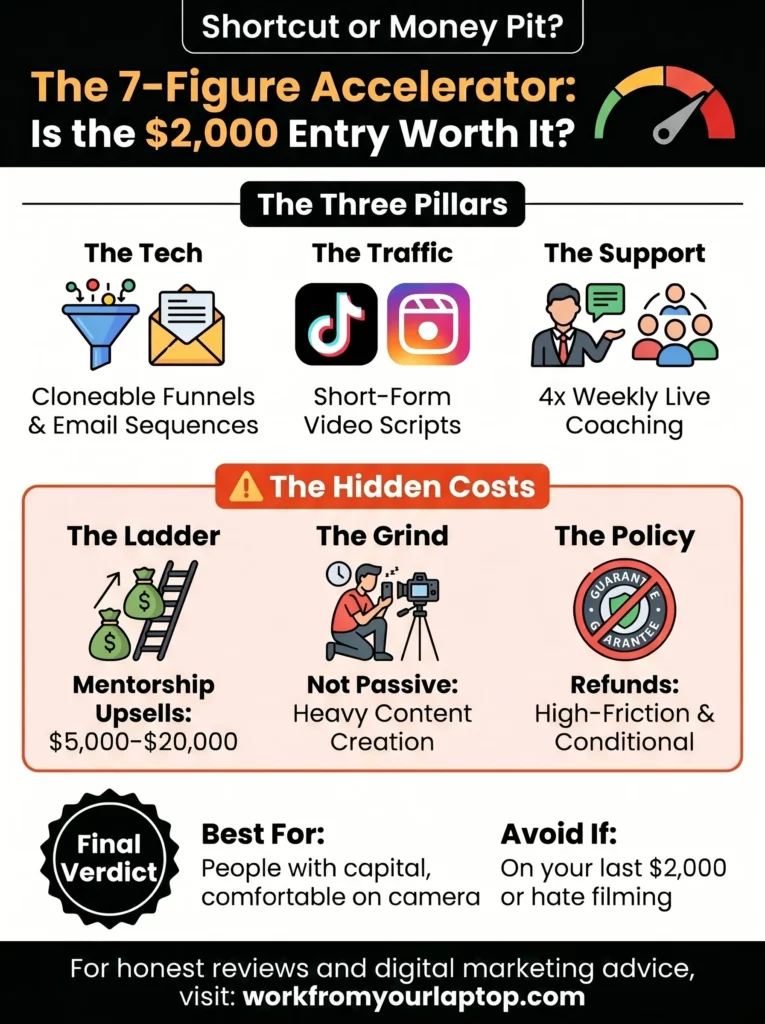
The 7-Figure Accelerator is a legitimate high-ticket affiliate marketing program that provides real training and assets. However, its high cost and aggressive upsell structure make it a risky investment for beginners.

  • High-Ticket Model: Focuses on selling expensive products (often the course itself) to generate commissions of $500 to $1,000+ per sale.
  • Done-For-You (DFY) Assets: Provides pre-built funnels and email sequences to reduce technical setup time from months to days. However, always beware of anything promising to be “done for you”.
  • Organic Focus: Teaches growth through short-form video (TikTok, Reels, Shorts) rather than relying on expensive paid ads.
  • Heavy Upsells: The initial entry price is often just the beginning, with “mentorship” levels reaching as high as $20,000.
  • Strict Refund Policy: Despite marketing “guarantees,” users report extreme difficulty actually getting money back once invested.
🔍 Have ChatGPT Summarize This Article

What’s In This Article? (Quick Jumps)

  • What Is the 7-Figure Accelerator?
  • How Much Does the 7-Figure Accelerator Cost?
  • 7 Figure Accelerator Features and Functionality
  • My Experience With the 7 Figure Accelerator
  • 7 Figure Accelerator Pros and Conc
  • Final Thoughts
  • Frequently Asked Questions

What Is the 7 Figure Accelerator?

Website: 7figurreaccelerator.com


7 figure accelerator review


The 7-Figure Accelerator is a program created by Philip Johansen. It first came out around 2022 or 2023, and its big selling point is that it’s “90% done-for-you.” (ALWAYS be very wary when any platform promises to be “done for you”.)

Basically, Philip promises to give you the exact same sales pages and email messages he uses for his own business. Your main job is just to get people to see them by making short videos.

This is “High-Ticket Affiliate Marketing” 101. It’s similar to programs like Freedom Accelerator or Legendary Marketer. It has a low buy-in, followed by very expensive upsells and your main goal is to buy the expensive program and then resell it.

Who is it for? It’s built for people who have more capital than time and want to skip the “tech-setup” phase of affiliate marketing.

Who is it not for? It is not for anyone on their last $2,000, as the pressure to recoup that investment can quickly lead to burnout.


How Much Does the 7 Figure Accelerator Cost?

The price for this program changes a lot. It often depends on which online presentation or ad you see first.

  • Standard Entry: This usually costs between $1,797 and $1,997. This price gets you lifetime access to the main training and the pre-made business tools.
  • Low-Ticket Entry: Sometimes, they offer a “lite” version or a cheaper tool for about $12.95. They do this to get you started in their system and then systematically hit you with all the upsells.

Speaking of Upsells

This is where things get expensive.

  1. Done-For-You Setup ($197 – $497): If you don’t want to follow the guides to set up your links yourself, the team will do it for you.
  2. VIP Mentorship ($5,000 – $20,000): This is a high-level “inner circle” where you get to work directly with Philip and his team. People who dislike the program argue that the main goal of the cheaper course is just to get you to buy these much more expensive levels.

In my experience, no beginner should ever be paying thousands of dollars to build an online business that’s promising to be “set it and forget it”. This is a huge red flag and you will find yourself in a massive hole without knowing how to fix it.


7 Figure Accelerator Features and Functionality

The “tech stack” you’re buying into includes:

  • Cloneable Sales Funnels: You get a “one-click” import for the exact landing pages Johansen uses.
  • Pre-Written Email Sequences: A series of automated emails designed to follow up with leads and close high-ticket sales.
  • Short-Form Video Scripts: Templates for TikTok and Reels that are designed to “go viral” by following specific hooks and transitions.
  • Weekly Live Coaching: Sessions held 2-4 times a week to answer student questions and review progress.
  • Private Community: A Skool or Facebook group where students share “wins” and help troubleshoot technical hurdles.

My Experience With the 7 Figure Accelerator

If you’ve followed any of my reviews, any time I see anything promising to be a “done for you” system, I cringe. Let’s be clear about something: There has never been a successful online business where work isn’t involved.

Period.

With 7 Figure Accelerator claiming its systems do 90% of the work for you, this should immediately raise a red flag for you.

Some positives, 7 Figure Accelerator’s onboarding is clean, and getting the funnel live takes less than an afternoon if you’re tech-savvy. I don’t think it’s exactly self-explanatory if you’ve never done this before though.

And the “10% work” you’re left with is heavy content creation, which is honestly the bulk of any business. I found that while the funnels can work, you’re basically becoming a full time video creator. If you aren’t comfortable posting 3+ times a day on TikTok, your “accelerator” will feel like it’s stuck in neutral.

The Balanced Take:

  • The Positive: The community is genuinely high-energy. Seeing others post $1,000 commission days in the group is a massive psychological boost when you’re struggling.
  • The Negative: The “copy-paste” nature means thousands of people are using the exact same scripts. This means you have a real chance that viewers are recognizing the exact same hooks instantly, making it harder to get organic reach than it was a year ago.
Work From Your Laptop YouTube Subscribe

7 Figure Accelerator Pros & Cons

Don’t just take my word for it. Here are positive and negative reviews I was able to gather from online forums such as Reddit, Quora, and Trustpilot.

✅ 7 Figure Accelerator Positive Reviews

  • DFY Assets: “The funnel setup was truly DFY. It saved me weeks of head-scratching over software integrations.”
  • Supportive Team: “Management is super supportive and response time is lightning quick.”
  • Live Coaching: “Access to live coaching 4 days a week is a game changer for staying on track.”
  • High-Ticket Focus: “Learning to sell $1k products instead of $10 Amazon items actually makes the math work for a full-time income.”
  • Clear Roadmap: “The step-by-step format is very beginner-friendly compared to other vague courses.”
  • Philip’s Energy: “Philip is a hands-on coach who genuinely seems to care about his students.”
  • Rapid Entry: “Reduced my setup time from months to weeks, allowing me to start testing the market immediately.”
  • Marketing Skills: “Teaches valuable digital marketing concepts like lead generation and automation.”

❌ 7 Figure Accelerator Complaints

  • Upsell Pressure: “Felt like I was constantly being pushed toward a $20k mentorship.”
  • No Refund Policy: “Despite the 30-day guarantee, they make it nearly impossible to actually get your money back.”
  • Unrealistic Claims: “The sales videos promise $200-$300 a day for beginners, which is rarely the case early on.”
  • Saturation: “Because everyone uses the same templates, the effectiveness of the content declines fast.”
  • Steep Investment: “The high upfront cost creates a lot of stress to see success quickly.”
  • Content Volume: “Beginners might get overwhelmed by the requirement to create daily videos.”
  • Algorithm Risk: “Your entire business depends on TikTok and Instagram not shadowbanning your account.”
  • Underwhelming Training: “Some users found the core training to be basic for the price paid.”
  • Pyramid Vibes: “The program heavily emphasizes reselling the program itself to make money.”
  • Time Commitment: “It’s not passive income; it’s a 12-month commitment to consistent content creation.”

Final Thoughts

While 7-Figure Accelerator gives you a fast way to start affiliate marketing with pre-made tools, it costs a lot of money to join, with many other people using the exact same content as you. This is not a good choice for beginners!

What Do You Think? Do you think the $2,000 price tag is justified for the time it supposedly saves you? Have you tried Philip’s system or a similar high-ticket program? Have you been successful in the past with “done for you” systems or have you been burned?

Drop your comments down below! I love hearing your perspectives and I always respond!


7 figure accelerator review

Trying to make money online and still not seeing results? Create your FREE STARTER ACCOUNT with the same straightforward training I’ve used to create full time revenue online. No matter your experience, this step by step training delivers! Click here and get started NOW!


Frequently Asked Questions

Is Philip Johansen’s 7-Figure Accelerator a scam?
While it has many detractors due to its high price and aggressive marketing, it is a legitimate training program with a 4.6-star rating on Trustpilot from over 1,600 users. It provides real assets and coaching, though results are never guaranteed.

Can beginners really make money with this?
Yes, but it is not “easy” money. The program requires a heavy commitment to short-form video production and audience engagement. Most successful users treat it as a long-term business rather than a quick cash fix.

Does the 7-Figure Accelerator offer refunds?
Technically, they have a 30-day money-back guarantee, but user feedback suggests it is highly conditional. Many users have complained about being unable to secure a refund after finding the program wasn’t a fit.


Want More Honest Reviews?

Don’t stop your momentum now! I’ve done the research so you don’t have to! You’d never believe how many training platforms are promising the world while being just upsell-filled hype machines!

  • Wordform AI review
    Wordform AI Review: What They Don’t Tell You About the $67 Price
  • Cash Tracking System Scam Review
    7 Red Flags That Prove Cash Tracking System Is a Scam
  • Keala Kanae Power Code Masterclass review scam
    Keala Kanae’s Power Code Masterclass Review: The Free Bait Before the $29K Hook
  • Genesis by Inspirean Keala Kanae Scam or Legit Review
    7 Reasons Why Keala Kanae’s Genesis by Inspirean Is a Bad Idea – Honest Review
  • 7 figure accelerator review
    7 Figure Accelerator Review
  • Mastermind.com Review
    Mastermind.com Review: Scam or the Ultimate Knowledge Business Tool?

Written by Eric Cantu · Categorized: Reviews & Comparisons

Apr 26 2026

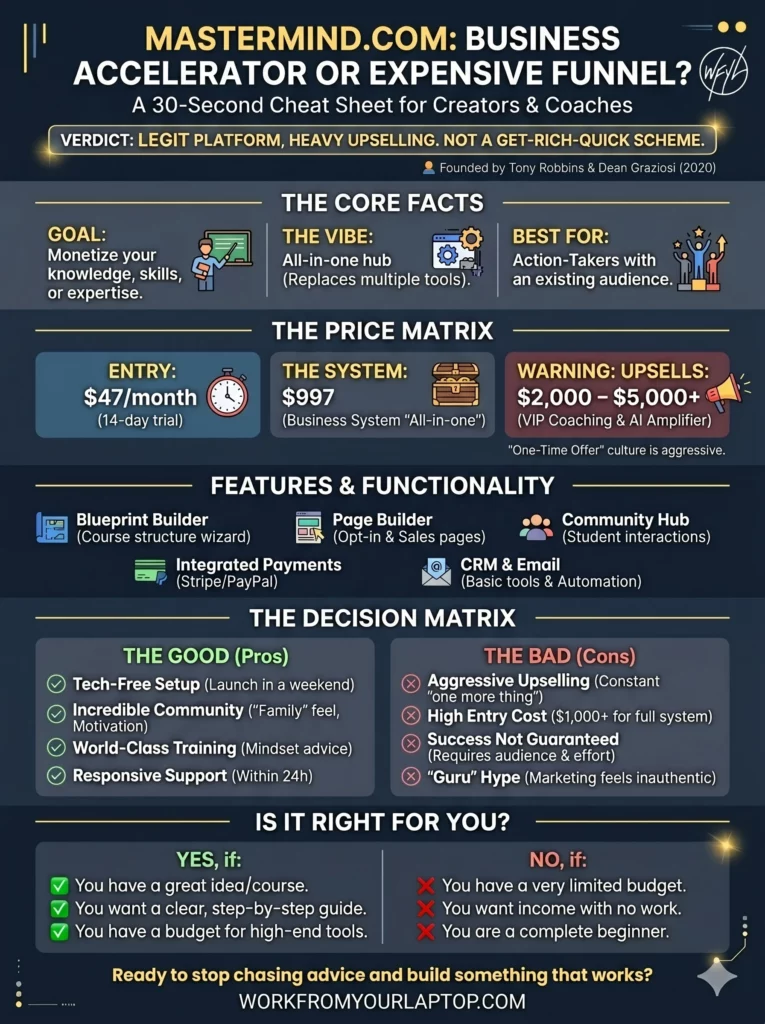
Mastermind.com Review: Scam or the Ultimate Knowledge Business Tool?

Mastermind.com Review

I keep seeing the Mastermind.com ads with Tony Robbins and Dean Graziosi on my Instagram promising to help you “turn what you know into a business.” Let’s see if it’s a legitimate path to freedom or just another expensive funnel, shall we?

TL;DR: Is Mastermind.com a Scam?

Mastermind.com is a legitimate platform for course creators and coaches, but its high price tag and aggressive upselling mean it is definitely not a “get rich quick” scheme for everyone.

  • Founded by Giants: Created by Tony Robbins and Dean Graziosi in 2020 to help experts monetize their skills.
  • Solid Tech Stack: The platform simplifies building landing pages, managing payments, and hosting communities in one place.
  • Pricing is Steep: While there is a $47/month base, most users are funneled into high-ticket “Business Systems” costing $1,000+.
  • Mixed Sentiment: Users love the motivational community but often complain about upsells and salesy tactics
  • Best for Action-Takers: It’s a powerful tool for those with an existing audience, but beginners may find the “all-in-one” upsell costs overwhelming compared to cheaper alternatives.
🔍 Have ChatGPT Summarize This Article

What’s In This Article? (Quick Jumps)

  • What is Mastermind.com?
  • How Much Does Mastermind.com Cost?
  • Mastermind Features and Functionality
  • My Experience with Mastermind.com
  • Mastermind.com Testimonials (Crowdsourced)
  • Final Thoughts
  • Frequently Asked Questions

What Is Mastermind.com?

Website: mastermind.com


Mastermind.com review

Mastermind.com was created by Tony Robbins and Dean Graziosi as a platform to help you build and run your own groups or online classes. Instead of just being a site where you host your training courses and videos, this site is designed to help you turn what you know into an actual business.

Think of Mastermind as a middle ground between other popular tools:

  • Kajabi: This is a “pro” tool that does everything but can be very complicated.
  • Skool: This tool focuses mostly on building a community.
  • Thinkific & Teachable: These websites focus on the technical side, like uploading your lessons.

Related articles: Check out my full guides on Skool for students and Skool for content creators!

Where Mastermind.com is different is it focuses on the marketing side, teaching you how to sell your skills and find the right people for your course.

Is It Right for You?

  • It’s for you if: You have a great idea for a course or a group and you want a clear, step-by-step guide to help you launch it.
  • It’s NOT for you if: You have a very limited budget or you are looking for a business that makes money without you having to do any work. This platform takes effort to make it successful!

How Much Does Mastermind.com Cost?

The pricing for Mastermind.com can be a bit of a moving target depending on which “challenge” or “webinar” you enter through.

  • Monthly Subscription: $47 per month after a 14-day free trial.
  • Yearly Plan: $423 per year, which usually includes “Marketing Secrets” bonuses.
  • Mastermind Business System (MBS): This is their premier “all-in-one” offer, often priced at $997 as a one-time entry fee that includes the software and extensive training.

Mastermind.com Upsells

Be prepared: Tony and Dean are the masters of the One-Time Offer (OTO).

  1. Inner Circle / VIP Coaching: Often presented as a high-ticket upsell (sometimes $2,000 – $5,000+) for those who want direct access to their top-tier coaches.
  2. The AI Amplifier: A newer add-on focusing on using AI to speed up content creation, often costing an additional monthly fee or a one-time upgrade.

Mastermind Features and Functionality

These features are designed to remove any “tech-headache” that stops most beginners from creating their own courses.

  • The Blueprint Builder: A step-by-step wizard that helps you structure your course or mastermind curriculum.
  • Built-in Page Builder: You don’t need a separate WordPress site or ClickFunnels; you can build your opt-in and sales pages directly in the dashboard.
  • Integrated Payments: Connect to Stripe or PayPal to handle transactions without needing any third-party integrations.
  • CRM & Email: Basic tools to manage your lead list and send automated follow-ups to your students.
  • Community Hub: A dedicated space for your students to interact, similar to a private Facebook group but hosted on your own platform.

My Experience With Mastermind.com

Ok, so when I first logged into the Mastermind dashboard, the first thing I noticed was how polished everything felt. Other Learning Management Systems I’ve used can sometimes feel clunky. The onboarding process guides you every step of the way and you’re immediately greeted by Dean Graziosi in a video walking you through your first steps.

The daily rhythm of using it is smooth. I found the page editor to be pretty intuitive, it’s a drag-and-drop system, pretty straightforward, especially for those who feel building a website is hard. I liked the “Marketing Vault” which is filled with templates for exactly what to say in your emails. That email automation sequence feature was a nice touch.

The Good: Intuitive and polished. I had a question that I reached out to their support team for and they answered within 24 hours without the usual runaround most platforms have.

The Bad: Tons of notifications to upgrade. Even after paying for the base system, you’re constantly reminded of what you’re “missing out on” by not being in the VIP tiers. It’s a little over the top and too salesy.

Work From Your Laptop YouTube Subscribe

Mastermind.com Testimonials (Crowdsourced)

Don’t take my word for it. Here are positive and negative reviews I was able to gather from online forums such as Reddit, Quora, and Trustpilot:

✅ Mastermind.com Positive Reviews

  • Incredible Community: Many users report that the “family” feel of the private groups keeps them motivated during the hard parts of building a business.
  • Simple Setup: Praise for the “tech-free” approach, allowing non-technical people to launch a site in a weekend.
  • World-Class Training: The actual business advice from Tony and Dean is often cited as “transformative” for mindset.
  • Responsive Support: Numerous 5-star reviews mention the support team going “above and beyond” to fix technical issues.
  • All-In-One Convenience: Users love not having to pay for multiple software subscriptions.
  • AI Integration: The new AI tools are helping users write copy faster than they ever could manually.
  • High-Quality Templates: Lots of reviews on the sales page templates being professional and designed to “convert like crazy.”
  • Mobile Friendly: The student experience on the mobile app is seamless.
  • Life-Changing Results: Several testimonials claim the 30-day challenge helped them launch their first business after years of “stalling”.

❌ Mastermind.com Complaints

  • Aggressive Upselling: Many find the constant “one more thing to buy” culture exhausting.
  • Cancellation Issues: Some users report being charged after canceling or finding it hard to find the “cancel” button.
  • High Entry Cost: The $1,000+ barrier for the full “system” is too high for many beginners.
  • “Guru” Hype: Critics on Reddit often point out that the marketing feels “inauthentic” or overly salesy.
  • Success Not Guaranteed: Despite the “proven system,” many users still struggle to make any money if they don’t have an audience.
  • Surprise Charges: Occasional reports of “automatic renewals” that users didn’t realize they agreed to.
  • Technical Glitches: Some reports of videos not loading or login issues during major “launch” events.
  • Email Spam: Complaints about a high volume of marketing emails after signing up for a free trial.
  • Feature Limits: The base plan has limits on how many attendees can be in a live session (e.g., 10 attendees).
  • Refund Friction: While they offer a guarantee, some users found the process of actually getting their money back to be tedious.

Final Thoughts

Mastermind.com is a polished platform for those ready to invest in their knowledge business. It removes the tech barriers but requires a significant financial and time commitment to see real ROI.

What Do You Think? I’ve seen these “guru” platforms come and go, but it looks like Tony and Dean have built something that doesn’t have the normal guru red flags and online business coaching scam cliches. But do you think the high-ticket price is worth it?

  • Have you ever tried any of Tony or Dean’s challenges?
  • Do you think an “all-in-one” platform is better than “stitching” together cheaper tools?
  • How do you think this compares with other course creators?

Drop your comments below! I love hearing your perspectives and I always respond!


Mastermind.com Review

Trying to make money online and still not seeing results? Create your FREE STARTER ACCOUNT with the same straightforward training I’ve used to create full time revenue online. No matter your experience, this step by step training delivers! Click here and get started NOW!


Frequently Asked Questions

Is Mastermind.com a scam?
No, it is not a scam. It is a legitimate SaaS platform and training program founded by well-known industry leaders. However, like any business tool, its effectiveness depends entirely on the user’s effort and ability to implement the marketing strategies provided.

How do I cancel my Mastermind.com subscription?
While there is no prominent “one-click” cancel button in some versions of the dashboard, you can cancel by contacting their support team at support@mastermind.com. It is recommended to do this several days before your next billing cycle to avoid unwanted charges.

Can I use Mastermind.com for free?
The platform usually offers a 14-day free trial that requires a credit card. Occasionally, they run “5-day challenges” where you can access certain training materials for free, but the full software suite is a paid service.


Want More Honest Reviews?

Check out these review on other make money online platforms! I do the research so you don’t have to!

  • Wordform AI review
    Wordform AI Review: What They Don’t Tell You About the $67 Price
  • Cash Tracking System Scam Review
    7 Red Flags That Prove Cash Tracking System Is a Scam
  • Keala Kanae Power Code Masterclass review scam
    Keala Kanae’s Power Code Masterclass Review: The Free Bait Before the $29K Hook
  • Genesis by Inspirean Keala Kanae Scam or Legit Review
    7 Reasons Why Keala Kanae’s Genesis by Inspirean Is a Bad Idea – Honest Review
  • 7 figure accelerator review
    7 Figure Accelerator Review
  • Mastermind.com Review
    Mastermind.com Review: Scam or the Ultimate Knowledge Business Tool?

Written by Eric Cantu · Categorized: Reviews & Comparisons

Apr 24 2026

Pinterest SEO for Bloggers: Turning Pins into Website Traffic

Pinterest SEO for Bloggers: Turning Pins into Website Traffic

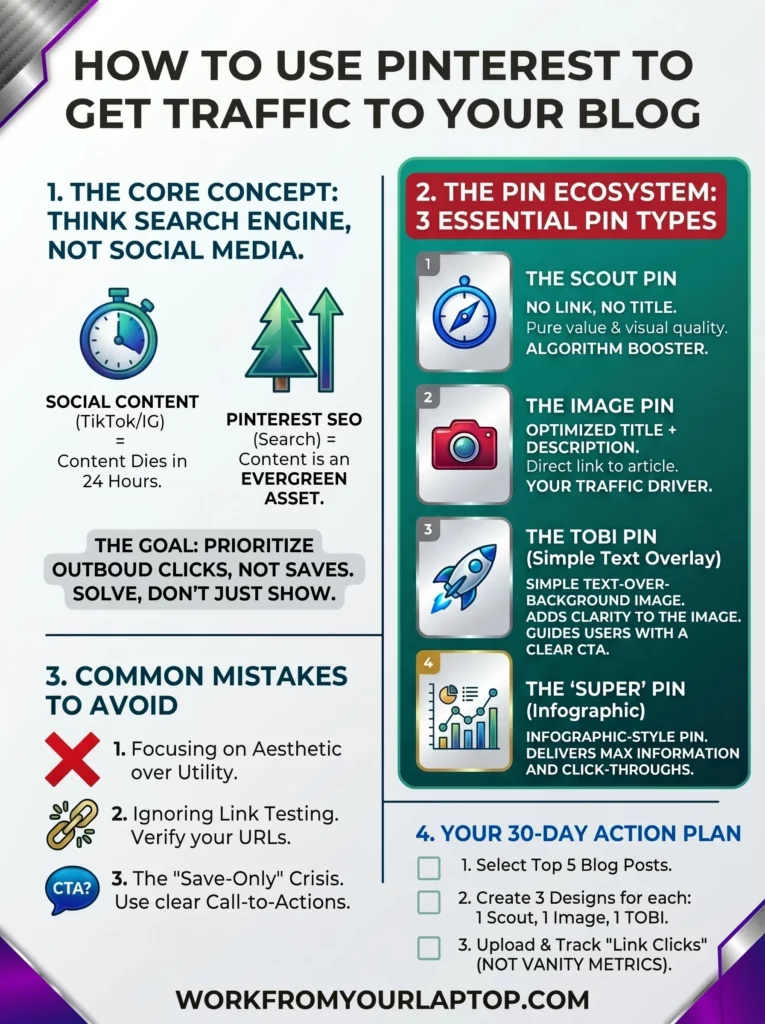
If you’re treating Pinterest like Instagram or TikTok, you’re doing it wrong. It’s time to stop acting like Pinterest is only a social media platform and start using it like it’s a search engine. If you aren’t using it to send people to your blog, you’re missing out on your best readers.

TL;DR: How Do I Use Pinterest to Drive Blog Traffic?

Pinterest drives traffic by functioning as a visual search engine. To convert viewers into website visitors, you need to create “click-bait” pins, not in the deceptive sense, but in the sense that your pin design and headline must promise a solution that the user can only fully access by clicking through to your blog post.

  • Prioritize Outbound Clicks: Your primary metric is “Link Clicks,” not “Saves” or “Followers.”
  • Solve, Don’t Just Show: Your pin must clearly communicate the value of the blog post.
  • Bridge the Gap: Use your pin to introduce a problem and your blog post to provide the solution.
  • Design for Intent: Stop making “pretty” pins; make “actionable” pins that invite a click.
  • Don’t fight the algorithm: Use “scout”, “image” and “TOBI” pins to keep Pinterest happy.

What’s In This Article (Quick Jumps)

  • Why Pinterest Matters for Traffic Right Now
  • My Experience with Using Pinterest for Blog Traffic
  • Step-by-Step Breakdown: The Core Strategy for Clicks
  • Common Pinterest Mistakes & What to Avoid
  • Your Next Steps In Mastering Pinterest SEO
  • Final Thoughts
  • Frequently Asked Questions

Why Pinterest Matters for Traffic Right Now

Pinterest is one of the most powerful, underrated traffic drivers for bloggers. Unlike social media platforms where content dies in hours, Pinterest content is evergreen. A single, well-optimized pin can drive consistent, high-intent traffic to your website for months or even years after you first post it.+1

If you ignore Pinterest, you’re missing out on a huge search engine that people use to plan, learn, and buy stuff. At its core, Pinterest is a visual discovery engine. Winning at Pinterest is much more than dominating social media. Think of it like a giant mood board where people go to save ideas.

Unlike social media apps which seem to be meant for trolling and starting arguments and scrolling through random stranger’s selfies, Pinterest is built for searching for answers.

Here are its strong points:

  • It’s a Search Engine: People go to Pinterest to type in a problem or a goal, like “DIY home office ideas.” They’re looking for answers, not just entertainment.
  • Long-Term Value: On social media, your post is usually forgotten in 24 hours. On Pinterest, your content acts like an asset. A pin you create today can still be found and clicked on months or even years from now.
  • Higher-Quality Traffic: Because people are searching for specific ideas, when they find your pin, they’re already looking for the information you have. This makes them much more likely to click through to your website to learn more.
  • Organized Discovery: Users save your content to “boards,” which act like organized file folders. This keeps your content relevant and easy to find for future users, rather than letting it get buried in a noisy feed.

In my experience Pinterest connects people looking for answers with the content you’ve made to help them. Plain and simple. It turns your website into a go-to resource that people can find, even a long time after you first posted it.

This is a perfect fit for a blogger.


My Experience with Using Pinterest for Blog Traffic

I was never a Pinterest guy. I honestly always thought it was just a social network for stay-at-home moms. I thought it was a place to look at home decor and cookie recipes. I didn’t see any real business value in it.

Then, I saw the light. I watched an expert class series on Wealthy Affiliate specifically talking about using Pinterest to drive targeted traffic to your blog. Again, at first I thought that was for people in the “home decor” or “antiquing” niches. I was 100% wrong.

That expert class series changed everything for me. I realized Pinterest isn’t really social media at all. It’s a search engine just as powerful as YouTube. When you build your boards right, not only are you keeping Pinterest happy, gaining a following there, but your driving high quality traffic to your site as well.

I learned about “scout pins,” “image pins,” and “TOBI pins.” That was my real “a-ha” moment. There’s a science to it all. And the final result is a huge boost of traffic that converts.


Step-by-Step Breakdown: The Core Pinterest Strategy for Clicks and Website Visits

The core strategy is to create “Click-Through Pins” by using keyword-optimized titles and descriptions, then designing visuals that explicitly promise a result or “how-to” answer that requires a click to access, all while creating pins that Pinterest loves and keeping the algorithm happy. 

Let’s talk Pinterest strategy that works. We want to build our Pinterest following the right way, and then drive targeted traffic to our blog content.

1. The “Click-Bait” Solution Design

This isn’t the “click bait” you’re thinking of. It’s all about getting attention. Your pins and their design need to be hyper relevant. But we also don’t want to just have spammy pins all over our boards. I use Wealthy Affiliate Image Studio to create unbelievably high quality pins and they’re as simple as typing a prompt.

Now, let’s talk about the 3 different types of pins you want to use to give your boards the high value your Pinterest audience is looking for while still driving that traffic to your blog content without being spammy.

2. Understanding Scout, Image, and TOBI Pins

This is really the meat of what I want you to understand. You can’t just spam links to your blog. You need to create an ecosystem that adds value to people who love Pinterest.

Remember, Pinterest wants its user to love the platform, so don’t fight against the algorithm. Add value to your Pinterest boards the right way and the natural follow through when you’re delivering answers will be the click-throughs.

  • Scout Pins: These are highly relevant, high-quality images. They don’t have an external link, a title, or a description, they just have an assigned board. Because they don’t take the user away from the app, Pinterest loves them. They keep your boards looking full and professional instead of “spammy.” Plus, they’re great for driving traffic to your boards.
  • Image Pins: These are your bread and butter. They have an optimized title, a clear description, an assigned board, and a link that goes directly to your article. They’re the perfect bridge between your scout pins and your content.
  • TOBI Pins (Text Over Background Image): These are the next level. They have everything an image pin has: the title, description, board, and link, but you also add simple text overlays on the image. This makes it super obvious that clicking the pin will lead to a direct answer. Personally, I like going a slightly different route and use WA Image Studio to create full infographics for my articles. It’s like TOBI pins on steroids!
  • Pro Tip: Use Scout pins to fill out your boards and build authority. Then, sprinkle in your Image and TOBI pins to guide those users to your actual articles. You can have multiple iterations of your image and TOBI pins. Have fun with it!

3. The “Destination URL” Strategy

This should be self explanatory, but I want to drive this point home. Be exact with your linking.

Don’t just link to your website. Link every image and TOBI pin directly to the article that gives the direct answer to the user’s question. If you’re pinning a recipe, link it directly to the recipe article. If you are pinning a tutorial, drive that traffic directly to that specific article.


Common Pinterest Mistakes & What to Avoid

Beginners fail when they chase vanity metrics over traffic. Common mistakes include pinning for aesthetic over utility, ignoring keyword intent, failing to use clear CTAs, neglecting to check link-through analytics, and treating boards as “mood boards” instead of SEO-organized content categories.

  1. Ignoring Link Testing: Not making sure your pins actually go to your site.
    • Solution: Periodically click your own pins. Make sure the link isn’t broken and goes to the intended page.
  2. Poor Mobile Optimization: Pins that look bad on phones.
    • Solution: Always check your pins on your phone. Mobile is how everyone operates. Make sure the mobile experience delivers.
  3. The “Save-Only” Crisis: You get way too focused on pin saves, but not enough click-throughs to your content.
    • Solution: Sure, saves are a good thing, it means you’re on the right track. But try adjusting your TOBI pins to have more of a CTA in the text. “Full Guide Inside!” or “Click to Read More!” can nudge your audience just enough
  4. Not finding balance: Having way too many TOBI pins and not enough scout pins.
    • Solution: For every article you write you have at least one scout pin. This gives your boards balance. They are highly relevant images with no agenda. They get more eyes to your boards where the image and TOBI pins can do the rest of the work of getting eyes on your content.
Work From Your Laptop YouTube Subscribe

Your Next Steps in Mastering Pinterest SEO

Now, let’s implement this strategy. Your next step is to look at your top 5 blog posts. For each article, create 3 new pin designs.

One will be a scout pin (relevant, but not overly specific to the article, broader in design), one will be an image pin (more specific to the article topic), and one will be a TOBI pin (highly specific with text overlayed on the image). Don’t stress about them being “pretty.” Focus on them being “useful.”

Once they’re ready, it’s time to put your plan into action. You’ll create and upload your pins to your boards. If you’re like me you’ll start getting addicted to the pins you’re creating and you’ll want to create more and more image pins in different styles for each article. Do it! It’s fun!

And don’t worry if every once in a while an image pin you create isn’t quite specific enough for the article you’re creating it for. Ask yourself, “Is it still relevant?” If so, make it a scout pin! Again, have fun with this!

Over time, you’ll find yourself adding high-quality, relevant pins to your boards and filling them up. This keeps Pinterest happy. Do this for a full month and take a look at how many clicks your pins are getting. All those clicks to your pins are soon to be click-throughs to your content!

Make those pin descriptions inviting! Let your audience know that the answer to what they’re looking for is right around the corner. Deliver that value!

This is the shift from just playing around on social media to actually building a business. You’re creating a roadmap for your readers by using a platform for what it’s meant for, delivering value, and using this tool to get eyes on your own content.. You’re now understanding what it means to be a professional blogger!

Check out my Pinterest boards here!


Final Thoughts

Stop trying to be an influencer and start being a search result. Create Pinterest content that delivers value to your audience, but also entices them to find more details in your content. Deliver value, keep Pinterest happy, and build your blog traffic.

What do you think? Have you been sleeping on the potential of Pinterest for your blog traffic? Do you have a Pinterest account yet? Follow mine here!

  • Are you struggling with getting “saves” but no “clicks”?
  • Which one of the pin types do you like creating the most?
  • What’s your tool of choice for creating your pins?

Pinterest SEO for Bloggers Infographic

Trying to make money online and still not seeing results? Create your FREE STARTER ACCOUNT with the same straightforward training I’ve used to create full time revenue online. No matter your experience, this step by step training delivers! Click here and get started NOW!


Frequently Asked Questions

Why are my pins getting saved but not clicked?
Your pin is likely providing too much information upfront. If the user feels they’ve already “gotten” the value from the image, they have no reason to click. Make your pin a “teaser” that requires a click to see the full solution.

Do I need a large following to get traffic?
No. Pinterest is a search engine. A brand-new account with zero followers can drive massive traffic if the pins are SEO-optimized for search terms that people are already actively typing into the platform.+1

What is the best type of pin for driving traffic?
The best pins are those that promise a specific result (like “5 ways to X” or “The guide to Y”). Listicles, “How-to” guides, and tutorials perform the best because they have a high-intent, problem-solving nature.


Want More Social Media Marketing Strategies?

Keep that momentum going! Check out my guides to explode your social media presence!

  • Pinterest SEO for Bloggers: Turning Pins into Website Traffic
    Pinterest SEO for Bloggers: Turning Pins into Website Traffic
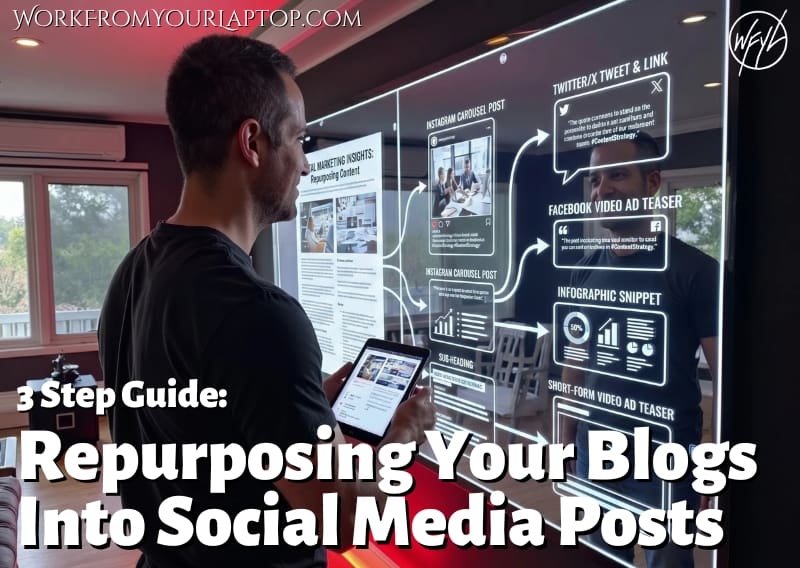
  • Repurposing Your Blog Content Into Social Media Posts
    Repurpose Your Blog Content: A 3-Step Guide to Turning Articles into Social Posts
  • Threads vs X vs Bluesky Review
    Threads vs. BlueSky vs. X: Which Platform is Best for Affiliate Marketing?
  • Affiliate Marketing Strategies for Social Media
    Affiliate Marketing Strategies For Social Media in 2025

Written by Eric Cantu · Categorized: Social Media for Affiliates

  • « Go to Previous Page
  • Page 1
  • Page 2
  • Page 3
  • Page 4
  • Page 5
  • Interim pages omitted …
  • Page 29
  • Go to Next Page »
  • Home
  • Sign Up
  • Blog & Search
  • Privacy Policy
  • Affiliate Disclosure

Copyright © 2026 · Work From Your Laptop · Eric J. Cantu · All Rights Reserved