Last updated on May 28, 2026 · In-depth guide, 5–7 min read

If you’ve spent any time in the world of online business or digital creators, you’ve probably seen the clean, gamified interface of Skool. I recently did a full Skool review for content creators who are looking to get their course content out to their community. But what’s it actually like to learn on Skool from the student’s perspective?
Is Skool Worth It for Students?
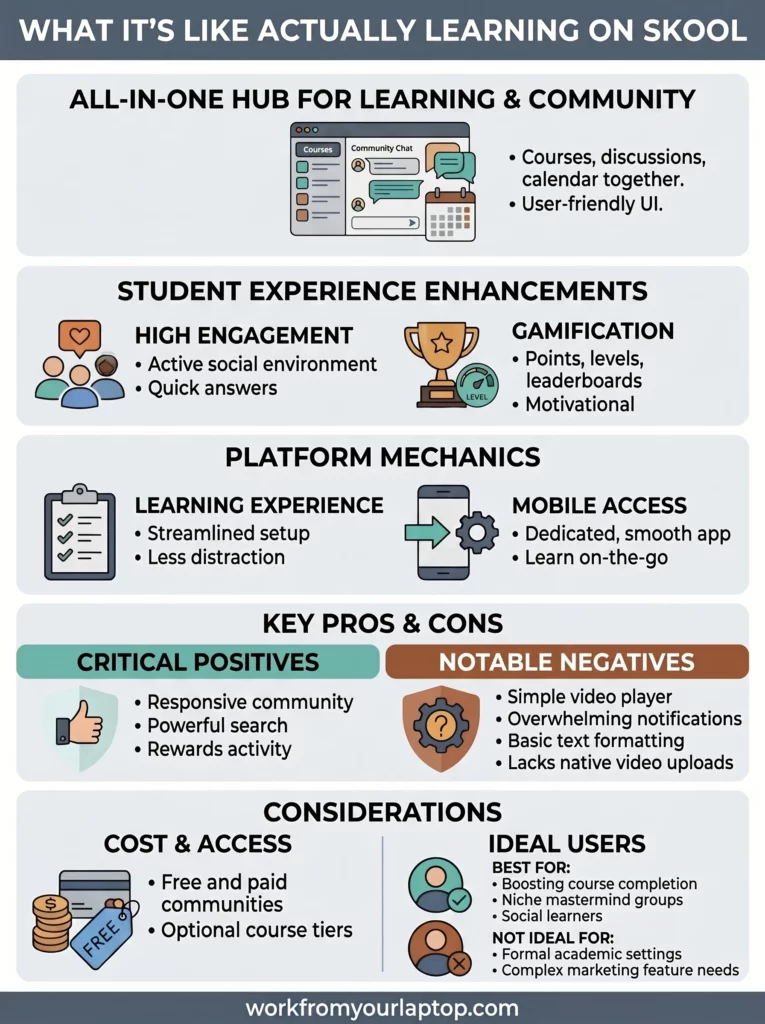
Skool is a legitimate, high-quality social learning platform that combines courses, community, and gamification. For students, it offers a streamlined, “distraction-free” environment that significantly boosts course completion rates compared to traditional platforms.
- Clean Interface: The minimalist design removes the “noise” of Facebook groups or complex LMS dashboards.
- Built-in Gamification: Points, levels, and leaderboards make the learning process feel like a game.
- All-in-One Hub: Courses, community discussions, and event calendars are all in one single location.
- High Engagement: The “social-first” approach encourages students to actually talk to each other and the creator.
- Mobile App: A dedicated app allows you to learn and participate in the community on the go.
What’s In This Article (Quick Jumps)
- What Is Skool?
- How Much Does Skool Cost For Students?
- Skool Features and Functionality For Students
- My Student Experience With Skool
- Skool Student Testimonials
- Final Thoughts
- Frequently Asked Questions
What Is Skool?
Website: skool.com
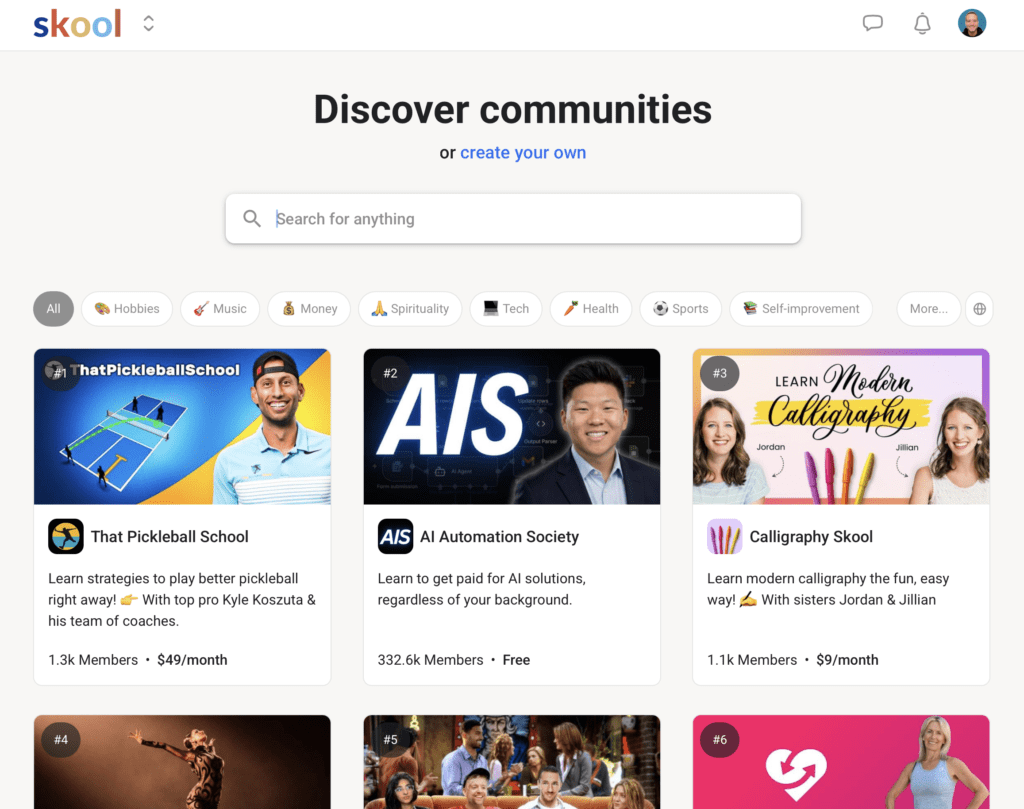
Skool is a community-based platform designed for creators to host their courses and build an engaged audience in one centralized spot. It was founded in 2019 by Sam Ovens who wanted to solve what he called a “fragmentation” problem where students had to go to one site for videos and another (like Facebook) for the community.
In my experience you’d see this all the time. You’d go to teachable for the full course and as part of the package you’d get access to a separate “private Facebook group”. But this always seemed like a hassle. I’m not active on Facebook, so I always ignored the Facebook group.
Now with Skool, the class and the community are all under one roof.
Other options that are similar to Skool are platforms like Kajabi, Mighty Networks, and Circle. However, while Kajabi focuses on being a “Swiss Army Knife” for marketing, Skool’s main focus seems to be on the student experience and community engagement.
Who this is for: It’s perfect for students who struggle with “course abandonment” and want a social, interactive way to learn. It’s also great for hobbyists and professionals looking for niche “mastermind” groups.
Who it isn’t for: If you prefer a formal, academic setting or need complex features like built-in email marketing and advanced sales funnels, Skool might feel too simplified for you.
How Much Does Skool Cost For Students?
From a student’s perspective, the “cost” is usually determined by the creator whose community you’re joining.
- Free Communities: Many creators offer free “entry-level” groups to get you into their ecosystem.
- Paid Memberships: These typically range from $20/month to $200+/month, depending on the level of access and coaching provided.
- Course-Based Access: Some creators charge a one-time fee for a course (e.g., $497 or $997) which then gives you lifetime access to their Skool group.
Any Upsells?
While Skool itself doesn’t have many “hidden” fees for students, you should be aware of Community Tiers. What this means is that a creator will have a basic community and then an optional “Elite” or “Mastermind” tier that is much more expensive. Not to worry though. From what I’ve seen, they’re usually not “essential”, they just offer more features and usually offer more direct access to the founder of the class.
Skool Features and Functionality For Students
The Skool user interface is intentionally thin to keep things fast and easy to use. I think it’s a plus.
- The Classroom: This is where the video lessons live. It’s a very simple list of modules and lessons.
- The Community Tab: This looks like a cleaner version of a Reddit feed. You can post questions, share your wins, and comment on others’ posts.
- Leaderboards & Levels: They’ve managed to gamify the UI which keeps things feeling alive. You earn “points” when people like your posts. Higher points unlock new “levels,” and creators can even set it up so that reaching a certain level unlocks a bonus course.
- Calendar: A built-in view of all upcoming live Zoom calls, workshops, or community events so you never miss a beat.
- Universal Search: You can search a keyword and it will find every post, comment, and lesson related to that topic.
My Student Experience With Skool
Just arriving inside Skool it looks like a professional and established spot that is here to stay. I like the simplicity. There’s no confusion as to what it is. Whether you’re a student or a creator you fully understand exactly how to navigate the platform.
The setup process is the fastest I’ve ever experienced with joining an online course. I didn’t have to wait for a “welcome email” with a dozen links; I just logged in and everything was right there, from the videos, the people, the schedule. Done and done.
The daily rhythm of using it is what I surprisingly enjoyed the most. I found myself “checking in” on the community like I would check a social media app. And because you get notifications when people “like” your input, it creates this positive feedback loop that actually kept me coming back to finish the lessons. You’re incentivized to be active, and to be honest, it was fun.
Balanced Take:
- Specific Positive: I once posted a pretty technical question about a WordPress detail at around 10 PM my time. Because the community was so active, I had three different students and a moderator jump in to answer it inside 15 minutes. That’s really responsive and a huge plus.
- Specific Negative: If I have to find a negative (and it’s not a big one), it’s that the Classroom player is very basic. If you are used to the advanced playback features of something like YouTube or Vimeo (like specific speed adjustments or advanced captioning), Skool’s native player can feel a bit no-frills, but, honestly, I think it’s meant to be that way on purpose.

Skool Student Testimonials
As always, don’t just take my word for it. Here are positive and negative reviews I was able to gather from online forums such as Reddit, Quora, and others.
✅ Skool Positive Student Reviews
- “The first course I actually finished because the leaderboard made me want to ‘win’ the levels.” – Reddit
- “No ads, no distractions, just learning. It’s so much better than Facebook Groups.” – Trustpilot
- “The mobile app is surprisingly smooth. I watch lessons while on the treadmill easily.” – G2
- “I love that I can see everyone else who is online; it makes the course feel ‘alive’.” – Quora
- “Search actually works. I found an answer to a niche problem in a post from two years ago.” – Reddit
- “The UI is so clean my grandma could use it without getting lost.” – Trustpilot
- “I like that the creator can reward active members with secret content.” – YouTube Comment
- “It feels like a private club rather than just a digital file folder of videos.” – Quora
- “The ‘Daily Activity’ chart keeps me accountable to my own habits.” – Reddit
- “Simple billing. I can see exactly what I’m paying for in my settings.” – Trustpilot
❌ Skool Student Complaints
- “It’s almost too simple. I wish I could format my posts more like a blog.” – Reddit
- “The ‘Gamification’ can feel a bit childish if you are in a very serious professional niche.” – G2
- “No native way to host ‘live’ videos; creators still have to link out to Zoom or YouTube.” – Quora
- “The notification system can get overwhelming if you are in a very large group.” – Reddit
- “I wish there were more options for ‘Dark Mode’ across the whole platform.” – Trustpilot
- “As a student, I can’t easily message people unless they message me first in some groups.” – Quora
- “Sometimes the ‘Classroom’ videos take a second to load on slower connections.” – Reddit
- “Not enough ‘sub-group’ options. Everything happens in one big feed.” – G2
- “The mobile app lacks some of the administrative settings of the desktop version.” – Trustpilot
- “It’s hard to find ‘small’ groups; the platform seems to favor the giant, noisy ones.” – Reddit
Final Thoughts
Skool is a game-changer for students who want everything under one roof with a focus on community and simplicity. While it doesn’t have the “bells and whistles” of older platforms, its focus on engagement makes learning much more fun.
What Do You Think? Have you tried learning on Skool yet, or do you prefer the traditional “video-only” course platforms? Do the leaderboards actually motivate you, or do they feel like a distraction? Let me know your experience in the comments below! I love hearing your perspectives and I always reply!
Check out my Skool review for content creators and see how this platform works from the other side!
Trying to make money online and still not seeing results? Create your FREE STARTER ACCOUNT with the same straightforward training I’ve used to create full time revenue online. No matter your experience, this step by step training delivers! Click here and get started NOW!
Frequently Asked Questions
Is Skool better than a Facebook Group for learning?
Yes, Skool is generally superior for learning because it is a dedicated environment without the distractions of personal notifications, ads, and unrelated newsfeed content. It also organizes the actual “lessons” right next to the conversation, which Facebook cannot do effectively.
Do I need a credit card to join a Skool group? It depends on the group.
If the creator has made their community “Free,” you can join with just an email address. If the community is “Paid,” you will need to provide payment details through Skool’s secure checkout (powered by Stripe).
Can I use Skool on my phone?
Yes, Skool has a highly-rated mobile app available for both iOS and Android. It allows you to watch all classroom videos, post in the community, and receive push notifications for mentions or likes.
Want More Honest Reviews?
Don’t slow your roll! We’re just getting started! Check out my experience-first reviews on some of these platforms below! Don’t fall for the online hype machines looking to make a quick buck!
- Wordform AI Review: What They Don’t Tell You About the $67 Price

- 7 Red Flags That Prove Cash Tracking System Is a Scam

- Keala Kanae’s Power Code Masterclass Review: The Free Bait Before the $29K Hook

- 7 Reasons Why Keala Kanae’s Genesis by Inspirean Is a Bad Idea – Honest Review

- 7 Figure Accelerator Review

- Mastermind.com Review: Scam or the Ultimate Knowledge Business Tool?


I’ve joined online courses before where everything felt scattered. Videos in one place. Group somewhere else. Random emails. Too much.
So the idea of Skool keeping the lessons, community, and calendar together feels really nice.
Less chasing links. Less confusion.
Sometimes learning online can feel kinda lonely. Having people answer questions and share wins makes a big difference.
Thanks for the comment!
This was really helpful because I had honestly never used Skool before and didn’t really understand what it was. After reading your post, I went and did a bit of research and even installed it to see how it works. It looks interesting, especially the community aspect, but I’m still trying to figure out how to use it in a way that’s actually productive and not overwhelming.
From your experience, what should a beginner focus on first when joining Skool? Is it better to just follow one community or explore different ones at the start?
Thanks for sharing this, it gave me a good push to check it out for myself!
You don’t join a class just to join a class, you join a class that specifically aims to teach what it is you’re wanting to learn. If you’re looking to learn how to blow up your TikTok, there’s courses on that. If you’re looking to get better at WordPress, there’s classes on that, and so on. Thanks for the comment!