Last updated on May 28, 2026 · Comprehensive breakdown, <10 min read

Out of nowhere I started seeing Skool ads everywhere. When I checked it out it looks like a centralized area for content creators and students alike to find communities to teach and learn just about anything. But how good is this for creators? Is it a legitimate game-changer or just another hype machine money-grab? If you want to see my Skool review for students, click here.
TL;DR: Is Skool a Good Deal for Creators?
Skool is a website that helps creators build online communities and sell online courses. At $99/month it can be a good fit if you already have an audience to monetize, but maybe not so much if you’re a brand new creator or need more technical features.
- It’s Easy to Use: The design is very clean. It doesn’t have too many buttons or confusing menus, so your members can focus on what matters: the conversation.
- Fun to Participate: Skool has a “game-like” system where members earn points and reach new levels by commenting and being helpful. This keeps people interested and coming back.
- Everything in One Place: You can host your videos directly on the site, manage payments, and host live events without needing a bunch of other expensive tools.
- Pricey for Beginners: At $99/month for the Pro plan, it’s a steep investment as a creator if you don’t already have an audience to monetize.
What’s In This Article? (Quick Jumps)
- What is Skool?
- What Type of Creator is Skool For?
- What Type of Creator is Skool Not For?
- How Much Does Skool Cost for Creators?
- Skool Features and Functionality
- My Experience: How Skool Compares to Teachable
- Skool Testimonials
- Final Thoughts
- Frequently Asked Questions
What Is Skool?
Website: https://www.skool.com
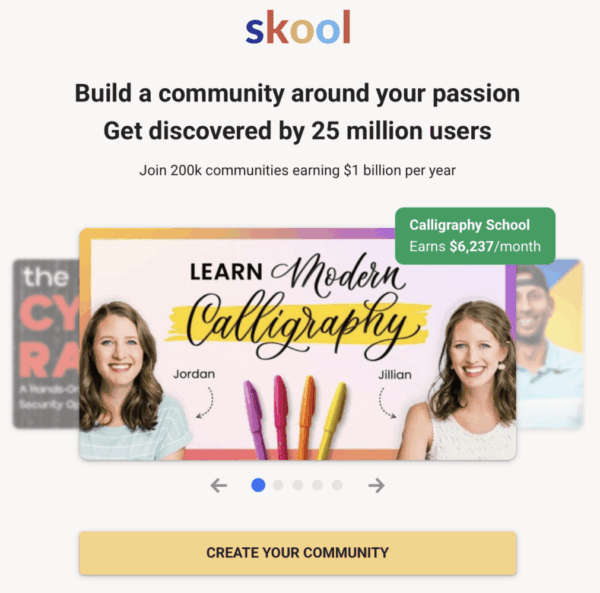
Skool was started in 2019 by Sam Ovens. He wanted to create a centralized spot where teachers and students alike could find their “community” and exchange ideas and learn..
In early 2024, the platform got a big boost when Alex Hormozi invested in it and added some gamification which breathed new life into it. This helped start the “Skool Games,” where creators compete to see who can build the best, most active groups.
Today, Skool is a mix of an online school and a private social network. It’s built to keep your members coming back every day to talk, learn, and grow. It’s taken off really well and creators are making money from it.
So is Skool the right fit for you as a creator?
Related article: Check out my full review for a similar platform Mastermind.com. Which one provides the best tools and resources for you as an online marketer?
What Type of Creator is Skool For?
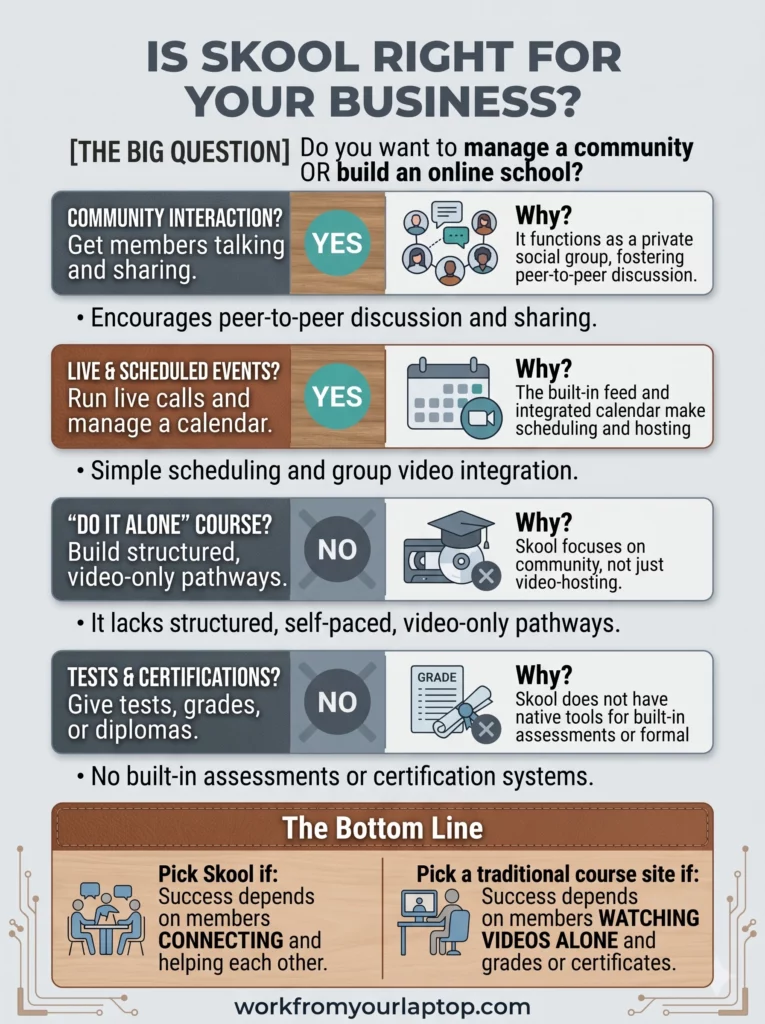
- Coaches and Mentors: If you run group coaching calls or want to mentor people, Skool is perfect. It’s easy to organize your lessons and host live calls all in one spot.
- Course Creators: If you have a course and want your students to be able to ask questions, share their progress, and help each other, Skool is much better than a static website.
- Community Builders: If you want to create a space for people with a common interest (like painting, fitness, or coding) to hang out and learn together, this is the best place to do it.
- People Tired of Social Media: If you want to move your audience away from the “noise” of Facebook or Instagram, Skool gives you a private, distraction-free “club” where you control the rules.
What Type of Creator is Skool Not For?
As a creator, Skool may not be the best fit if:
- You’re Just Starting Out (Without an Audience): If you’re building your very first course and have no followers, no email list, and no customers, then paying $99/month for a “ghost town” community is a fast way to lose money. You’re better off starting on free platforms to prove people actually want what you are selling before you commit to a monthly bill.
- You Need “White-Label” Branding: If it’s very important that your community looks exactly like your own custom website with your own colors and fonts, Skool might frustrate you. It always looks a bit like “Skool.”
- You Need Complex Sales Funnels: If you need a site that automatically sends complex email series, tracks people across different pages, or creates “order bumps” and “upsells” at checkout, Skool isn’t the right tool. You will need a separate sales software for that.
- You Need Deep Learning Tools: If you’re building a formal school that needs strict grading, fancy certificates, or complex quizzes to test students, Skool is probably too simple for you.
- You Sell Physical Products: If your main business is shipping boxes of physical products to customers, Skool is not built for that. It is designed for digital knowledge, not store inventory.
How Much Does Skool Cost For Creators?
Skool has simplified its pricing model to keep things more straightforward. They previously had a Hobby Plan at $9/month, but that has been removed. Now you’re either on the sidelines watching or you’re all in.
- The Plan: It is a flat $99/month.
- What’s Included: This gives access to all community features, course hosting, events, payments, and analytics.
- Transaction Fees: There is a processing fee of 2.9% + $0.30 per successful charge.
The “Multiple Community” Catch: It’s important to note that the $99/month price covers one community. If you want to start a second group for a different topic, or if you want a separate “VIP” group that is totally disconnected from your main one, you have to pay another $99/month for each new community you create.
There is no “unlimited” plan for power users.
Skool Features and Functionality
Skool’s design is simple on purpose. They want you to spend time with your members, not fiddling with tech.
- Community Feed: This is your private forum. There are no ads, no fake news, and no annoying algorithms. You choose what people see, and your members can talk to each other without distractions.
- Classroom: This is where your lessons live. You can upload your videos directly to Skool, so you don’t have to pay for other video hosting services anymore. This native hosting wasn’t available at first, so it’s a big win for creators.
- Gamification: This is the secret sauce that has leveled up Skool’s user experience. Members earn points by posting and helping others. You can set it up so that when they reach a certain “level,” they unlock new lessons or special rewards. This means your own community is incentivized to help answer questions so you don’t have to.
- Events Calendar: If you host live coaching calls, this feature is a lifesaver. It automatically tells your members what time the call is in their local time zone.
- Freemium Model: This is a big one. You can now create multiple tiers within a single community, offering a “free” tier for entry-level engagement while locking specific courses or chat areas behind a “paid” tier.
- No Complex Sales Pages: Skool doesn’t include a funnel builder. You don’t need to build custom sales pages, opt-in forms, or complex “order bumps.” Instead, it uses a simple, standard “Membership Page” where users see your community description and pricing, and then click to join.
My Experience: How Skool Compares to Teachable
Most creators start on Teachable because it’s the “traditional” way to sell a course. You build a library, focus on a structured lesson plan, and create a professional, “school-like” experience. Teachable has comment sections under each lesson, and many creators use these to answer student questions.
The difference, though, is these comments are “lesson-bound.” If a student has a question, they post it under that specific video. You answer, and that’s often the end of the conversation.
With Skool, the entire platform is built around the “feed.” Instead of the lesson being the center of the world, I feel like it’s the community discussion that takes center stage. If a student has a question, they post it to the main feed. And because of Skool’s gamification with leaderboards and levels, members aren’t just waiting for me to answer. They’re motivated to jump in, answer each other’s questions, and share their own tips to earn points.
Skool’s workflow is what saved lots of time:
- The Teachable Workflow: On Teachable, you’re managing a storefront. For every course you publish, you have to build a dedicated sales page, manage specific checkout settings, etc., to structure your school
- The Skool Workflow: Skool is “community-first.” You set the price once for the entire group, not for every individual course. When you add a new module or a “Set” of training videos to the Classroom, your existing members automatically gain access to it. You don’t have to build a new sales page or worry about checkout links for each new course.

Skool Testimonials
Don’t take my word for it. Here are positive and negative reviews creators working with Skool. I was able to gather from online forums such as Reddit, YouTube, and others:
✅ Skool Positive Reviews from Creators
- “I found Skool to be the ultimate tech-stack killer; dumping my Vimeo, Circle, and scheduling subscriptions saved me $150+ monthly.” — Reddit
- “Churn finally plummeted after moving here—the community feed gives members a social reason to stay subscribed.” — YouTube
- “The gamification engine is my secret moderator; members fight to earn points helping each other, so I don’t have to be in the feed 24/7.” — Reddit
- “Launching is lightning fast; I just dump modules into the Classroom and skip the funnel-builder headache entirely.” — YouTube
- “The community directory is an underrated growth hack; it’s pulling in warm leads who are already hunting for my specific niche.” — Reddit
- “The freemium model is a genius entry point; it’s so much easier to upsell people who are already active in the free community.” — Reddit
- “No more ‘what time is the call?’ emails; the automatic time-zone conversion on the events calendar was worth the price alone.” — YouTube
- “The Daily Digest is a total set-and-forget engagement tool; it drags members back to my content without me touching a newsletter.” — Reddit
- “Converting is way smoother now; the unified checkout within the community feels way less jarring than external payment links.” — YouTube
- “The app is actually fast; my members are checking in daily on mobile, which they never did on my old clunky platform.” — YouTube
❌ Skool Complaints from Creators
- “It’s annoying that I still need a separate funnel tool; Skool can’t handle my custom upsells or order bumps.” — Reddit
- “I’m genuinely concerned about being locked in; there’s no easy way to export my community’s full discussion history if I ever want to leave.” — Reddit
- “The $99 monthly fee is a brutal barrier; it’s a lot of overhead to swallow when you’re still pre-revenue.” — Reddit
- “It’s a non-starter for my coaching business; without proctored quizzes or certificates, it’s not professional enough for my certification program.” — YouTube
- “The pricing is too rigid; I’m stuck paying $99 for every single sub-group instead of having one main account with cheaper private areas.” — Reddit
- “The analytics are too basic; I’m flying blind because I can’t track student drop-off points in my videos.” — YouTube
- “Evergreen training gets buried instantly; the feed-first design makes it impossible to keep important content visible for new members.” — Reddit
- “I hate being forced into their payment processor; the transaction fees add up, and I’d rather use my own Stripe integration.” — Reddit
- “It’s way too cookie-cutter; the lack of custom CSS makes my brand look identical to every other group on the platform.” — Reddit
- “The signal-to-noise ratio is terrible at scale; my high-paying members are annoyed that the feed is flooded with basic questions from free-tier users.” — YouTube
Final Thoughts
Skool is the best choice for creators who want a “set it and forget it” community without paying for extra tools, but it isn’t for those who need complex features or have yet to find their audience.
What Do You Think? The second you arrive inside Skool is seems like it’s an established platform with staying power. I’ve seen dozens of these platforms come and go, but the gamification factor seems like the “game-changer” that keeps the community interested. As a creator, would you pay the $99/month?
Answer these 2 questions in the comments section for me:
- If you’re using Skool, has it actually helped your course completion rates?
- Are you someone who’s always wanted to create your own course, and now you see this as a much easier path than the traditional one using Teachable?
- Are there any features lacking that make joining as a creator a no-go for your business?
Drop your comment below and let’s talk about it! I love hearing your perspective and I always reply! Want to check out the student experience and what it’s like to actually learn on Skool? Click here!
Trying to make money online and still not seeing results? Create your FREE STARTER ACCOUNT with the same straightforward training I’ve used to create full time revenue online. No matter your experience, this step by step training delivers! Click here and get started NOW!
Frequently Asked Questions
Is Skool better than a Facebook Group?
For business, absolutely. Skool removes the distractions of social media, provides a structured Classroom for your content, and uses gamification to keep members active, which Facebook simply cannot match.
Is Skool worth the $99 monthly fee?
If you already have paying members, the price is a bargain because you can cancel other tools like video hosting and scheduling software. If you are just starting and have no income, it is a high cost to pay every month while you build your audience.
Is it good for formal online schools or certifications?
No. If your business needs to issue official certificates, grade quizzes, or track exactly how much of a video a student watched, Skool will not work for you because it lacks these specific professional academic features.
Want More Honest Reviews?
I search far and wide doing the research so you don’t have to! Check out these other honest reviews and see if they stack up!
- Wordform AI Review: What They Don’t Tell You About the $67 Price

- 7 Red Flags That Prove Cash Tracking System Is a Scam

- Keala Kanae’s Power Code Masterclass Review: The Free Bait Before the $29K Hook

- 7 Reasons Why Keala Kanae’s Genesis by Inspirean Is a Bad Idea – Honest Review

- 7 Figure Accelerator Review

- Mastermind.com Review: Scam or the Ultimate Knowledge Business Tool?


Great review topic for anyone exploring online business platforms. With so many tools available today, it helps to see honest opinions about whether Skool is really worth the investment. I think platforms like this can be powerful when used with the right niche and engaged community. What type of creator or business do you think benefits the most from using Skool?
Any content creator who has an audience can benefit by creating a course and hosting it on Skool. It’s an easy spot to call home for both content creator and student.
Hi Eric,
I come across so many Facebook ads regarding Skool nowadays, this actually feels like someone who’s used the platform rather than just repeating marketing talking points. The gamification angle is interesting, if it actually drives members to help each other instead of relying entirely on the creator, that alone could justify the switch from something like Facebook Groups.
And as a creator, that’s exactly what you want. Glad this helped!