Last updated on May 28, 2026 · Comprehensive breakdown, <10 min read
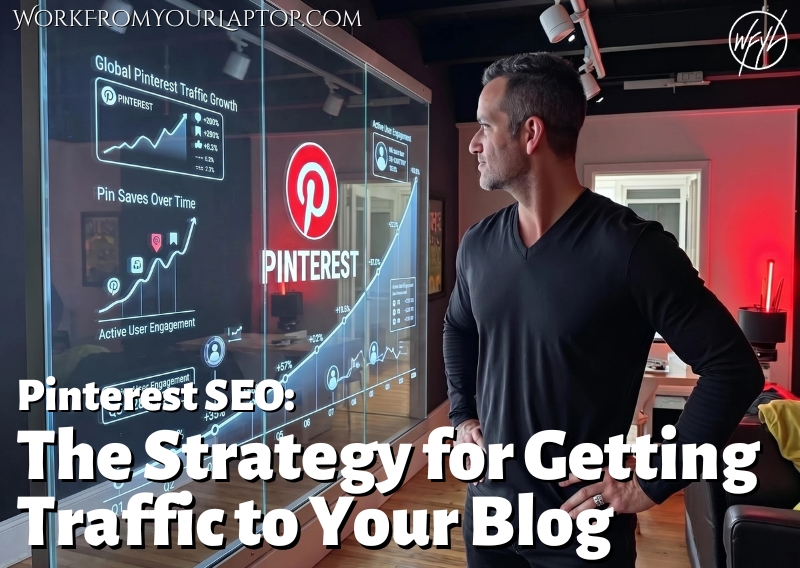
If you’re treating Pinterest like Instagram or TikTok, you’re doing it wrong. It’s time to stop acting like Pinterest is only a social media platform and start using it like it’s a search engine. If you aren’t using it to send people to your blog, you’re missing out on your best readers.
TL;DR: How Do I Use Pinterest to Drive Blog Traffic?
Pinterest drives traffic by functioning as a visual search engine. To convert viewers into website visitors, you need to create “click-bait” pins, not in the deceptive sense, but in the sense that your pin design and headline must promise a solution that the user can only fully access by clicking through to your blog post.
- Prioritize Outbound Clicks: Your primary metric is “Link Clicks,” not “Saves” or “Followers.”
- Solve, Don’t Just Show: Your pin must clearly communicate the value of the blog post.
- Bridge the Gap: Use your pin to introduce a problem and your blog post to provide the solution.
- Design for Intent: Stop making “pretty” pins; make “actionable” pins that invite a click.
- Don’t fight the algorithm: Use “scout”, “image” and “TOBI” pins to keep Pinterest happy.
What’s In This Article (Quick Jumps)
- Why Pinterest Matters for Traffic Right Now
- My Experience with Using Pinterest for Blog Traffic
- Step-by-Step Breakdown: The Core Strategy for Clicks
- Common Pinterest Mistakes & What to Avoid
- Your Next Steps In Mastering Pinterest SEO
- Final Thoughts
- Frequently Asked Questions
Why Pinterest Matters for Traffic Right Now
Pinterest is one of the most powerful, underrated traffic drivers for bloggers. Unlike social media platforms where content dies in hours, Pinterest content is evergreen. A single, well-optimized pin can drive consistent, high-intent traffic to your website for months or even years after you first post it.+1
If you ignore Pinterest, you’re missing out on a huge search engine that people use to plan, learn, and buy stuff. At its core, Pinterest is a visual discovery engine. Winning at Pinterest is much more than dominating social media. Think of it like a giant mood board where people go to save ideas.
Unlike social media apps which seem to be meant for trolling and starting arguments and scrolling through random stranger’s selfies, Pinterest is built for searching for answers.
Here are its strong points:
- It’s a Search Engine: People go to Pinterest to type in a problem or a goal, like “DIY home office ideas.” They’re looking for answers, not just entertainment.
- Long-Term Value: On social media, your post is usually forgotten in 24 hours. On Pinterest, your content acts like an asset. A pin you create today can still be found and clicked on months or even years from now.
- Higher-Quality Traffic: Because people are searching for specific ideas, when they find your pin, they’re already looking for the information you have. This makes them much more likely to click through to your website to learn more.
- Organized Discovery: Users save your content to “boards,” which act like organized file folders. This keeps your content relevant and easy to find for future users, rather than letting it get buried in a noisy feed.
In my experience Pinterest connects people looking for answers with the content you’ve made to help them. Plain and simple. It turns your website into a go-to resource that people can find, even a long time after you first posted it.
This is a perfect fit for a blogger.
My Experience with Using Pinterest for Blog Traffic
I was never a Pinterest guy. I honestly always thought it was just a social network for stay-at-home moms. I thought it was a place to look at home decor and cookie recipes. I didn’t see any real business value in it.
Then, I saw the light. I watched an expert class series on Wealthy Affiliate specifically talking about using Pinterest to drive targeted traffic to your blog. Again, at first I thought that was for people in the “home decor” or “antiquing” niches. I was 100% wrong.
That expert class series changed everything for me. I realized Pinterest isn’t really social media at all. It’s a search engine just as powerful as YouTube. When you build your boards right, not only are you keeping Pinterest happy, gaining a following there, but your driving high quality traffic to your site as well.
I learned about “scout pins,” “image pins,” and “TOBI pins.” That was my real “a-ha” moment. There’s a science to it all. And the final result is a huge boost of traffic that converts.
Step-by-Step Breakdown: The Core Pinterest Strategy for Clicks and Website Visits
The core strategy is to create “Click-Through Pins” by using keyword-optimized titles and descriptions, then designing visuals that explicitly promise a result or “how-to” answer that requires a click to access, all while creating pins that Pinterest loves and keeping the algorithm happy.
Let’s talk Pinterest strategy that works. We want to build our Pinterest following the right way, and then drive targeted traffic to our blog content.
1. The “Click-Bait” Solution Design
This isn’t the “click bait” you’re thinking of. It’s all about getting attention. Your pins and their design need to be hyper relevant. But we also don’t want to just have spammy pins all over our boards. I use Wealthy Affiliate Image Studio to create unbelievably high quality pins and they’re as simple as typing a prompt.
Now, let’s talk about the 3 different types of pins you want to use to give your boards the high value your Pinterest audience is looking for while still driving that traffic to your blog content without being spammy.
2. Understanding Scout, Image, and TOBI Pins
This is really the meat of what I want you to understand. You can’t just spam links to your blog. You need to create an ecosystem that adds value to people who love Pinterest.
Remember, Pinterest wants its user to love the platform, so don’t fight against the algorithm. Add value to your Pinterest boards the right way and the natural follow through when you’re delivering answers will be the click-throughs.
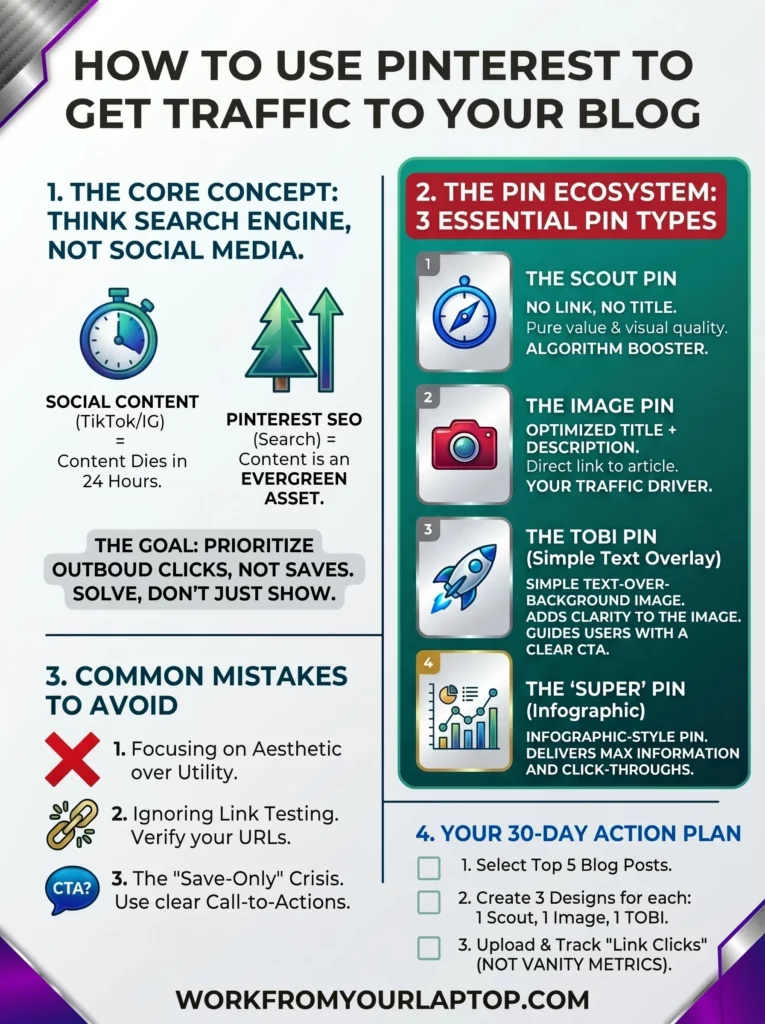
- Scout Pins: These are highly relevant, high-quality images. They don’t have an external link, a title, or a description, they just have an assigned board. Because they don’t take the user away from the app, Pinterest loves them. They keep your boards looking full and professional instead of “spammy.” Plus, they’re great for driving traffic to your boards.
- Image Pins: These are your bread and butter. They have an optimized title, a clear description, an assigned board, and a link that goes directly to your article. They’re the perfect bridge between your scout pins and your content.
- TOBI Pins (Text Over Background Image): These are the next level. They have everything an image pin has: the title, description, board, and link, but you also add simple text overlays on the image. This makes it super obvious that clicking the pin will lead to a direct answer. Personally, I like going a slightly different route and use WA Image Studio to create full infographics for my articles. It’s like TOBI pins on steroids!
- Pro Tip: Use Scout pins to fill out your boards and build authority. Then, sprinkle in your Image and TOBI pins to guide those users to your actual articles. You can have multiple iterations of your image and TOBI pins. Have fun with it!
3. The “Destination URL” Strategy
This should be self explanatory, but I want to drive this point home. Be exact with your linking.
Don’t just link to your website. Link every image and TOBI pin directly to the article that gives the direct answer to the user’s question. If you’re pinning a recipe, link it directly to the recipe article. If you are pinning a tutorial, drive that traffic directly to that specific article.
Common Pinterest Mistakes & What to Avoid
Beginners fail when they chase vanity metrics over traffic. Common mistakes include pinning for aesthetic over utility, ignoring keyword intent, failing to use clear CTAs, neglecting to check link-through analytics, and treating boards as “mood boards” instead of SEO-organized content categories.
- Ignoring Link Testing: Not making sure your pins actually go to your site.
- Solution: Periodically click your own pins. Make sure the link isn’t broken and goes to the intended page.
- Poor Mobile Optimization: Pins that look bad on phones.
- Solution: Always check your pins on your phone. Mobile is how everyone operates. Make sure the mobile experience delivers.
- The “Save-Only” Crisis: You get way too focused on pin saves, but not enough click-throughs to your content.
- Solution: Sure, saves are a good thing, it means you’re on the right track. But try adjusting your TOBI pins to have more of a CTA in the text. “Full Guide Inside!” or “Click to Read More!” can nudge your audience just enough
- Not finding balance: Having way too many TOBI pins and not enough scout pins.
- Solution: For every article you write you have at least one scout pin. This gives your boards balance. They are highly relevant images with no agenda. They get more eyes to your boards where the image and TOBI pins can do the rest of the work of getting eyes on your content.

Your Next Steps in Mastering Pinterest SEO
Now, let’s implement this strategy. Your next step is to look at your top 5 blog posts. For each article, create 3 new pin designs.
One will be a scout pin (relevant, but not overly specific to the article, broader in design), one will be an image pin (more specific to the article topic), and one will be a TOBI pin (highly specific with text overlayed on the image). Don’t stress about them being “pretty.” Focus on them being “useful.”
Once they’re ready, it’s time to put your plan into action. You’ll create and upload your pins to your boards. If you’re like me you’ll start getting addicted to the pins you’re creating and you’ll want to create more and more image pins in different styles for each article. Do it! It’s fun!
And don’t worry if every once in a while an image pin you create isn’t quite specific enough for the article you’re creating it for. Ask yourself, “Is it still relevant?” If so, make it a scout pin! Again, have fun with this!
Over time, you’ll find yourself adding high-quality, relevant pins to your boards and filling them up. This keeps Pinterest happy. Do this for a full month and take a look at how many clicks your pins are getting. All those clicks to your pins are soon to be click-throughs to your content!
Make those pin descriptions inviting! Let your audience know that the answer to what they’re looking for is right around the corner. Deliver that value!
This is the shift from just playing around on social media to actually building a business. You’re creating a roadmap for your readers by using a platform for what it’s meant for, delivering value, and using this tool to get eyes on your own content.. You’re now understanding what it means to be a professional blogger!
Check out my Pinterest boards here!
Final Thoughts
Stop trying to be an influencer and start being a search result. Create Pinterest content that delivers value to your audience, but also entices them to find more details in your content. Deliver value, keep Pinterest happy, and build your blog traffic.
What do you think? Have you been sleeping on the potential of Pinterest for your blog traffic? Do you have a Pinterest account yet? Follow mine here!
- Are you struggling with getting “saves” but no “clicks”?
- Which one of the pin types do you like creating the most?
- What’s your tool of choice for creating your pins?
Trying to make money online and still not seeing results? Create your FREE STARTER ACCOUNT with the same straightforward training I’ve used to create full time revenue online. No matter your experience, this step by step training delivers! Click here and get started NOW!
Frequently Asked Questions
Why are my pins getting saved but not clicked?
Your pin is likely providing too much information upfront. If the user feels they’ve already “gotten” the value from the image, they have no reason to click. Make your pin a “teaser” that requires a click to see the full solution.
Do I need a large following to get traffic?
No. Pinterest is a search engine. A brand-new account with zero followers can drive massive traffic if the pins are SEO-optimized for search terms that people are already actively typing into the platform.+1
What is the best type of pin for driving traffic?
The best pins are those that promise a specific result (like “5 ways to X” or “The guide to Y”). Listicles, “How-to” guides, and tutorials perform the best because they have a high-intent, problem-solving nature.
Want More Social Media Marketing Strategies?
Keep that momentum going! Check out my guides to explode your social media presence!

This was really interesting because I’ll admit I always thought of Pinterest as more of an inspiration platform and never really considered it a search engine for blog traffic. The comparison to Google and YouTube definitely made me look at it differently.
I also liked the part about focusing on clicks rather than saves, because it’s easy to get excited when you see saves and followers grow, but at the end of the day, the goal is to get people back to your content. The explanation of the different pin types was helpful, too. I had never heard of scout pins before, so that was something new for me.
As someone trying to grow a blog myself, I can relate to the challenge of creating content while also learning traffic strategies. Pinterest can feel a little overwhelming at first, but this made it seem much more approachable.
When you first started seeing results from Pinterest, how long did it take before you noticed actual traffic coming through to your blog?
The two are one and the same. Results from Pinterest ARE clicks through to the blog. ???????? I feel it’s such an important strategy that I walk every single one of my students through Jay’s 0-10K Traffic Blueprint using Pinterest. No matter your niche, no matter your website, it works. Thanks for the comment!
Honestly, I have never understood Pinterest. I don’t go there, and never have for any reason other than to see what it was about. It seems like a giant, weird, self-indulgent photo album.
You say it is a search engine, though, so will this strategy work for any site? I have a chicken-raising site with a lot of images, and an MMO site with next to no imagery. Will Pinterest work for both of them?
I was basically in the same boat when I first saw Pinterest. Like I mention at the top of the article, I thought it was for stay-at-home moms looking for ideas on like how to decorate their bathrooms, lol. But the GREAT thing about Pinterest is that it’s literally a visual search engine. So when you create your images, the people searching and finding them are wanting to now see more and go to your articles and content. With AI you can now easily create amazing imagery for any niche, (my fave AI image tool is this one) so 100% yes, Pinterest is a great tool and asset for your website! Thanks for the comment!
I’ve been trying to understand Pinterest SEO better, and your explanation made things clearer, especially the idea of treating Pinterest more like a search engine. I actually tried promoting some of my pins before, and I noticed my audience went really high while I was running ads. But after watching some training videos, I stopped promoting them, and my traffic dropped a lot. That made me wonder how much of the growth was really organic.
From your experience, which one is better in the long run, organic traffic or promoting pins? Is it worth using ads at the beginning, or is it better to focus only on SEO and consistency?
I’m trying to figure out the best approach without wasting time or money.
Pinterest allows for ad promotion starting ultra cheap like $1/day. You really can’t beat that. If that $1 brings you more clicks and conversions, it’s a no brainer. Or if you’d like to grow organically first, and then promote pins, you can do that too. It’s all about being consistent on the platform and delivering value with your pins. ???????? Thanks for the comment!