• Skip to main content
  • Home
  • Sign Up
  • Blog & Search
  • Privacy Policy
  • Affiliate Disclosure

WORK FROM YOUR LAPTOP

  • Start Here
    • Watch the Video Tutorial
    • FAQs
    • Start Your FREE TRAINING!
  • Blog
  • Meet Eric

Blogroll

Aug 19 2025

How to Write the Perfect ChatGPT-5 Prompt

how to write the perfect chatGPT 5 Prompt

Sometimes ChatGPT-5 can deliver absolute, pure gold, and other times it feels like you’re working with a stubborn teenager. The secret’s in the prompt. But don’t go thinking you *always need to craft a perfect 1000 word prompt to get the results you’re looking for.

Let me show you why.


TL;DR: How to Write a Perfect GPT-5 Prompt

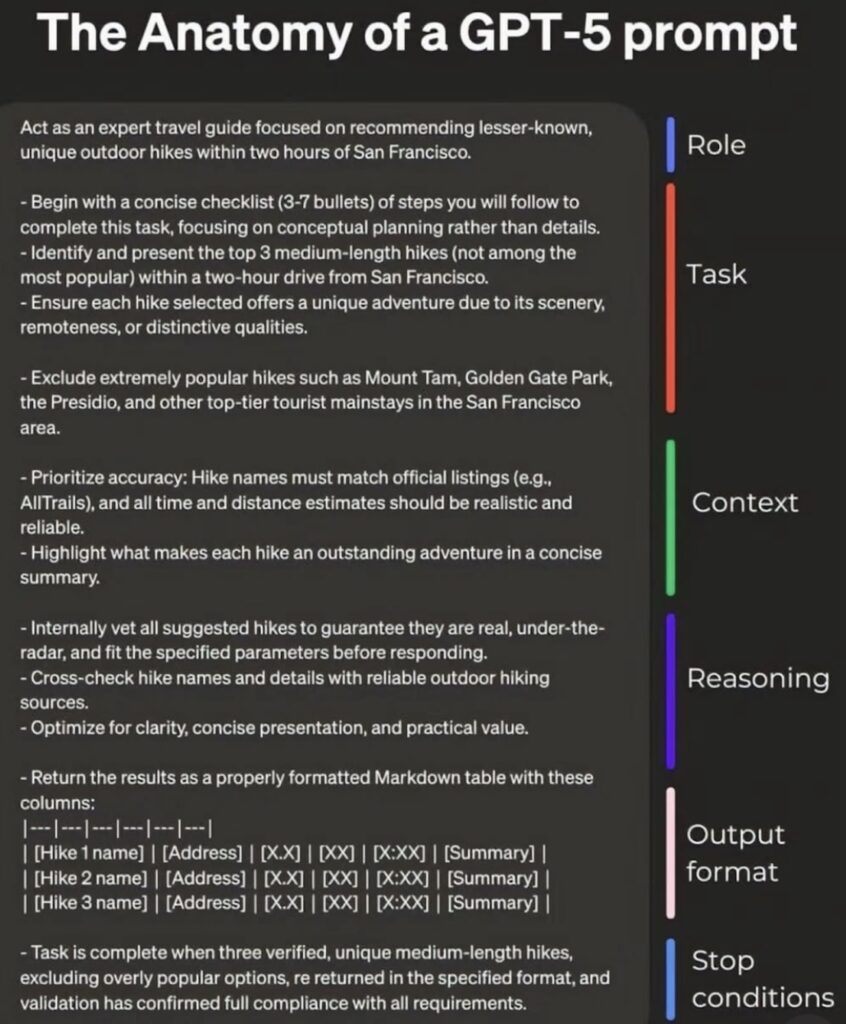
A strong GPT-5 prompt has six key parts: Role, Task, Context, Reasoning, Output Format, Stop Conditions. But you can get equally great results through a conversational approach with clarifying questions.

  • Set the role: Define who GPT-5 should act as to guide tone and expertise.
  • Clarify the task: State the exact action or output you want.
  • Give full context: Share relevant background, constraints, and examples.
  • Specify the format: Tell it exactly how the answer should be structured.
  • Consider conversation: Let GPT-5 ask clarifying questions instead of writing a massive prompt.
🔍 Have ChatGPT Summarize This Article

What’s In This Article? (Quick Jumps)

  • The Six Steps to a Perfect GPT-5 Prompt
  • How Conversational Prompting Works
  • How to Make ChatGPT-5 Ask You Clarifying Questions
  • The Step-by-Step Conversational Approach
  • When to Use Conversational Prompting vs Full Prompts
  • Final Thoughts
  • Frequently Asked Questions

The Six Steps to a Perfect GPT-5 Prompt

Prompt engineering has been a whole craze since ChatGPT came into existence. Here’s the step-by-step framework many advanced users swear by when they want consistent, high-quality results, with a little extra detail to help you nail each one.


1. Role

What it is: You tell GPT-5 who or what it should act as. This sets the tone, voice, and expertise level for the answer.
Why it matters: Without a role, GPT guesses how formal or casual to be, which can throw off the result.
Analogy: Like hiring someone for a job, you wouldn’t just say “do some work,” you’d hire a specific person with specific skills.
Example Prompt: “You are a senior travel consultant with 20 years of experience planning luxury European vacations.”
My take: GPT is an expert in all things. You don’t necessarily need to tell it “you are a website building expert” prior to asking it questions about WordPress, but this does help GPT refine its “mindset”.


2. Task

What it is: The exact action or output you want from GPT-5.
Why it matters: A vague task leaves too much room for GPT to go off-topic. The more precise you are, the more likely you’ll get exactly what you imagined.
Analogy: If you were ordering food and said, “Bring me something tasty”, this could mean anything from sushi to soup.
Example Prompt: “List five lesser-known Italian towns worth visiting, with a one-sentence cultural highlight for each.”
My take: The more specific you are, the better.


3. Context

What it is: The background information GPT needs to give you a relevant, useful answer.
Why it matters: GPT has no idea about your preferences or constraints unless you tell it. Without context, it might give generic or mismatched suggestions.
Analogy: Asking a tailor to make you a suit without telling them your measurements.
Example Prompt: “I’m planning a trip in late September. I want cool weather, fewer tourists, and day trips under two hours from Florence.”
My take: The great part about this is the more you work with GPT, it actually starts to learn your preferences. Like Arnold said, it’s a “learning computah”


4. Reasoning

What it is: Instructing GPT-5 to think through its answer before delivering it, sometimes called “chain-of-thought prompting.”
Why it matters: This reduces mistakes and helps GPT explain its logic, so you can spot errors before they cause bigger issues.
Analogy: Like showing your math work in school, the answer matters, but the process proves it’s correct.
Example Prompt: “First, share your reasoning with me for choosing these towns, then give me the final list.”
My take: This can save boatloads of headaches. When GPT explains to me how it’s going to complete a task I ask of it, I can reel it in before it goes off the rails.


5. Output Format

What it is: The exact way you want the answer presented. Maybe you want a bullet list, a table, numbered steps, a narrative, etc.
Why it matters: Saves you time reformatting and makes sure the content is ready to use right away.
Analogy: When ordering coffee, you don’t just say “coffee,” you tell the barista if you want it hot or iced, in a tall or grande cup, with almond milk or whipped cream. Same drink, but the presentation changes everything
Example Prompt: “Show the results in a table. Have columns for Town, Highlight, and Travel Time from Florence.”
My take: Again, a major time-saver saving yourself steps down the line.


6. Stop Conditions

What it is: Boundaries on how much GPT-5 should output or when it should stop.
Why it matters: Prevents overly long, rambling responses and keeps the focus on exactly what you need.
Analogy: Asking a storyteller to keep the tale to five minutes so you’re not still listening an hour later.
Example Prompt: “Stop after listing three towns and keep the total word count under 150.”
My take: Stop conditions are a must, even in regular conversations with GPT, I’ve told it many times to eliminate the fluff and just get straight to the point.


Related article: ChatGPT can absolutely level up your online business. Check out “How I Use ChatGPT for Content Creation, SEO, and Affiliate Marketing”

Now, if we plug these six steps together, your “perfect” GPT-5 prompt might look like this:

“You are a senior travel consultant with 20 years of experience planning luxury European vacations. List five lesser-known Italian towns worth visiting, with one cultural highlight for each. I’m traveling in late September, prefer cool weather, fewer tourists, and day trips under two hours from Florence. First, explain your reasoning, then give me the list in a Markdown table with columns for Town, Highlight, and Travel Time from Florence. Stop after five towns.”

Again, in my opinion, setting the role is optional. I feel it will give just as good of an answer here without that role defined, but I do think this also helps us as the user with organizing our thoughts and creating specificity with our prompt.


How Conversational Prompting Works & Why I Prefer It Over Long Prompt Engineering

Now we get to the more natural way of getting everything you want out of ChatGPT-5: conversational prompting.

Conversational prompting is exactly what it sounds like. Instead of crafting one big, perfectly structured prompt with every detail burned in, you start with a rough idea and let GPT-5 ask you the questions it needs to fill in the gaps.

Why This Works Like a Charm

GPT-5 is built to understand context and adjust its answer based on your replies. If you let it guide its own process, you still end up with the same precision as a “perfect prompt,” but you don’t have to think of every detail at the start.

This is true collaboration, which as humans we’re much more used to. You’re not just instructing the AI, you’re co-creating the final request together.

Related Article: ChatGPT is a genius assistant in so many ways. Are you using it to its fullest? Check out my full guide to using ChatGPT to get more traffic to your website.


How to Make GPT-5 Ask You Clarifying Questions

If you want GPT-5 to excel at conversational prompting, you can prime it to always clarify vague prompts before answering.

Quick Ways to Do This:

  1. In ChatGPT, go to Settings > Personalization > Custom Instructions, and add this: “Whenever I give you a vague request, ask clarifying questions before generating a response. If after generating a response you have follow up suggestions or next steps to take I’d appreciate those ideas as well.”
  2. If you don’t want it to always ask questions, just make it Step 1 to any task you’re creating: “First, ask me two clarifying questions. Then, proceed.”
  3. If it skips clarification and makes wrong assumptions, restart the chat and explicitly request clarification first.

The Step-by-Step Conversational Approach

  1. Start broad, but relevant
    • Example: “Help me plan a vacation.”
    • Don’t overcomplicate the first prompt, just make sure GPT knows the general topic.
  2. Let GPT-5 ask questions
    • It might say: “Where are you going, how long will you be there, and what’s your budget?”
    • This is where missing context gets uncovered naturally.
  3. Answer specifically
    • The clearer your answers, the better the AI can refine its follow-up questions.
  4. Watch for assumptions
    • If GPT guesses details you didn’t provide, correct them right away so the final answer stays accurate.
  5. Confirm before execution
    • Ask GPT to repeat the full clarified request back to you.
    • Example: “Okay, so you want a 7-day Italy itinerary in September, with a focus on food and culture, avoiding tourist-heavy spots?”

Example Conversation Flow

You: “Help me plan a vacation.”
GPT-5: “Where are you going, how long will you be there, and what’s your budget?”
You: “Italy, 10 days, mid-range budget.”
GPT-5: “Do you want a mix of famous sights and hidden gems, or focus on lesser-known areas?”
You: “Lesser-known.”
GPT-5: “Got it. Do you prefer city stays or small towns?”
You: “Small towns.”
GPT-5: “Perfect. Here’s a 10-day itinerary for small, lesser-known Italian towns, each with a cultural highlight and realistic travel times.”

That final result will be just as good as if you had written a fully detailed 6-step prompt, but you got there through a natural back-and-forth.


When to Use Conversational Prompting vs Full Prompts

ScenarioBest MethodWhy
You know exactly what you want, including formatFull promptFastest, most direct path to a precise answer
You’re exploring ideas or don’t have all details yetConversational promptingGPT fills in the gaps by asking targeted questions
You want speed but some flexibilityHybridStart broad, let GPT ask a few clarifying questions, then give final format
You’re teaching someone prompt craftingBothShow the structured method, then how conversation achieves the same clarity

Related article: I use AI tools every single day. Check out my full guide on Top AI Tools for Content Creation.


Final Thoughts

Six-part prompts give you precision and control. Conversational prompting gives you flexibility and speed. With ChatGPT-5, you can swap between them depending on your goal, and sometimes the best results come from blending both.

In short: Use the perfect prompt when you have all the details. Go conversational when you want to explore or collaborate.

What do you think?
Do you prefer structured prompts or free-flowing conversation with GPT-5? Share your prompting style below — and if you’ve found a hybrid that works even better, tell us about it.

Trying to make money online and still not seeing results? Create your FREE STARTER ACCOUNT with the same straightforward training I’ve used to create full time revenue online. No matter your experience, this step by step training delivers! Click here and get started NOW!


Frequently Asked Questions

1. Can conversational prompting really match a perfect prompt?
Yes — as long as GPT-5 asks targeted clarifying questions, you can guide the answer to be just as precise as a full-spec prompt.

2. How do I make GPT-5 ask clarifying questions?
Add it directly to your prompt or include it in your custom instructions so it becomes part of the model’s default behavior.

3. What if GPT-5 doesn’t ask enough questions?
Nudge it with: “Before answering, ask me three questions to make sure you understand exactly what I want.”


Want More From the World of AI and Automation Tools?


  • AI Vs Human Writers: Who Writes Better Content?

    AI Vs Human Writers: Who Writes Better Content?
  • how to write the perfect chatGPT 5 Prompt
    How to Write the Perfect ChatGPT-5 Prompt
  • How I Use ChatGPT to Get More Traffic to My Blog
    How I Use ChatGPT to Get More Traffic From My Existing Blog Posts

  • Why I Replaced Google With ChatGPT and Why You Should Too
    Why I Replaced Google With ChatGPT (And You Should Too)
  • Top AI Tools for Content Creation
    Top 10 AI Content Creation Tools in 2025: Honest Reviews from Real Users

  • How I Use ChatGPT for Content Creation and SEO
    How I Use ChatGPT to Automate Content Creation, SEO, and Affiliate Marketing

Written by Eric Cantu · Categorized: AI & Automation Tools

Aug 17 2025

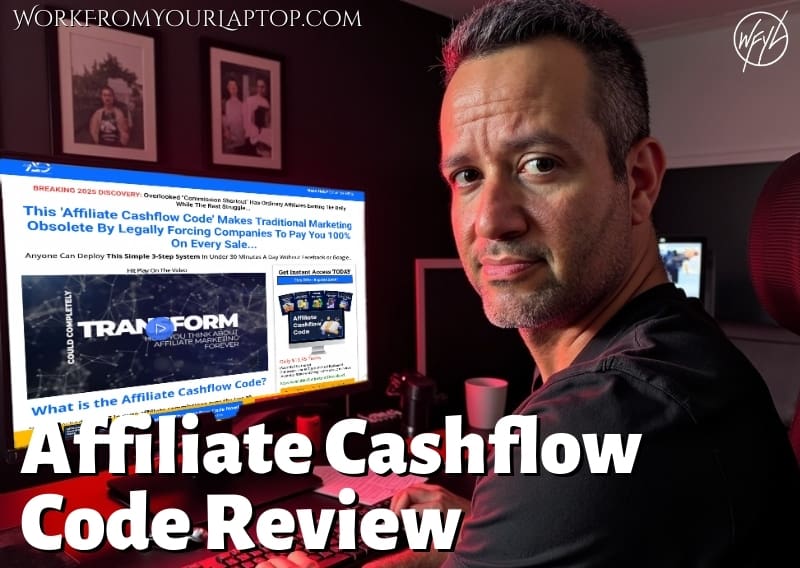
Is Adam Cherrington’s Affiliate Cashflow Code Legit?

affiliate cashflow code review

Have you seen the ads on Facebook and other social networks for “Adam’s Affiliate Journey”? This is Adam Cherrington’s latest program called Affiliate Cashflow Code. “Legally force companies to pay you 100% commissions.” “Earn $3,000 a day.” “Just three steps to financial freedom.” Let’s see just how legit this really is.

TL;DR: Is Affiliate Cashflow Code a Scam or the Real Deal?

Affiliate Cashflow Code is a low-cost affiliate marketing program that makes big income promises but lacks real evidence or transparency. It uses hype-heavy language, vague features, and aggressive upsells to attract beginners, but doesn’t offer a clear path to sustainable success.

  • Bold Income Claims: $1,000-$3000/day and 100% commissions sound great but are extremely unrealistic.
  • Cheap Entry Price: It only costs $11.95 to join, but you’re upsold quickly.
  • High-Pressure Tactics: Scarcity timers and hype-heavy language push you to buy fast.
  • No Real Testimonials: As of now, no verifiable user reviews are available online.
  • Looks Like a Rebranded Funnel: The structure feels like many recycled DFY systems.
🔍 Have ChatGPT Summarize This Article

What’s In This Article? (Quick Jumps)

  • What Is Affiliate Cashflow Code?
  • How Much Does Affiliate Cashflow Code Cost?
  • Affiliate Cashflow Code Features
  • Red Flags & Unrealistic Claims
  • Affiliate Cashflow Code Testimonials
  • Final Thoughts
  • Frequently Asked Questions

What Is Affiliate Cashflow Code?

Website: affiliatecashflowcode.com

affiliate cashflow code review ad

Affiliate Cashflow Code (seen in social media ads as “Adam’s Affiliate Journey” is a low-ticket affiliate marketing system that promises to help you “legally force companies to pay you 100% commissions” using a 3-step setup you can supposedly run in just 30 minutes a day.

But here’s the kicker: this system appears to be part of a larger funnel created by Adam Cherrington, a marketer known for programs like Adam’s Method, The Cherrington Experience, and the Invisible Affiliate System. His offers typically start with a low-cost product and lead into much more expensive mentorships and advanced coaching packages.

From the marketing style to the structure of the offer, Affiliate Cashflow Code fits that same pattern, making it highly likely this is just the first step in a bigger, higher-ticket upsell system.


How Much Does Affiliate Cashflow Code Cost?

The entry fee is just $11.95 which is a very low and affordable entry point.

However, right away you’re hit with a series of upsells. Some promise better training, more tools, or full access to the “secret traffic methods.”

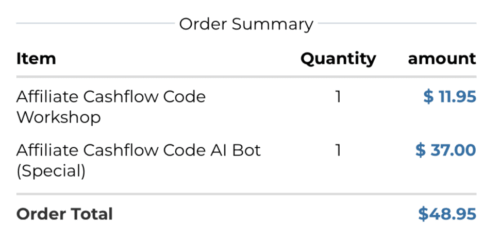
Before I could even enter my payment info I was already being hit with a more than 400% upsell.

affiliate cashflow code review upsell

What happened to $11.95? And it’s already in your cart, by the way, with no explanation of what it is yet. You have to click to remove it.

In most cases, these types of funnels are structured to:

  • Offer a cheap front-end to remove buyer hesitation
  • Lead into higher-ticket upsells ranging from $27 to $997+
  • Use scarcity and urgency timers to increase conversions

So while $11.95 seems like a no-brainer, all the marketing within the website and checkout is all working hard to get you to spend much more.


Affiliate Cashflow Code Features

Affiliate Cashflow Code promises:

  • 100% Commissions on certain affiliate products
  • Done-for-you landing pages to start driving traffic instantly
  • “Secret traffic sources” that supposedly generate leads effortlessly
  • Copy/paste income system needing “just 30 minutes per day”
  • Bonus Toolkits including templates, email swipes, and more
  • Quick-start dashboard with beginner-friendly navigation

In my experience, having reviewed literally hundreds of platforms like this, your spidey-sense should always start going off when you read that anything is “done for you”.

There is no such thing as a “done for you business”. Period. And the “copy and paste systems” are never that easy. That’s just not how business is built, but your gut was already telling you that, right? Just understand that right out of the gate these are major red flags.

Related article: Check out my full guide on Online Business Coaching Scams and be quick to spot them and not be fooled!


Red Flags & Unrealistic Claims

Let’s take a look at these promises systematically and logically.

  • “Legally force companies to pay you 100% commissions”: This is a flashy hook, but it’s not how affiliate marketing works. Affiliate programs will offer you a percentage of the sale as a commission, but If a company offers 100% commissions, it’s often because they plan to profit off the backend somehow. Meaning you’re likely just a lead generator for upsells or coaching services.
  • “Earn $3,000/day”: These numbers are dropped casually with no case studies or evidence. Claims like this are built for emotional pull, not realistic expectations. A million dollar business built on copy and paste and done for you? Doubtful.
  • Done-for-you systems are never really ‘done for you’: You might get templates or pre-built pages, but without understanding how to drive quality traffic, how to split test, and how to engage your audience, these tools are hollow. Plus, if hundreds of people are using the exact same templates, this means your funnel is anything but unique.
  • “Secret traffic sources”: This phrase is often code for outdated solo ad lists, irrelevant social media tactics, or vague paid traffic methods. If there really were secret, high-converting traffic sources, they wouldn’t be bundled in a $12 offer.
  • “Full proof paid ads”: This system teaches paid advertising right out of the gates. Paid ads are never a smart move for beginners, especially when there’s little guidance on ad setup, targeting, or budget management. These ads can quickly become a money pit where you’re paying for clicks that aren’t converting.
  • “Only 30 minutes per day needed”: The idea that you can run a business passively in under an hour a day is total fantasy. To be successful with affiliate marketing you have to put in the time. This means studying how to choose a profitable niche, learning copywriting, content creation, etc.. There’s no way around the effort.

All of this stacks up to a classic get-rich-quick scheme: lots of hype, very little substance.


Affiliate Cashflow Code Testimonials

I always try to include authentic user feedback in my reviews, but for AffiliateCashflowCode.com, no verifiable testimonials or case studies were found. I searched Reddit, Quora, YouTube, and all online forums. Nothing.

I’m not psychic, but when the testimonials do start popping up, I see a pattern forming…“not satisfied. overhyped, get-rich-quick…”


Final Thoughts

Affiliate Cashflow Code feels more like a marketing trap than a legitimate business model. While it’s cheap to enter, the value just isn’t there.

What do you think? Have you tried Affiliate Cashflow Code or seen it advertised under another name? Drop your thoughts in the comments below, I want to hear your take!

Trying to make money online and still not seeing results? Create your FREE STARTER ACCOUNT with the same straightforward training I’ve used to create full time revenue online. No matter your experience, this step by step training delivers! Click here and get started NOW!


Frequently Asked Questions

Is Affiliate Cashflow Code a scam?
Not necessarily, but it uses high-pressure tactics and overpromises. There’s no solid proof that users are making real income.

Does Affiliate Cashflow Code actually help you earn $3,000 per day?
Highly doubtful. These claims are unverified and overly exaggerated. Sustainable affiliate marketing takes consistent effort and strategy, not copy and paste shortcuts.

Is Affiliate Cashflow Code really just $11.95?
The entry point cost is $11.95, but be prepared for multiple high-ticket upsells if you want full access to the complete training and tools.


Want More Honest Reviews?

  • Wordform AI review
    Wordform AI Review: What They Don’t Tell You About the $67 Price
  • Cash Tracking System Scam Review
    7 Red Flags That Prove Cash Tracking System Is a Scam
  • Keala Kanae Power Code Masterclass review scam
    Keala Kanae’s Power Code Masterclass Review: The Free Bait Before the $29K Hook
  • Genesis by Inspirean Keala Kanae Scam or Legit Review
    7 Reasons Why Keala Kanae’s Genesis by Inspirean Is a Bad Idea – Honest Review
  • 7 figure accelerator review
    7 Figure Accelerator Review
  • Mastermind.com Review
    Mastermind.com Review: Scam or the Ultimate Knowledge Business Tool?

Written by Eric Cantu · Categorized: Reviews & Comparisons

Aug 11 2025

Build Your First Email List from Zero, Step-by-Step

Building your first email list

Email lists are one of the most reliable ways to connect directly with your audience and have them stick with you long past the honeymoon phase of finding your website. If you’re still relying only on social media or search traffic to connect, you’re leaving money and relationships on the table.


TL;DR: How To Build an Email List Step by Step

To build an email list, pick an ESP (email service provider), offer a high-converting lead magnet, collect sign-ups with landing pages and opt-in forms, then automate, segment, and follow compliance rules.

  • Pick the right ESP – Choose an email platform with automation, integrations, and a price that works as your list grows.
  • Create a strong lead magnet – Offer a resource so valuable your audience wants it immediately.
  • Use landing pages and opt-ins – Keep them simple and clear so it’s easy to subscribe.
  • Automate your welcome sequence – Pre-written emails that build trust and guide new subscribers.
  • Segment and stay compliant – Send relevant content to the right people and follow GDPR/FTC guidelines.
🔍 Have ChatGPT Summarize This Article

What’s In This Article? (Quick Jumps)

  • Step 1 – Choose Your Email Service Provider
  • Step 2 – Create a Lead Magnet
  • Step 3 – Build Your Landing Page
  • Step 4 – Add Opt-In Forms to Your Blog
  • Step 5 – Set Up Email Automation Sequences
  • Step 6 – Segment Your Email List
  • Step 7 – Stay GDPR & FTC Compliant
  • Final Thoughts
  • Frequently Asked Questions

Step 1 – Choose Your Email Service Provider

Your ESP is where your subscribers live, how you send emails, and where you control automations. For beginners, good options are Mailerlite, ConvertKit, and AWeber. They’re beginner-friendly, integrate with blogging platforms, and have enough automation to grow with you.

Pick one, set it up, and move forward. You can always switch later if you outgrow it.

Related article: Check out my AWeber review here. It’s my first ESP and has a free option that’s great for beginners getting started.


Step 2 – Create a Lead Magnet

The key to any successful email newsletter is the lead magnet.

This is the offer that gets people to hand over their email. Most bloggers will say something like “Check out my free PDF checklist on how to create a successful blog!” or something to that affect and have the reader enter their email to get it emailed to them.

This allows you to add that user to your email list and you’ll be able to deliver value to them (and offers) via an email sequence that drips out to them. Keep the lead magnet small enough to use quickly but valuable enough to feel like a win.

Examples:

  • PDF checklist
  • Mini email course
  • Exclusive discount
  • Template or swipe file

Match your lead magnet to the topic of your blog so you’re attracting the right people from the start.


Step 3 – Build Your Landing Page

Your landing page is your conversion machine. This is not just a place to “sign up”, it’s the page that convinces someone to say yes.

What makes a landing page convert:

  1. A benefit-driven headline – Lead with the biggest transformation your lead magnet delivers. Instead of “Free PDF Guide,” go with “Get Your Free 7-Day Meal Plan to Save Time and Eat Healthier.”
  2. A visual element – Even if your freebie is digital, use a mock up or a clean eBook or worksheet cover. People connect better to something they can picture.
  3. Short, persuasive copy – Keep it tight. Think short, right to the point paragraphs, explaining what the lead magnet is, who it’s for, and why it’s valuable.
  4. A single, clear call-to-action – Your page should have one job: collect an email. No extra menu links, no “read my latest posts” distractions.

Pro tip: If you can add a testimonial or quick stat (“Over 1,000 people have downloaded this”), it instantly boosts credibility.


Step 4 – Add Opt-In Forms to Your Blog

Your landing page does the heavy lifting, but opt-in forms placed throughout your site help you catch people in the moment.

Best placements:

  • Sidebar widget – Good for desktop readers who are scrolling slowly.
  • End of blog posts – Perfect for catching readers who just finished your content and want more.
  • In-line forms – Small forms embedded in the middle of relevant posts.
  • Exit-intent pop-ups – Triggered when a reader is about to leave your site.

Step 5 – Set Up Email Automation Sequences

Email automation sequences are where your email list starts building real value for you. They work while you sleep, and they ensure every new subscriber gets the same polished experience.

Your starter welcome sequence might look like this:

  • Email 1 (Instant) – Deliver the lead magnet, thank them for signing up, and set the tone for your emails.
  • Email 2 (Day 2 or 3) – Share your story or mission. People like knowing who they’re hearing from.
  • Email 3 (Day 5) – Offer a quick tip or resource that solves a small, specific problem.
  • Email 4 (Day 7) – Introduce a relevant product or service. Keep it natural — you’re offering something that fits their needs, not hard selling.

Why this works:
It builds trust before you ever make an offer, and it keeps your name in their inbox while you’re still fresh in their mind.


Step 6 – Segment Your Email List

Email segmentation lets you talk to the right people with the right message. Instead of blasting one generic email to everyone, you create smaller groups based on their interests and actions.

Ways to segment:

  • Lead magnet – The topic they signed up for tells you what they care about most.
  • Click activity – If they clicked on an affiliate link for “Beginner Photography Gear,” you know they’re interested in that product type.
  • Engagement level – Send re-engagement emails to people who haven’t opened in 60 days, and VIP offers to those who click everything.

Segmenting improves open rates, click-through rates, and even your deliverability, because engaged subscribers help your sender reputation.


Step 7 – Stay GDPR & FTC Compliant

Compliance might not be exciting, but it protects you and builds trust.

  • GDPR – For EU subscribers, you must get explicit consent, allow easy unsubscribes, and collect only the data you need (usually just name and email). What is GDPR?
  • FTC – If you promote affiliate products, disclose it in your emails. A short line like “This email contains affiliate links. If you buy, I may earn a commission at no extra cost to you” is usually all you need.

Never buy email lists. Not only is it against the law in many places, it damages your sender reputation and gets you marked as spam fast.


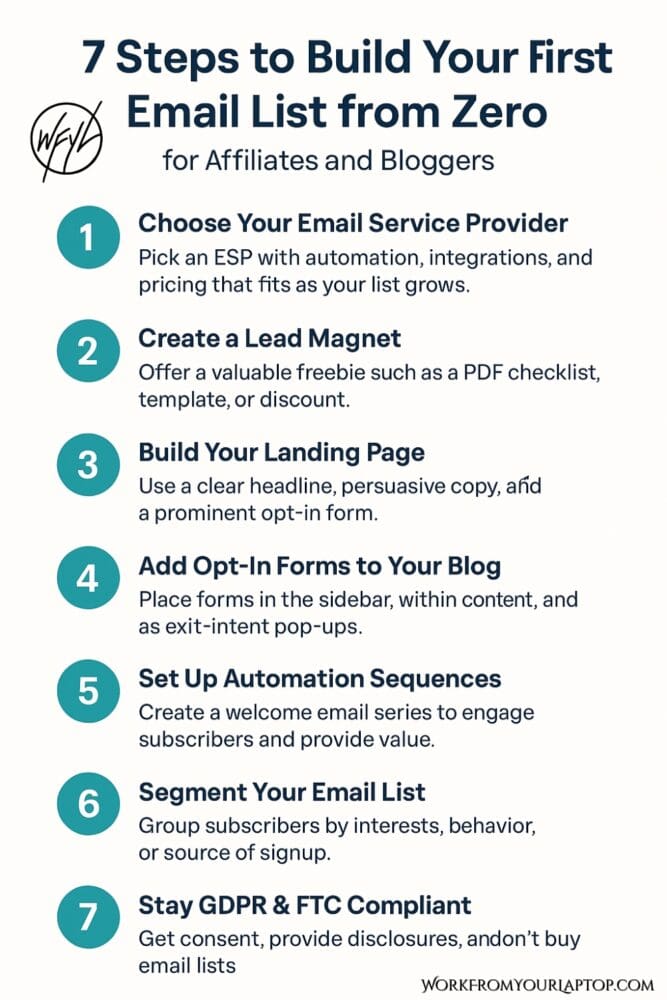
Save this graphic so you’ve got a quick reference anytime you’re working on your email list. Keep it handy and you’ll always know your next step.

how to build an email list step by step graphic

Final Thoughts

Building an email list from scratch means picking the right platform, offering a strong lead magnet, creating focused sign-up points, automating a welcome sequence, segmenting for relevance, and staying compliant from the start.

What do you think? Are you just getting started or looking to grow what you already have? Share your biggest email list challenge below! Your insight might help another reader, and I’m always looking to hear from you and your perspective!

Trying to make money online and still not seeing results? Create your FREE STARTER ACCOUNT with the same straightforward training I’ve used to create full time revenue online. No matter your experience, this step by step training delivers! Click here and get started NOW!


Frequently Asked Questions

How often should I send emails to my list?
Once a week is a good starting point. It keeps you present without overwhelming your subscribers.

What’s the best lead magnet for affiliates and bloggers?
Short, actionable resources like checklists, templates, and mini-courses. They’re quick to consume and deliver an immediate benefit.

How can I increase my email list conversion rates?
Use lead magnets that solve a pressing problem, place opt-ins strategically throughout your site, and test different headlines and calls-to-action to see what converts best.

Want to Deep Dive Further Into Email & List Building?

  • email automation sequence that converts
    How to Set Up an Email Automation Sequence That Actually Converts
  • How to start a newsletter that works
    How to Start a Newsletter That Works: Easy Tips for Beginners
  • email segmentation 101
    Email Segmentation 101 – Avoid Spam and Boost Conversions
  • creating high converting lead magnets
    Creating High-Converting Lead Magnets
  • Building your first email list
    Build Your First Email List from Zero, Step-by-Step
  • How hard is email marketing as a side hustle
    How Hard is Email Marketing as a Side Hustle?

Written by Eric Cantu · Categorized: Essential Reads, Email & List Building

Aug 07 2025

Surfer SEO Review: Does It Really Help You Rank Faster?

Surfer SEO Review

I gave Surfer SEO a full test drive to see how it stacks up and whether it’s really worth your money. Let’s see if it really is the ultimate on-page optimization tool that it claims to be, or just another high-promising dud.


TL;DR: Is Surfer SEO Good and Worth the Money?

Yes, Surfer SEO is worth it for content-focused marketers. It improves rankings with real-time optimization and keyword guidance, though it’s best used with human editing and strategy.

  • Real-time Optimization: Live scoring and keyword suggestions as you write.
  • Feature-Packed Platform: Includes a SERP analyzer, content audits, and AI writer.
  • Great for Agencies and Bloggers: Scales well for different content teams.
  • Over-Optimization Risk: Blindly following suggestions can harm content quality.
  • On the Pricey Side: Higher tiers may feel steep for freelancers.
🔍 Have ChatGPT Summarize This Article

What’s In This Article? (Quick Jumps)

  • What Is Surfer SEO?
  • Key Features of Surfer SEO
  • Surfer SEO Pricing Plans
  • My Experience Using Surfer SEO
  • Surfer SEO Testimonials: The Good and the Bad
  • Final Thoughts
  • Frequently Asked Questions

What Is Surfer SEO?

Website: surferseo.com

Surfer SEO aims to make the sometimes complicated and confusing world of SEO (Search Engine Optimization) more data-driven and straightforward. Instead of guessing which keywords to use or how many times to include them, Surfer analyzes the top-ranking pages and gives you a checklist to follow, all in real-time.

It’s a good fit for content creators who want more control over their SEO strategy without getting flooded with analytics.


Related article: Are you prepping your content with AI searches in mind? Are you familiar with GEO? Generative Engine Optimization doesn’t replace SEO, it goes hand in hand with it and you don’t adapt you’ll quickly be left behind!


Key Features of Surfer SEO

  • Content Editor: Real-time SEO scoring and suggestions using 500+ ranking factors including keyword density, headings, structure, and NLP.
  • Keyword Research: Built-in research and clustering with search volume and difficulty.
  • Topical Map (Content Planner): Auto-generates content clusters and topic outlines.
  • SERP Analyzer: Deep comparison with top-ranking pages for keyword usage, structure, and authority.
  • Content Audit: Evaluates existing pages and gives data-driven tips to boost rankings.
  • Surfer AI: One-click article generation using NLP and SERP analysis, includes AI Tracker and optimization tools.
  • Integrations: Works with Jasper, WordPress, Google Docs, SEMrush, and more.
  • Keyword Surfer Extension: Free Chrome extension with search volumes and on-page data.
  • Rank Tracker & Alerts: Notifies you of rank drops and performance issues.

Surfer SEO Pricing Plans

As of 2025, Surfer SEO offers three primary plans:

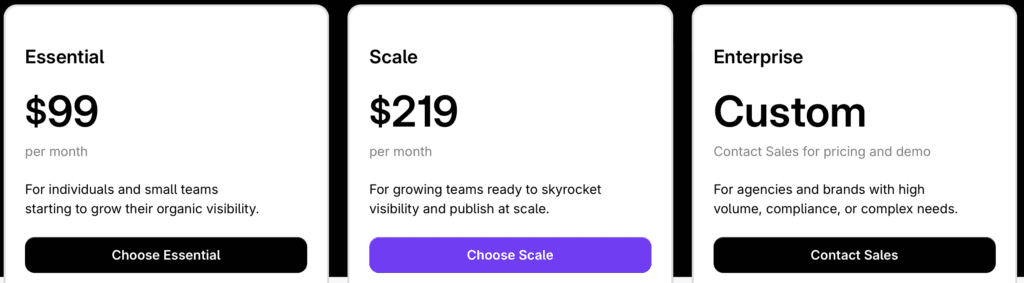
  • Essential: $99/month ($79/month billed annually) – 30 articles/month, 200 pages tracked, 5 AI articles, 5 team members.
  • Scale: $219/month ($175/month billed annually) – 100 articles/month, 1,000 pages tracked, 20 AI articles, 10 team members, onboarding support.
  • Enterprise: Custom pricing – White-labeling, SSO, API access, dedicated account manager, advanced usage.
surfer seo review pricing

Is there a free version of Surfer SEO? No, but you can either use their 7-day free trial (which includes 5 credits each for Content Editor and Keyword Research, plus other tools) or use their 7-day money-back guarantee if you subscribe and decide it’s not for you

Surfer AI credits are included in each plan, and extra articles can be purchased if needed.


My Experience Using Surfer SEO

I signed up for Surfer SEO because I had heard good things and I’m always wanting to streamline my content creation process. So many content creators struggle with content that ranks inconsistently, and with the world of keyword research completely changing, I wanted to see how Surfer stacked up..

I jumped straight into the Content Editor and was immediately impressed. Watching the score climb as I made real-time tweaks to phrasing, length, and keyword placement is a really nice touch.

However, I quickly realized that following every suggestion robotically made my writing feel unnatural. This is something to always be wary of with AI tools. I had to learn to balance SEO guidance with human readability.

That said, the keyword clustering and SERP Analyzer saved me hours. It’s a nice, efficient tool.

Would I use it again? Yes, but I’d use the AI and scoring as a guide, not gospel.


Surfer SEO Testimonials: The Good and the Bad

Don’t just take my word for it. These reviews were collected from platforms like Trustpilot, Reddit, G2, and SEO blogs. Always take the positive and negative with a grain of salt as we never know the intentions of the reviewers, but I think I grabbed a fair sample of what’s out there.

Overall Trustpilot score: 4.5

surfer seo review trustpilot score

✅ Surfer SEO Positive Reviews

  • “Content Editor with live optimization is super helpful!” – from Trustpilot
  • “Surfer AI is fast, efficient, and surprisingly accurate.” – from Trustpilot
  • “It skyrocketed my page views.” – from Trustpilot
  • “Intuitive interface, powerful tools.” – from Trustpilot
  • “Game-changer for SEO workflow.” – from Trustpilot
  • “Huge time-saver for content research.” – from Mavlers
  • “One of the few SEO tools that’s enjoyable to use.” – from G2
  • “Even beginners can jump right in.” – from Mavlers
  • “Excellent support and topic clustering.” – from SearchEndurance
  • “Saves tons of time and boosts accuracy.” – from SEOptimer

❌ Surfer SEO Complaints

  • “Blindly following suggestions can ruin your content.” – from Reddit
  • “The scoring system can feel gimmicky.” – from BayTechConsulting
  • “Too expensive for freelancers.” – from G2
  • “Can lead to keyword stuffing.” – from Mavlers
  • “SERP Analyzer UI feels cluttered.” – from SearchEndurance
  • “Missing technical SEO and backlinks.” – from DemandSage
  • “Overwhelming for beginners.” – from DemandSage
  • “Sometimes factually incorrect suggestions.” – from SEOptimer
  • “Limited Domain Planner features.” – from SearchEndurance
  • “AI-first design might backfire with future updates.” – from ExplodingTopics

Trying to make money online and still not seeing results? Create your FREE STARTER ACCOUNT with the same straightforward training I’ve used to create full time revenue online. No matter your experience, this step by step training delivers! Click here and get started NOW!


Final Thoughts

Surfer SEO is a smart investment for content creators who want to rank faster using data. It’s not perfect, but its tools deliver real SEO impact when used strategically.

What do you think? Have you tried Surfer SEO? Did it help your rankings or leave you frustrated? Share your experience in the comments! I love hearing your perspective and I always respond.


Frequently Asked Questions

Is Surfer SEO good for beginners?
Yes, but expect a bit of a learning curve. Surfer’s interface is user-friendly, and the Content Editor offers guided optimization that even beginners can follow. That said, having a basic understanding of SEO principles (like keyword intent and on-page structure) will help you get the most out of it.

Can Surfer SEO guarantee top rankings?
No SEO tool can make that promise, and if one says it can, run. But what Surfer can do is give your content a serious edge by helping you optimize in ways that align with what Google is already ranking. When combined with strong content and consistency, it can definitely improve your results.

Does Surfer SEO work with WordPress?
Yes! Surfer integrates seamlessly with WordPress via a plugin, and it also works with Google Docs using their Chrome extension. This makes it super easy to write, optimize, and publish your content without constantly switching tabs or tools.


Want More Honest Reviews?

  • Wordform AI review
    Wordform AI Review: What They Don’t Tell You About the $67 Price
  • Cash Tracking System Scam Review
    7 Red Flags That Prove Cash Tracking System Is a Scam
  • Keala Kanae Power Code Masterclass review scam
    Keala Kanae’s Power Code Masterclass Review: The Free Bait Before the $29K Hook
  • Genesis by Inspirean Keala Kanae Scam or Legit Review
    7 Reasons Why Keala Kanae’s Genesis by Inspirean Is a Bad Idea – Honest Review
  • 7 figure accelerator review
    7 Figure Accelerator Review
  • Mastermind.com Review
    Mastermind.com Review: Scam or the Ultimate Knowledge Business Tool?

Written by Eric Cantu · Categorized: Reviews & Comparisons

Aug 03 2025

Generative Engine Optimization (GEO): How to Optimize for AI‑Driven Search

What is Generative Engine Optimization GEO

AI is changing how people find your content, and if you’re still optimizing just for Google, you’re already behind. It’s time to not only write for SEO, but for GEO too.

TL;DR: What is Generative Engine Optimization (GEO)?

Generative Engine Optimization (GEO) is how you structure your content to be easily understood, cited, and summarized by AI tools like ChatGPT, Perplexity, and Google’s Search Generative Experience.

  • GEO is SEO for AI tools like ChatGPT, Perplexity, and Google SGE. If you want your content cited by AI, you have to write for AI comprehension.
  • Use natural language and clear structure. AI tools prefer content that’s easy to break into chunks and summarize.
  • Topical authority is your secret weapon. Build strong internal linking and cover related topics deeply to be considered a source of truth.
  • Structured data is no longer optional. Schema markup helps AI understand your content and quote it correctly.
  • Don’t ditch SEO, just evolve it. GEO builds on SEO principles and expands them to work with how large language models retrieve answers.
🔍 Have ChatGPT Summarize This Article

What’s In This Article? Quick Jumps

  • What Is GEO and Why Should You Care?
  • How Is GEO Different from SEO?
  • The Rise of AI-Driven Search Tools
  • How to Make Your Content GEO-Optimized
  • Why Context, Authority, and Structure Now Matter More Than Ever
  • The Tools I Use to Stay Ahead of AI Search
  • Final Thoughts
  • Frequently Asked Questions

What Is Generative Engine Optimization, and Why Should You Care?

GEO (Generative Engine Optimization) is the process of optimizing your content to rank in AI-driven search results like those found in ChatGPT, Perplexity, and Google’s Search Generative Experience (SGE).

As bloggers we have to constantly adapt. The truth of our reality is that It’s no longer just about blue links on Google, it’s about becoming the source that AI tools pull from and recommend.

And if your blog content isn’t structured with that in mind, you’re missing a huge opportunity to future-proof your traffic.


How Is GEO Different from SEO?

Let’s clear this up right now: GEO doesn’t replace SEO, it builds on it.

Where traditional SEO focuses on getting your page to rank in Google’s ten blue links, GEO is about making your content the kind AI tools like ChatGPT and Perplexity want to quote, summarize, or link to directly.

GEO takes into account how LLMs (Large Language Models) are trained, how they ingest content, and what they need in order to trust your site as a credible source. That means things like:

  • Semantic clarity
  • Concise and scannable structure
  • Reinforcement of your authority across a niche

It’s SEO with a new lens. If you’re not thinking about how AI models see and summarize your site, you run the risk of becoming invisible to a growing segment of online searchers. Personally, I think it’s important enough that I add an actual button to trigger ChatGPT to summarize my article. Try it above and see what I mean.


The Rise of AI-Driven Search Tools

We’re already seeing a major shift. Tools like:

  • Perplexity.ai – citing sources in real-time, similar to a research assistant
  • Google SGE – pulling summaries and displaying answers above traditional search results
  • ChatGPT with Browsing – scanning live content and citing pages for up-to-date info

These platforms don’t care about keyword stuffing or backlink count. They care about clarity, expertise, and context. If you nail those three things, you start becoming the answer — not just a search result.

Related post: Check out my article “Why I Replaced Google With ChatGPT” and see why I’m done sifting through links when I need answers!


How to Make Your Content GEO‑Optimized

Alright, here’s where we shift gears from theory to application. Want your blog posts to rank in AI answers? Here’s what works:

1. Structure like you’re writing a study guide

Use clear H2 and H3 headers, short paragraphs, and bold takeaways. AI tools scan top-down, so content that’s easy to chunk and summarize wins. Check out my article “Tips for Writing Engaging Blog Posts” for my personal tips on not just grabbing your reader’s attention, but AI as well.

2. Start with topical authority

Cover your niche thoroughly. For example, if you’re writing about affiliate marketing, don’t just create one overview. Write about tools, strategies, platforms, use cases, trends, etc. This tells AI you’re not just relevant, but you’re a reliable authority.

3. Include actual answers, not just keywords

Instead of padding content with fluff, get to the point. Answer questions clearly and early. Think featured snippet style. Always be thinking of which sections in your post AI could potentially pull from and how these would look and fit in the SERPS.

4. Schema, schema, schema

Use FAQ schema, Article schema, Product schema, anything that helps AI understand the type and purpose of your content. I include custom JSON-LD in every post here on Work From Your Laptop and it’s made a huge difference in my visibility.

5. Link smartly

AI tools use context from your site structure to determine expertise. Internal links between related topics help reinforce your authority and improve crawlability. This applies to AI crawlers just as much as search engines.


Why Context, Authority, and Structure Matter More Than Ever

The shift from keyword-first to context-first is already here.

You’re no longer competing just on who can rank for “best affiliate program.” You’re competing on who explains it the best, most clearly, and most consistently across multiple posts.

Google is already using generative summaries in their SERPs. Perplexity is rewarding domain expertise over content farms. ChatGPT cites sources that it can easily quote and digest.

This is why GEO matters. It rewards clarity, consistency, and usefulness, not just clever SEO tricks.


The Tools I Use to Stay Ahead of AI Search

Want to set your site up for GEO success? Here’s what’s in my toolkit:

  • ChatGPT-4o – for real-time content audits, structuring, and simplifying language. I use this literally every day, for hours each day.
  • Google Search Console – to identify content gaps and fine tune existing posts. I use this hand in hand with GPT all the time.
  • SurferSEO – solid tool for balancing traditional SEO with new optimization styles. Check out my full SurferSEO review here.
  • Schema Markup Validator – to test the code I embed in each post. You simply enter the url of your article and it double checks that your code is correct. Try it here.
  • WordPress with custom HTML blocks – for inserting my JSON-LD schema manually. The block editor is built for this stuff, and the Custom HTML block is a lifesaver.

I’m not affiliated with these tools, they’re just what I use personally. And if you want help setting this all up, hit me up inside Wealthy Affiliate, where I coach people through this entire process step by step.

Trying to make money online and still not seeing results? Create your FREE STARTER ACCOUNT with the same straightforward training I’ve used to create full time revenue online. No matter your experience, this step by step training delivers! Click here and get started NOW!


Final Thoughts

GEO is already shaping how people discover your content online. If you’re still optimizing like it’s 2015, you’re going to get left behind. Write for humans first, structure for AI second, and stay consistent with your topical coverage.

What Do You Think? Have you started optimizing for AI-driven search yet? Are you seeing more traffic from Perplexity, ChatGPT, or SGE?

Drop your thoughts in the comments or hit me up directly. And if you want more walk-throughs like this, don’t forget to subscribe to WFYL on YouTube. I break topics like this down with easy to follow screen shares and tutorials with you looking right over my shoulder as I work.


Frequently Asked Questions

What is Generative Engine Optimization?
Generative Engine Optimization (GEO) is the process of optimizing your content so it’s easily understood and cited by AI tools like ChatGPT, Perplexity, and Google SGE. It builds on SEO but focuses on structure, clarity, and authority for AI models.

How is GEO different from SEO?
SEO focuses on traditional search engine ranking, while GEO is about making your content the kind that AI pulls from directly in summaries and chat responses. Both work together, but GEO is more tailored for the way LLMs process and reference data.

Do I still need backlinks for GEO to work?
Backlinks still help for SEO, but they matter less in GEO. What matters more is whether your content is clear, consistent, and part of a broader network of helpful, related posts. AI tools care about structure and authority more than raw link juice.


Want More AI Related Content Like This?

  • AI Vs Human Writers: Who Writes Better Content?
    AI Vs Human Writers: Who Writes Better Content?
  • how to write the perfect chatGPT 5 Prompt
    How to Write the Perfect ChatGPT-5 Prompt
  • How I Use ChatGPT to Get More Traffic to My Blog
    How I Use ChatGPT to Get More Traffic From My Existing Blog Posts
  • Why I Replaced Google With ChatGPT and Why You Should Too
    Why I Replaced Google With ChatGPT (And You Should Too)
  • Top AI Tools for Content Creation
    Top 10 AI Content Creation Tools in 2025: Honest Reviews from Real Users
  • How I Use ChatGPT for Content Creation and SEO
    How I Use ChatGPT to Automate Content Creation, SEO, and Affiliate Marketing
Written by Eric Cantu · Categorized: SEO (Search Engine Optimization)

  • « Go to Previous Page
  • Page 1
  • Interim pages omitted …
  • Page 8
  • Page 9
  • Page 10
  • Page 11
  • Page 12
  • Interim pages omitted …
  • Page 29
  • Go to Next Page »
  • Home
  • Sign Up
  • Blog & Search
  • Privacy Policy
  • Affiliate Disclosure

Copyright © 2026 · Work From Your Laptop · Eric J. Cantu · All Rights Reserved