• Skip to main content
  • Home
  • Sign Up
  • Blog & Search
  • Privacy Policy
  • Affiliate Disclosure

WORK FROM YOUR LAPTOP

  • Start Here
    • Watch the Video Tutorial
    • FAQs
    • Start Your FREE TRAINING!
  • Blog
  • Meet Eric

Blogroll

Oct 04 2025

Is RateForMoney.online a Scam or Legit Side Hustle?

rateformoney.online scam review

If you’ve landed on RateForMoney.online and your instincts are telling you “This is way too easy to be real,” you’re not alone. Let’s break this down honestly. Is RateForMoney.online a legit new way to earn passive income? Or is it yet another viral scam feeding off desperation?

TL;DR: Is RateForMoney.online a Scam or Legit Side Hustle?

RateForMoney.online makes big promises, but there’s zero transparency and dozens of scam indicators. Avoid it altogether. It is an obvious scam.

  • Too-good-to-be-true claims: Earn $500/day by referring friends and clicking links? Nope.
  • No business transparency: No contact info, no team, no legal disclaimers.
  • Fake testimonials & payment proofs: Images are clearly lifted or AI-generated.
  • Zero payout success stories: Every legit reviewer says they were ghosted at withdrawal.
  • Identical to other proven scams: Mirrors other shady “task sites” taken down.
🔍 Have ChatGPT Summarize This Article

What’s In This Article? (Quick Jumps)

  • What Is RateForMoney.online?
  • How Much Does RateForMoney.online Cost?
  • RateForMoney.online Key Features
  • My Experience With RateForMoney.online
  • RateForMoney.online Testimonials
  • Final Thoughts
  • Frequently Asked Questions

What Is RateForMoney.online?

Website: RateForMoney.online
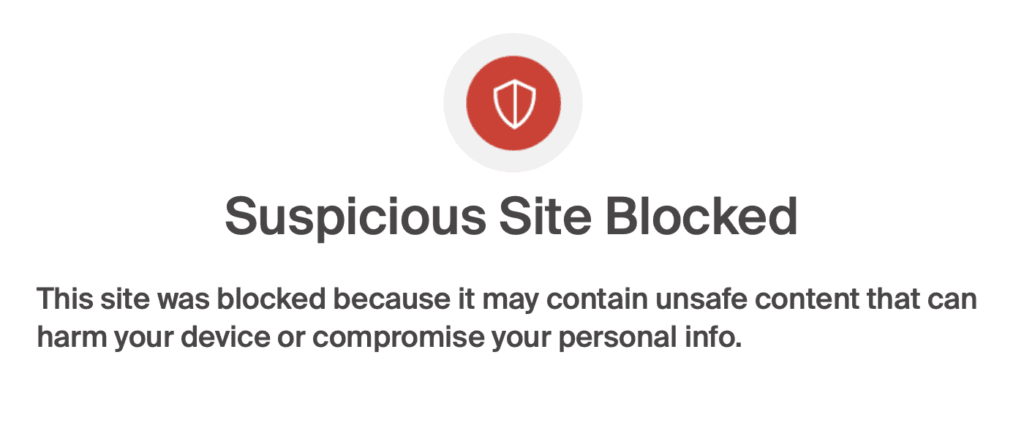
is rateformoney.online legit website warning screenshot
MASSIVE red flag when the website itself comes with a warning

RateForMoney.online is a VERY suspicious website claiming you can make money by doing easy online tasks like filling out surveys, inviting your friends, or clicking on links. The site makes it sound super easy and offers you a $25 bonus just for signing up.

The first massive red flag: you currently can’t even access the website as it’s flagged as a scam.

At first, it comes off like other sites where people really do get paid for tasks (think Swagbucks). But the more you look, the more things seem off.

The website (back when it actually loaded) doesn’t explain how they can afford to pay people. Who is giving them money? How does inviting friends help them make money? There are no clear answers, and that’s just the beginning of the red flags.

Unfortunately, after reviewing countless “done for you” systems with unrealistic claims, what I see is that websites like this promise fast money, but they don’t follow through. They want you to keep sharing their site and bringing in more people. That’s something scammers do a lot.

There’s no real contact info, no page explaining who runs it, and no good reason to believe they actually pay people. It’s all designed to look good so people keep using it. In the end, you get nothing.


How Much Does RateForMoney.online Cost?

Early versions of this site had it costing nothing, but that doesn’t mean it’s really free. Instead of taking your cash, the site takes your time, your personal information, and maybe even your good name online.

Other versions have it charging $24 that you will be “refunded” right after sign-up. This is said to ensure that “serious people only” will access the site. Spoiler alert, you will never get this $24 back. Stay away!

Once you join, they ask you to share links that lead to weird or sketchy websites. A lot of these links don’t even work well or go to places that might trick people into signing up for things they don’t want.

The site might also ask you for personal details like your email, your phone number, and even where you live. The more you try to earn, the more they seem to ask. That’s not a good deal, especially if they’re not actually planning to pay you anything.

Some people said the site sent them to pages asking for credit card numbers or told them to download apps that didn’t seem safe. Others got tons of junk emails after they joined. So even though signing up doesn’t cost money, it can still cost you a lot.


RateForMoney.online Key Features

Let’s use “features” loosely here:

  • $25 sign-up bonus (too generous for a free platform)
  • Earn $10 to $50 per referral
  • Paid surveys and tasks (none of which result in actual payouts)
  • Withdrawal threshold: $300
  • “Payment proof” gallery (which appears fake or stolen)

My Experience With RateForMoney.online

I found RateForMoney after a comment was left on one of my other reviews to check it out (thank you very, very much!).
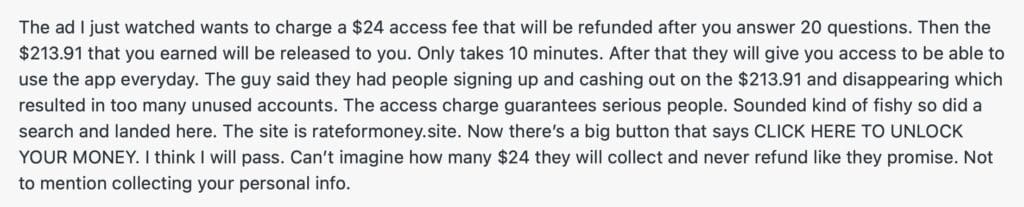

rateformoney.online scam review comment screenshot

These kinds of sites are all over social media, and they always play towards people’s everyday struggles to earn money, especially when they say you can earn cash fast. So I made a fake email account and signed up, just to see what would happen.

Right away, they said I had earned a $25 bonus just for signing up. MASSIVE red flag. We live in reality people. You don’t earn $25 for nothing, EVER. I kept going to see just how deep this rabbit hole goes.

I tried a few of the tasks they had, like filling out surveys, clicking on ads, and signing up for random email lists. I even made a few fake referrals to test it out. After two days, my account said I had over $300 ready to withdraw. Obviously, this is predictably where the other shoe dropped.

I tried to cash out, and nothing happened. I didn’t get a confirmation email, and my account didn’t show any updates. I clicked on the “support” links to ask for help, but they didn’t work. I even sent messages through the website, and, of course, nobody ever replied.

I started doing a little more digging and found that the pictures in their reviews and “proof of payment” section were just stock photos from other websites. Some of the reviews were copied from other scam sites too.

It was all fake.

RateForMoney.online isn’t a real way to make money. It’s just another scam pretending to be something helpful. They use fake reviews and big promises to trick people into sharing links and giving away their information.

Period.

Work From Your Laptop YouTube Subscribe

RateForMoney.online Testimonials

Now armed with these facts, you can sift through these very fake positive reviews and weigh them against the very real complaints I gathered from Reddit, Quora, YouTube, Trustpilot, and other scam-reporting forums.

✅ RateForMoney.online FAKE Positive Reviews

  • “I made $350 in one day just by referring my friends!” — from a YouTube comment
  • “It paid me once, hoping the next one goes through too.” — from TikTok
  • “It’s a fun way to kill time and maybe earn extra.” — from a blog comment
  • “Looks legit to me so far.” — from Facebook group
  • “Referral payouts are real if you follow all steps.” — from Reddit
  • “Takes time, but it’s working for me.” — from forum post
  • “Easy to use interface.” — from Quora
  • “The sign-up bonus is generous.” — from comment thread
  • “Way better than Swagbucks IMO.” — from Twitter
  • “Pays better than most GPT sites.” — from random forum

❌ RateForMoney.online Complaints

  • “Never got paid. Complete scam.” — from Reddit
  • “Fake screenshots, fake reviews, fake everything.” — from Trustpilot
  • “They ghost you after payout request.” — from Quora
  • “Uses your data and gives nothing back.” — from Scamwatchers forum
  • “Asks for payment info on shady offers.” — from Reddit
  • “Too many red flags. Avoid at all costs.” — from YouTube review
  • “Feels like a phishing operation.” — from WebParanoid
  • “They just want traffic and clicks, not legit tasks.” — from Twitter
  • “Identical to another scam site shut down last year.” — from ScamAdviser
  • “Promoting this could damage your online rep.” — from AffiliateForum

Final Thoughts

RateForMoney.online is a scam, full of fake promises, shady tactics, and no real payouts. It wastes your time and risks your data. Avoid this platform completely.

What do you think? Have you tried RateForMoney.online or seen it pop up on your feed? How much time did you waste before you finally gave up on it? Share your story in the comments. Your experience could help someone else avoid a scam.

Trying to make money online and still not seeing results? Create your FREE STARTER ACCOUNT with the same straightforward training I’ve used to create full time revenue online. No matter your experience, this step by step training delivers! Click here and get started NOW!


Frequently Asked Questions

Is RateForMoney.online legit?
No. While it pretends to be a money-making platform, there is zero evidence of real user payouts or business legitimacy.

Can you really earn $500/day with RateForMoney.online?
Zero chance. These claims are part of the bait. Real income online takes time, skill, and transparency.

What should I do if I signed up for RateForMoney.online?
Stop using it immediately. Avoid sharing personal data. If you used sensitive info, consider updating passwords or monitoring your accounts.


Want More Honest Reviews?

  • Wordform AI review
    Wordform AI Review: What They Don’t Tell You About the $67 Price

  • Cash Tracking System Scam Review
    7 Red Flags That Prove Cash Tracking System Is a Scam

  • Keala Kanae Power Code Masterclass review scam
    Keala Kanae’s Power Code Masterclass Review: The Free Bait Before the $29K Hook

  • Genesis by Inspirean Keala Kanae Scam or Legit Review
    7 Reasons Why Keala Kanae’s Genesis by Inspirean Is a Bad Idea – Honest Review

  • 7 figure accelerator review
    7 Figure Accelerator Review
  • Mastermind.com Review
    Mastermind.com Review: Scam or the Ultimate Knowledge Business Tool?

Written by Eric Cantu · Categorized: Reviews & Comparisons

Sep 27 2025

Micro-Influencer Affiliate Marketing: How to Start Small and Build a Real Online Business

micro influencer affiliate marketing

If you’re starting from zero and want to build an online income, micro influencer affiliate marketing is one of the most practical routes. Even a few thousand engaged followers can create real opportunities, and brands are already looking for creators like you.

TL;DR: Can you realistically become a micro influencer and earn with affiliate marketing from scratch?

Yes. With a focused niche and consistent content, small but engaged audiences convert well. Brands increasingly partner with micro influencers for performance, so beginners can earn by recommending products they genuinely use.

  • Higher engagement: Smaller creators often see stronger likes, comments, and clicks per follower, which leads to better conversion.
  • Low barrier to entry: You can start monetizing with a few thousand followers and grow from there.
  • Brands want micros: Budgets are shifting toward micro influencers because performance is better and costs are lower.
  • Authenticity wins: People trust relatable voices who use the product in real life.
  • Scale with systems: Track links, repeat winning content, and grow income steadily.
🔍 Have ChatGPT Summarize This Article

What’s In This Article? (Quick Jumps)

  • What Exactly Is a Micro Influencer?
  • Why Micro Influencers Beat Macro Influencers in Engagement
  • Current Trends: Brands Choosing Micros for Performance
  • How to Become a Micro Influencer and Start Earning
  • Tools to Help You Grow and Track Income
  • Final Thoughts
  • Frequently Asked Questions

What Exactly Is a Micro Influencer?

A micro influencer is someone who has a smaller but very active audience. This usually means between one thousand and fifty thousand followers. The number itself isn’t as important as the connection.

If your posts get comments, shares, and real conversations, you are doing it right. Followers often see micro influencers as friends they can trust, which makes their advice feel real.

The good news for beginners is you don’t need to be famous to start earning. Choose a topic you like, post often, and keep helping your followers. Little by little you start building trust.

And over time that trust makes brands notice you. Even a small group of fans can become the base of a real online business if you stay consistent and provide value to your audience.


Why Micro Influencers Beat Macro Influencers in Engagement

Micro influencers often do better than big accounts when it comes to selling.

  • Better engagement: Many micro accounts get two to three percent engagement, while bigger accounts often get less than one and a half percent.
  • Closer connections: Smaller groups let you answer comments and messages making you much more accessible which builds trust.
  • More relatable: Followers see you as a friend. When you share a product, it feels real.
  • Focused topics: Narrow niches like budget travel, simple fitness, or creator tools bring in buyers who are ready to act.

For new creators, this means you can start making money early, even before you feel big.


Current Trends: Brands Choosing Micros for Performance

Brands are spending more on micro influencers because the results are better and more reliable. Many companies report that smaller creators bring more likes, comments, and sales, while keeping costs lower compared to large influencer campaigns.

Tracking results is easier too because engagement is more consistent and tied closely to a loyal audience. Studies also show that people are quicker to buy when they feel a personal connection to the person sharing the product, which is the strength of micro influencers. 

For beginners, this is huge! It means there is growing demand for new creators, and companies are ready to test partnerships as long as you can show consistent results and a willingness to grow.


How to Become a Micro Influencer and Start Earning

If you’re beginning from zero, use this simple 7 step roadmap.

  1. Pick a niche
    Pick a topic you enjoy and can talk about often. Think about what you could discuss for months without getting bored. Examples include travel, fitness, tech tools, or simple cooking. The more specific your niche, the easier it is to stand out. Narrow niches often build stronger connections.
    Related article: How to Pick Your Niche as a Micro Influencer
  2. Choose your platforms
    Start with one short form platform and one long form platform. For example, TikTok for quick videos and YouTube for deeper guides. Using Instagram with a blog also works well. Pick platforms where your audience actually hangs out. Don’t try to be everywhere at once, master one or two first.
    Related article: How to Make Money on Instagram & YouTube
  3. Set up your profiles
    Use clear photos that match your personal brand. Write short, but effective bios that explain who you are and what followers will get from your content. Add easy link tools so people know where to click. A well built profile creates trust right away.
  4. Join affiliate programs
    Sign up for beginner friendly networks like Amazon Associates, Impact, or ShareASale (now Awin). These platforms let you promote products you love from many trusted brands. Look for programs that pay fairly and align with your niche so you don’t lose credibility.
  5. Create content around products and services
    Create review articles, tutorials, and other helpful content that shows how you use the products and services that help you. Promote these to your audience and be honest about what you like and don’t like. Show the product in action. Help your audience connect with the services that will give them the most value. Storytelling and personal experience make content more engaging than a sales pitch
    Related article: 10 Simple Steps to Starting a Successful Blog
  6. Place and promote your links
    Add affiliate links to your bio, stories, video descriptions, blog posts, and emails. Don’t just drop links everywhere, be smart about it. Remind viewers where to click and explain why. A clear call to action makes a huge difference.
    Related article: 5 Proven Ways to Drive Traffic to Your Affiliate Links
  7. Track and improve
    Check which posts drive the most clicks and sales. Use affiliate dashboards and platform analytics. Repeat what works, drop what doesn’t, and keep testing new ideas. Growth comes from learning and improving over time.

Want deeper tactics for social platforms? Check out my full guide Affiliate Marketing Strategies for Social Media and hit the ground running!

Work From Your Laptop YouTube Subscribe

Tools to Help You Grow and Track Income

You don’t have to be big into analytics to track your success. There are several tools out there that make things a lot easier. Even if you are brand new, using simple software can save time, keep you organized, and help you grow faster.

  • Link tracking: Pretty Links or Bitly to create clean, trackable URLs.
  • Affiliate networks: ShareASale and Impact to discover programs in your niche.
  • Content planning: Notion or Trello to map ideas and schedules.
  • Scheduling: Buffer, Later, or Content360 to batch and post consistently.
  • Influencer search tools: Databases that surface brands or creators by niche and engagement.

Final Thoughts

Micro influencer affiliate marketing is a simple way to build a business online. Start small, learn quickly, and grow by repeating what works. It rewards creators who stay consistent and honest.

What do you think?
Are you on the path to becoming a micro influencer, or making your first affiliate sale right now? Share your wins and hurdles in the comments! I love hearing your perspective and I reply every time!

Trying to make money online and still not seeing results? Create your FREE STARTER ACCOUNT with the same straightforward training I’ve used to create full time revenue online. No matter your experience, this step by step training delivers! Click here and get started NOW!


Frequently Asked Questions

Can I start earning with fewer than one thousand followers
Yes. Many programs accept small creators, especially if engagement is healthy. Focus on a tight niche, helpful posts, and clear calls to action.

Why are brands choosing micro influencers over macro influencers
Because engagement is higher, audiences trust them more, and cost per result is lower. Many brands combine micro creators with performance channels to scale proven content.

How much can a beginner earn with affiliate marketing as a micro influencer
Income ranges widely. Expect tens to hundreds per month at first, then more as your content library and trust grow. Treat it like a business and results compound.


Want More Affiliate Marketing Strategies?


  • How to Drive Traffic to Your Affiliate LInks
    5 Smart Ways to Drive Traffic to Your Affiliate Links in 2026
  • Why Affiliate Marketing Isn't a Pyramid Scheme
    4 Reasons Why Affiliate Marketing Isn’t a Pyramid Scheme
  • Done For You Businesses Scam Legit
    Are Done For You Online Business Opportunities Legit? (2026 Update)
  • Online Coaching Business Scams Exposed
    11 Online Business Coaching Scams Exposed & How to Avoid Them (2026 Update)
  • Is Affiliate Marketing Still Worth It in 2026?
    Is Affiliate Marketing Still Worth It in 2026?
  • Why You Need to Stop Obsessing Over Analytics
    Why You Need to Stop Obsessing Over Analytics!

Written by Eric Cantu · Categorized: Affiliate Marketing Strategies

Sep 20 2025

WordPress vs Wix vs Blogger vs Elementor: Which Is the Best Blogging Platform?

WordPress vs Wix vs Blogger vs Elementor- Which Is the Best Blogging Platform

Starting a blog is simple, but picking the right tool can be tricky. WordPress gives control, Wix is easy, Blogger is basic, and Elementor helps make WordPress look better. It depends on your needs. Let’s compare some the pros and cons of each so you can see which option is best for you.


TL;DR: Which Blog Platform Should You Choose?

If you’re deciding between WordPress, Wix, Blogger, and Elementor, it comes down to control, cost, and ease. WordPress is most powerful, Wix is easiest, Blogger is simplest, and Elementor adds design to WordPress.

  • WordPress = flexibility and growth. Best for serious bloggers, businesses, and anyone who wants full control over design, SEO, and scaling.
  • Elementor = design power on WordPress. Adds drag-and-drop design to WordPress, making it more visual without sacrificing flexibility.
  • Wix = simple, fast, all-in-one. Great for beginners who don’t want to mess with hosting or maintenance.
  • Blogger = free and basic. Great for hobbyists or those testing blogging before committing.
  • Control vs convenience trade-off. The more control you want (WordPress), the more setup/maintenance you handle. The less you want to think about it (Wix/Blogger), the fewer options you’ll have later.
🔍 Have ChatGPT Summarize This Article

What’s In This Article? (Quick Jumps)

  • Features & Key Traits of Each Platform
  • Ease of Use: How Beginner-Friendly Are They?
  • Pros and Cons of Each Platform
  • Direct Comparisons: Which One Wins in Different Scenarios
  • Best Fit Recommendations for Different Types of Bloggers
  • Final Thoughts
  • FAQs

Features & Key Traits of Each Platform

Let’s start with the basics. Each of these has its own “core identity.”

WordPress (self-hosted, WordPress.org)

  • Number one global website platform (over 40% of all websites are built on WordPress)
  • Installed on a hosting service to build websites.
  • Powers many sites because it’s flexible and can grow.
  • Supports themes and plugins for almost any feature.
  • Great for long-term blogs, though harder to learn.
  • Can handle small blogs, big sites, or even online stores.

Elementor

  • A WordPress plugin, not its own platform.
  • Has many modern design features and uses drag-and-drop tools.
  • Pro version adds advanced features and full site design.
  • Popular with bloggers who want a polished look.
  • Includes many ready-made templates.

Wix

  • All-in-one website builder with hosting included.
  • Start by signing up and picking a template.
  • Drag-and-drop editing makes it beginner-friendly.
  • Once you choose a design, big changes are harder.
  • Works well for simple blogs or small business sites.

Blogger

  • Google’s free blogging tool, very basic.
  • Easy to start within minutes.
  • Good for hobby blogs and casual writing.
  • Limited design choices and growth potential.
  • Often replaced by WordPress or Wix for more control.

Ease of Use: How Beginner-Friendly Are They?

Blogger is the easiest to use. You log in with your Google account, pick a template, and start writing right away. It’s very beginner-friendly, but you can’t change much about how it looks. If you want special designs or advanced tools, you’ll run into limits fast.

Wix is the next easiest. It uses drag-and-drop editing, so you can move things around on the page. You don’t have to worry about hosting or security. You can make a good-looking blog in one day, and it’s fun to use. But if you want advanced tools or try to switch templates later, it can be tricky.

WordPress takes a little more work. You need to buy hosting, set up a domain name, install WordPress, and pick a theme. Writing posts is easy, but you have to keep plugins updated and make sure your site stays secure.

For beginners, it might feel a little tough, but once you get the hang of it, you’ll have way more options and control than with Wix or Blogger.

Related article: Just how easy can it be to create a website on WordPress? Check out my guide and see how you can have your own WordPress website up in MINUTES!

Elementor used to feel like you were unlocking all of WordPress’s capabilities when you installed the plugin. But that was back when WordPress used the classic editor. Now that WordPress has upgraded to the block editor by default I feel there’s really no need to use Elementor.

The main reason is that Elementor isn’t very intuitive. It has a steep learning curve, but if you master it, you’ll be able to utilize some cool motion style graphics and more.

Related article: Will Updating Elementor Break My Website?


Pros and Cons of Each Platform

Alright, here’s where it gets interesting. Let’s break them down.

WordPress (self-hosted)

Pros:

  • Maximum control over design, functionality, and hosting.
  • Thousands of plugins and themes to customize almost anything.
  • Strong SEO potential with plugins like Yoast or Rank Math.
  • Scales easily from a tiny personal blog to a massive site.
  • You own your content and can move hosts anytime.
  • Block editor is a massive step up from the classic editor.

Cons:

  • Higher learning curve than other platforms.
  • Requires you to manage updates, backups, and security.
  • Costs vary depending on hosting, themes, and plugins.
  • Plugin or theme conflicts can cause headaches.

Elementor (on WordPress)

Pros:

  • Drag-and-drop visual editing.
  • Can customize headers, footers, and entire site layouts without using any code.
  • Responsive design controls built-in.
  • Lots of pre-made templates to get started quickly.

Cons:

  • Adds complexity and potential performance issues if overused.
  • High learning curve and not very intuitive
  • Premium features require a paid plan.
  • Still requires you to manage WordPress hosting and maintenance.

Wix

Pros:

  • Very beginner-friendly, no technical setup needed.
  • Hosting, security, and updates are all handled for you.
  • Attractive templates and an easy visual editor.
  • Built-in apps for SEO, eCommerce, and more.
  • Quick setup for custom domains.

Cons:

  • Less flexible than WordPress for advanced features.
  • Templates are harder to switch later, so you often have to rebuild.
  • SEO tools are improving but still more limited than WordPress.
  • Migration away from Wix is difficult.
  • Pricing climbs if you need advanced features.

Blogger

Pros:

  • Completely free to use (except for custom domains if you want one).
  • Extremely simple to set up and start posting.
  • Integrated with Google services like AdSense and Analytics.
  • Hosting and security handled by Google.
  • Perfect for hobby or experimental blogs.

Cons:

  • Very limited design options and customization.
  • Few updates over the years, feels outdated.
  • No real plugin ecosystem.
  • Harder to scale or monetize seriously.
  • Your blog lives on Google’s servers and you don’t have full ownership.
Work From Your Laptop YouTube Subscribe

Direct Comparisons: Which One Wins in Different Scenarios

Let’s say you have different goals and want to know which platform fits best.

  • If you just want to write without worrying about tech → Blogger is the easiest. It costs nothing and has no upkeep.
  • If you want something simple but modern-looking → Wix works well. It’s easy to use, though you give up some control.
  • If you want to grow your blog or maybe make money from it → WordPress is the best choice. Add Elementor if design is very important to you.
  • If design is your top priority → WordPress with Elementor lets you build any look you want.
  • If you need the cheapest option → Blogger or low-cost WordPress hosting is the winner.

Best Fit Recommendations for Different Types of Bloggers

  • Hobbyist or journal-style blogger: Blogger. Free, quick, nothing to maintain.
  • Beginner lifestyle or travel blogger: Wix. Attractive templates, easy to use, you can focus on writing and photos.
  • Business owner who wants a blog: WordPress with Elementor. Looks professional, grows with you, integrates with ecommerce.
  • Tech-savvy or long-term growth blogger: WordPress. It’s the most flexible and scalable choice.
  • Design-focused creative blogger: Elementor on WordPress. The perfect mix of visuals and control.

Final Thoughts

The best platform depends on your needs. For ease, pick Blogger or Wix. For growth and flexibility, WordPress is stronger. Elementor helps by adding extra design functionality to WordPress. In my opinion, if you’re serious about building a website, use WordPress.

What Do You Think? Have you tried one of these platforms already, and did it live up to your expectations? Drop your thoughts in the comments below. Your experience might help someone else who’s stuck making the same choice.

Trying to make money online and still not seeing results? Create your FREE STARTER ACCOUNT with the same straightforward training I’ve used to create full time revenue online. No matter your experience, this step by step training delivers! Click here and get started NOW!


Frequently Asked Questions

Can I switch from Blogger to WordPress later?
Yes, you can export posts from Blogger and import them into WordPress. But you may lose formatting or need to fix broken links. Setting up redirects helps keep SEO intact.

Is Elementor its own blogging platform?
No, Elementor is a WordPress plugin. It doesn’t work on Wix or Blogger. It’s designed to give you drag-and-drop design power inside WordPress.

Is Wix or WordPress better for SEO?
WordPress generally has the edge because of plugins and fine-tuned control over structure, speed, and metadata. Wix has improved a lot though and works well for small to medium blogs.


Want More Honest Reviews?

  • Wordform AI review
    Wordform AI Review: What They Don’t Tell You About the $67 Price
  • Cash Tracking System Scam Review
    7 Red Flags That Prove Cash Tracking System Is a Scam
  • Keala Kanae Power Code Masterclass review scam
    Keala Kanae’s Power Code Masterclass Review: The Free Bait Before the $29K Hook
  • Genesis by Inspirean Keala Kanae Scam or Legit Review
    7 Reasons Why Keala Kanae’s Genesis by Inspirean Is a Bad Idea – Honest Review
  • 7 figure accelerator review
    7 Figure Accelerator Review
  • Mastermind.com Review
    Mastermind.com Review: Scam or the Ultimate Knowledge Business Tool?

Written by Eric Cantu · Categorized: Reviews & Comparisons

Sep 17 2025

How to Start a Newsletter That Works: Easy Tips for Beginners

How to start a newsletter that works

Starting an email newsletter that really works is way more than just writing something nice and clicking “send.” You need to pick the right tools, get people to sign up, keep things consistent, and track what works. This guide will help you do all that, step by step. Let’s dive in!

TL;DR: How Do You Start a Newsletter That Works?

Pick a platform that fits your needs, make your sign-up forms and freebies helpful, plan your email schedule so people stay interested, write in a friendly and clear way, and check how your emails are doing.

  • Pick the right platform that fits your goals and budget.
  • Make your sign-up form and freebie (lead magnet) simple and helpful.
  • Plan when and what you’ll send so people stay engaged.
  • Write emails that are easy to read with a warm greeting, one main idea, and a clear next step.
  • Watch your email stats to see what’s working and what needs to change. to see what’s working and what needs to change.
🔍 Have ChatGPT Summarize This Article

What’s in This Article?

  • Why Do I Need to Add an Email Newsletter to my Website?
  • Choosing the Right Newsletter Platform
  • Setting Up Sign-Up Forms and Freebies
  • What Should You Say in Your Emails?
  • Planning Your Email Schedule
  • Checking Your Results
  • Final Thoughts
  • FAQs

Why Do I Need to Add an Email Newsletter to my Website?

If you have a website, adding a newsletter is a really smart move and it opens you up to the lucrative world of email marketing. It’ll help you keep in touch with the people who already like what you do and it’s a great way to boost your conversions consistently.

Newsletters help people trust you more over time. You can send helpful tips, stories, special deals, or anything useful. People who join your list already want to hear from you, so it’s easier to build a strong connection and maybe even turn them into customers.

Unlike social media, where posts might get missed, emails go straight to someone’s inbox. It’s more direct and dependable. Plus, the list of people who sign up is yours, so you don’t have to worry if a social media site changes the rules or disappears.

Related article: Check out my full guide on building your email list from zero to hero!


Choosing the Right Newsletter Platform

Before you start sending emails, you need a platform that helps you do it easily.

Look for a platform that has a free plan to start. Make sure your emails won’t end up in spam folders. If you don’t like tech stuff, choose one that’s easy to use with drag-and-drop tools or ready-made designs.

Here are a few options to check out:

  • Beehiiv – good if you want to grow fast or earn money.
  • MailerLite – easy to use and budget-friendly.
  • Substack – great if you like writing and want something simple.
  • Mailchimp – powerful, but may feel a bit complicated for beginners.
  • AWeber – reliable and beginner-friendly with solid customer support and helpful features like drag-and-drop editors. Check out my full AWeber review here.
  • Systeme.io – a great all-in-one option if you want email, landing pages, and course tools together in one place. It’s especially helpful for people who are also selling products or services online. Check out my Systeme.io review here.

Start with something simple and easy. You can switch later when your list gets bigger or you need more tools.


Setting Up Sign-Up Forms and Freebies

Example Plugin: WPForms

If you’re using WordPress, a great way to collect emails is with WPForms. It’s one of the most popular and easy-to-use form plugins out there. You can:

  • Drag and drop fields to build your form with no coding.
  • Use pre-made templates made just for newsletter sign-ups.
  • Connect it with services like Mailchimp, AWeber, and others.
  • Start for free, then upgrade if you need more features.

Now, it’s time to get people to sign up. You need to give them a reason to share their email with you.

This is done by offering them something useful in return. This is called a lead magnet. It could be a checklist, a free guide, a small course, or a simple template. Make sure it matches what your newsletter is about. If you send tips about social media, give them a few ready-made posts they can use.

Keep your sign-up form short and easy. Just ask for their name and email. Put the form in places where people will see it, like:

  • On your blog or website. Some will have an inline CTA in the middle of their posts, or possibly in a sidebar
  • At the top or bottom of your pages
  • As a pop-up (but don’t make it annoying)
  • On a special sign-up page you can link to from social media

Tell people what they’ll get and how often. For example: “Get weekly tips and tools to grow your audience.” Let them know it’s safe to sign up, with lines like “No spam, unsubscribe anytime.” If others already follow you, you can say that too. It helps build trust.


What Should You Say in Your Emails?

Now that you’re planning to send newsletters, you might wonder, “Okay, but what do I actually write?” You’re not alone. A lot of people get stuck here. But don’t worry, writing your emails can be fun and simple if you follow a few easy steps.

Start with a friendly greeting, like you’re talking to someone you know. Say hi by name if you can, and remind them who you are, especially in your first email. For example, you might say, “Hi! I’m Sam, and I help people grow their small businesses with simple marketing tips.”

Make sure your first email welcomes them. Thank them for signing up, let them know what kind of content to expect, and how often you’ll be in touch. This helps set expectations and builds trust right away.

Keep your emails short and clear. People are busy, and most of them read emails on their phones. One main idea per email is usually enough. Don’t try to cram everything in at once. If you have lots to say, break it up over a few emails.

Write like a real person. Use everyday words, keep your tone friendly, and try to sound like yourself. If you’re funny, be funny. If you’re calm and thoughtful, write that way. That’s what keeps people reading.

Also, always include a call to action (CTA). That could be something small like “Hit reply and tell me your biggest challenge,” or something bigger like “Click here to check out this free tool.” Give your reader one clear next step.

And don’t forget to end with a thank you. Even something simple like “Thanks for reading!” can go a long way in making people feel appreciated.

Related article: Want to see my own personal 7-day automation sequence template? Check out my full guide on building an email automation sequence that converts!


Planning Your Email Schedule

If you send emails randomly, people might forget about you. Or they might get annoyed if you send too many. That’s why it’s good to stick to a schedule.

Weekly emails are great if you have lots to share. Bi-weekly (every other week) gives you more time to plan and write. Monthly emails are good for deep thoughts or big updates.

Think about what works best for your topic. If things change fast (like news or tech), weekly might work. If you’re sharing personal stories or tips, maybe every two weeks or monthly is better.

If you’re guiding your new subscriber on a step by step journey showing them how to do something, then an email a day could be perfect. In fact, most of the time when you’re offering a lead magnet to gain a subscriber it’s common to offer some sort of how-to / step by step guidance to accomplish something related to your niche.

Even after your how-to is completed, that doesn’t end the conversation. You can still deliver value in ay number of ways. Plan your topics ahead of time. You can use a calendar or a list to keep track. Try mixing things up with different types of emails, like:

  • Quick how-to tips
  • Personal stories
  • Cool stuff you found online
  • Free tools or downloads
  • Questions for your readers

Stick to a simple format to make writing easier. For example: start with a greeting, share your main message, and end with a helpful link or next step.


Checking Your Results

Once you’ve sent a few emails, check how they’re doing. Most platforms will show you some helpful numbers:

  • Open rate – how many people opened your email
  • Click rate – how many clicked a link
  • Unsubscribes – how many people left your list

If not many people open your emails, try different subject lines or send them on a new day. If they’re opening but not clicking, your content might need a clearer link or stronger message.

Also look at how your list is growing. Are more people signing up than leaving? Are your freebies helping? Some platforms even let you see how long people stay active after signing up.

Test different ideas. Try different subject lines, email formats, or send times. Look at what works best and do more of that.


Final Thoughts

Creating a newsletter that really works takes time and planning. Choose the right tools, offer helpful freebies, stay on schedule, and keep an eye on what’s working. Little changes over time can make a big difference.

What do you think? Have you started a newsletter yet? Or are you planning to? What’s been the hardest part so far? Share your story! I’d love to hear it!

Trying to make money online and still not seeing results? Create your FREE STARTER ACCOUNT with the same straightforward training I’ve used to create full time revenue online. No matter your experience, this step by step training delivers! Click here and get started NOW!


Frequently Asked Questions

What’s a good open rate?
Most small newsletters see open rates around 20 to 25%. If yours is lower, try changing your subject lines or send time.

How big should my freebie be?
Keep it short and useful. A one-page checklist or a quick download usually works better than a big, long ebook.

How soon will I see results?
It takes time. Most people see growth after a few months of sending good content and promoting their sign-up form.


Want More Email Marketing Tips?

  • email automation sequence that converts
    How to Set Up an Email Automation Sequence That Actually Converts
  • How to start a newsletter that works
    How to Start a Newsletter That Works: Easy Tips for Beginners
  • email segmentation 101
    Email Segmentation 101 – Avoid Spam and Boost Conversions
  • creating high converting lead magnets
    Creating High-Converting Lead Magnets
  • Building your first email list
    Build Your First Email List from Zero, Step-by-Step
  • How hard is email marketing as a side hustle
    How Hard is Email Marketing as a Side Hustle?

Written by Eric Cantu · Categorized: Email & List Building

Sep 12 2025

Threads vs. BlueSky vs. X: Which Platform is Best for Affiliate Marketing?

Threads vs X vs Bluesky Review

Every year there seems to be a new big social app. Twitter once felt unbeatable, then Musk bought it and many left. That’s when Threads and BlueSky took off. So which one works best for affiliate marketing in 2025?


TL;DR: Which platform, Threads, X, or Bluesky, works best for affiliate marketing?

Threads is currently the hottest growth platform, BlueSky is ideal for niche and community building, and X (formerly Twitter) is regaining traction but remains competitive. The best choice depends on your niche and posting strategy.

  • Threads for growth: Explosive user adoption, great engagement for lifestyle niches like fashion and health.
  • BlueSky for niches: Decentralized, strong community culture, best for digital services and thoughtful content.
  • X for reach: Still the largest overall, good for fast-paced engagement and affiliate conversions.
  • Link strategies differ: Direct links work on all three, but link-in-bio tools like Linktree or solo.to are essential for multi-offer affiliates.
  • Posting tactics matter: Each platform has its own frequency, content type, and engagement sweet spot.
🔍 Have ChatGPT Summarize This Article

What’s In This Article? (Quick Jumps)

  • Threads for Affiliate Marketing
  • BlueSky for Affiliate Marketing
  • X for Affiliate Marketing
  • Posting Strategies: Platform Playbook
  • Final Thoughts
  • FAQs

Threads for Affiliate Marketing


Threads vs X vs Bluesky Review Threads logo

Website: threads.com

Meta’s Threads got really big really fast with 30 million people signing up in one day, and over 100 million in just a week. I remember being on instagram and suddenly this “Create Your Threads Account” prompt popped up. That first day was crazy, and it was actually fun talking with brand new people who would reply back without anything to sell you.

Then of course, the excitement reached a plateau and it dropped down to about 8 million daily users by the end of summer 2023. But the cool part is it bounced back.

By 2025, Threads has over 115 million daily users and is still growing. How did this happen? Meta pushed Threads hard through Instagram, added new features like trending topics and better search, and asked influencers to start posting early.

This mix made people give it another try. For marketers, it means a big, curious audience that is still figuring out how they like to use the app.

Affiliate Link Strategies on Threads

  • Direct Links: Threads lets you share clickable links, so you can drop affiliate links right into your posts. Since posts are short, keep your message simple and friendly.
  • Link in Bio: Many people use a link-in-bio page like Linktree or solo.to when they have more than one product to share. This way your posts stay clean but your followers can still find your offers.
  • Content-first approach: Threads works a lot like Instagram. Posts that teach, entertain, or tell stories usually do best. Give value first, then share your link.

Related post: Check out my full guide on driving traffic to your affiliate links! This is the lifeblood of your business, so get it right!

Niche Examples

  • Health: Share short wellness tips, easy habits, or bust a common myth, then link to supplements, workout gear, or apps.
  • Fashion: Post outfit ideas, style guides, or trend alerts, then share links to clothes or accessories.
  • Digital Services: Talk about why you use a tool, compare it to others, and then link to it with your affiliate tag.

Posting Tips for Threads

  • Frequency: Posting 2-3 times a day keeps you active. Some people mix one fun post, one tip, and one question to keep things fresh.
  • Best Content Types: Chatty posts, lifestyle photos, quick how-tos, or slides with useful info. Behind-the-scenes stuff also works because the app feels casual.
  • Hashtags & Engagement: Threads doesn’t really use hashtags yet, but comments and reposts matter a lot. Ask real questions, reply to comments, and encourage shares to get noticed.

BlueSky for Affiliate Marketing


Threads vs X vs Bluesky Review Bluesky logo

Website: bsky.app

BlueSky is smaller (about 38 million users), but it’s been growing super fast, up 370% in just one year. It’s built on something called a decentralized protocol, which basically means it’s run differently than big apps like Twitter.

BlueSky is something I hadn’t tried myself yet, but after researching I can see the appeal of it.

It honestly just feels calmer. Instead of people racing to post quick takes and fake AI inspirational thoughts, the community likes longer chats and actual conversations.

Many people joined because they were tired of all the noise, rants, and constant selling via bots on other apps. I totally get that. My X account feels like a massive echo chamber of nothing but people selling their latest course. So on Bluesky, the lack of all that makes it easier for your posts to stand out.

For affiliates, this is great because your posts don’t have to compete with endless bots or fake AI posts. Since BlueSky is still young, you can grow a name for yourself early on.

Affiliate Link Strategies on BlueSky

  • Direct Links: You can share links, but users like it better when you explain why you recommend something instead of just dropping the link with no context.
  • Link in Bio: Works really well on BlueSky since most posts are more like chats. People often click on bios to learn more. You can use tools like Linktree or solo.to to keep all your offers in one spot.
  • Community over clicks: People here like honesty. If you push products too hard, it can turn them off. A better way is to share your story and then connect it to the product naturally.

Niche Examples

  • Health: Write longer posts about your daily routines or healthy habits, then link to an app or product you really use. For example, a post about your morning routine with a meditation app link fits well.
  • Fashion: Talk about brands you care about, especially sustainable or eco-friendly ones. Then share your affiliate link to their products. Explaining why you like the brand works better than a quick ad.
  • Digital Services: BlueSky’s audience likes tech, so reviews or tutorials on digital tools do great. Show how you use the tool step by step, then share your link.

Posting Tips for BlueSky

  • Frequency: Post 1–2 times per day, but make your posts thoughtful. Quality beats quantity here.
  • Best Content Types: Longer text posts, community chats, real recommendations, and how-to guides. Funny memes don’t do as well as honest stories.
  • Hashtags & Engagement: BlueSky doesn’t really use hashtags much. Instead, focus on starting conversations and replying to others. Ask questions, join chats, and build back-and-forth instead of chasing viral hits.

X for Affiliate Marketing


Threads vs X vs Bluesky Review X logo

Website: x.com

Let’s talk about the big one in the room. X has gone through a lot of ups and downs. After Elon Musk took over, many people stopped using it. The app lost about 75 million users when Linda Yaccarino was in charge, then daily activity dropped by 10% in 2025, and Europe lost another 10 million users.

For me, like I mentioned at the top, it all started feeling like a massive echo chamber of fake tweets being engaged with by people looking to sell their latest course. Nothing but AI created motivational quotes for businesses being liked by other creators doing the exact same thing and it just all feels, well, fake.

Changes in rules, new features that didn’t stick, and ad problems all made people leave. But it’s still massive, with over 600 million users each month. With many users coming back, X is still where breaking news and trending topics often show up first.

For affiliate marketers, this means you can still get lots of eyes on your posts if you know how to play it smart.

Looking for some automation on X? Check out my review of Postwise and start scheduling your content easily!

Affiliate Link Strategies on X

  • Direct Links: Still useful, especially in fast-moving areas like fashion and digital products. Short links with clear action words work best.
  • Link in Bio: Super helpful if you promote more than one thing. It looks clean in the quick X feed. Tools like Linktree or solo.to make it easy to share many links.
  • Thread Marketing: Many people write longer “value threads” that end with a soft push to check their bio or link (see my Postwise review here [placeholder]). Threads with stories do better than plain ads.

Niche Examples

  • Health: Quick health tips, simple myth-busting, or short threads about routines. You can link to wellness products. Adding a picture or small chart makes it stronger.
  • Fashion: Posts about new trends, style comparisons, or photo sets with links to buy the look. Limited-time offers or discounts work great here.
  • Digital Services: How-to threads about software tools with a clear call to action link. Step-by-step guides with images or GIFs help people pay attention.

Posting Tips for X

  • Frequency: Aim for 3–5 short posts a day or 1–2 longer threads each week. Being steady is more important than posting too much.
  • Best Content Types: Quick posts, threads, memes, polls, and quote-posts with your thoughts. Mixing things up makes your feed fun to follow.
  • Hashtags & Engagement: Hashtags still help—use 1–2 per post. To get more reach, reply to others, ask questions, tag creators, and join trending chats.

Posting Strategies: Platform Playbook

Here’s a quick way to think about posting strategies: every platform has its own personality, and each one likes a different style of content. If you match what you post to that style, you’ll do better.

  • Threads: Threads feels casual and easygoing. Post 2–3 times a day. Mix things up with a fun or personal update, a helpful tip, and maybe a light call-to-action. Posts that feel like real thoughts or stories do better than ones that look like plain ads.
  • BlueSky: On BlueSky, it’s not about posting a lot, but posting something meaningful. Aim for 1–2 solid posts each day. Spend time writing longer posts, joining group chats, or sharing honest stories. People like helpful guides and answers to questions. That’s how you stand out in a smaller, more niche space.
  • X: X moves fast and likes a mix of styles. Posting 3-5 times a day works well, and adding 1-2 longer threads each week helps too. Memes, polls, quick takes, and storytelling threads all work. Changing up your content keeps people interested.

If spending time on your socials starts to feel overwhelming, you can always use a content scheduler.

For affiliate marketers, the trick is to put the right kind of content on the right app. Fashion and lifestyle posts do best on Threads, where photos and casual updates feel normal. Tech reviews and software guides fit better on BlueSky, because people there want deeper chats and explanations. Fast-moving deals, discounts, and viral trends rule on X.

Related article: Check out my full guide on Affiliate Marketing Strategies for Social Media! Up your social media game and watch your traffic and conversions explode!

The more you match your posts to the culture of each app, the easier it is to grow your audience and make sales without feeling worn out. And don’t forget that the easiest way to find social media content ideas is to repurpose your high-performing blog posts!


Final Thoughts

Threads is best for lifestyle niches, BlueSky for thoughtful audiences, and X for mass reach. All three have unique affiliate link strategies and posting rhythms.

What do you think? Have you tried promoting affiliate offers on Threads, BlueSky, or X? Which one is giving you the best results right now? Drop your experience in the comments! I’d love to hear what’s working (or not working) for you.

Trying to make money online and still not seeing results? Create your FREE STARTER ACCOUNT with the same straightforward training I’ve used to create full time revenue online. No matter your experience, this step by step training delivers! Click here and get started NOW!


Frequently Asked Questions

Is Threads good for affiliate marketing in 2025?
Yes. With over 115 million daily users and a growing focus on lifestyle content, Threads is great for health, fashion, and digital niches. Direct links and link-in-bio both perform well.

Is BlueSky worth using for affiliate links?
Absolutely. BlueSky is smaller, but its niche-friendly, decentralized structure makes it perfect for building trust. Affiliates who focus on authentic recommendations do well here.

How effective is X for affiliate marketing today?
Despite losing millions of users, X is still the biggest platform by reach. Affiliate marketers thrive by combining direct links, threads, and link-in-bio strategies.


Want More Social Media Marketing Tips?

  • Pinterest SEO for Bloggers: Turning Pins into Website Traffic
    Pinterest SEO for Bloggers: Turning Pins into Website Traffic
  • Repurposing Your Blog Content Into Social Media Posts
    Repurpose Your Blog Content: A 3-Step Guide to Turning Articles into Social Posts
  • Threads vs X vs Bluesky Review
    Threads vs. BlueSky vs. X: Which Platform is Best for Affiliate Marketing?
  • Affiliate Marketing Strategies for Social Media
    Affiliate Marketing Strategies For Social Media in 2025

Written by Eric Cantu · Categorized: Social Media for Affiliates

  • « Go to Previous Page
  • Page 1
  • Interim pages omitted …
  • Page 6
  • Page 7
  • Page 8
  • Page 9
  • Page 10
  • Interim pages omitted …
  • Page 29
  • Go to Next Page »
  • Home
  • Sign Up
  • Blog & Search
  • Privacy Policy
  • Affiliate Disclosure

Copyright © 2026 · Work From Your Laptop · Eric J. Cantu · All Rights Reserved