• Skip to main content
  • Home
  • Sign Up
  • Blog & Search
  • Privacy Policy
  • Affiliate Disclosure

WORK FROM YOUR LAPTOP

  • Start Here
    • Watch the Video Tutorial
    • FAQs
    • Start Your FREE TRAINING!
  • Blog
  • Meet Eric

Reviews & Comparisons

Apr 26 2026

Mastermind.com Review: Scam or the Ultimate Knowledge Business Tool?

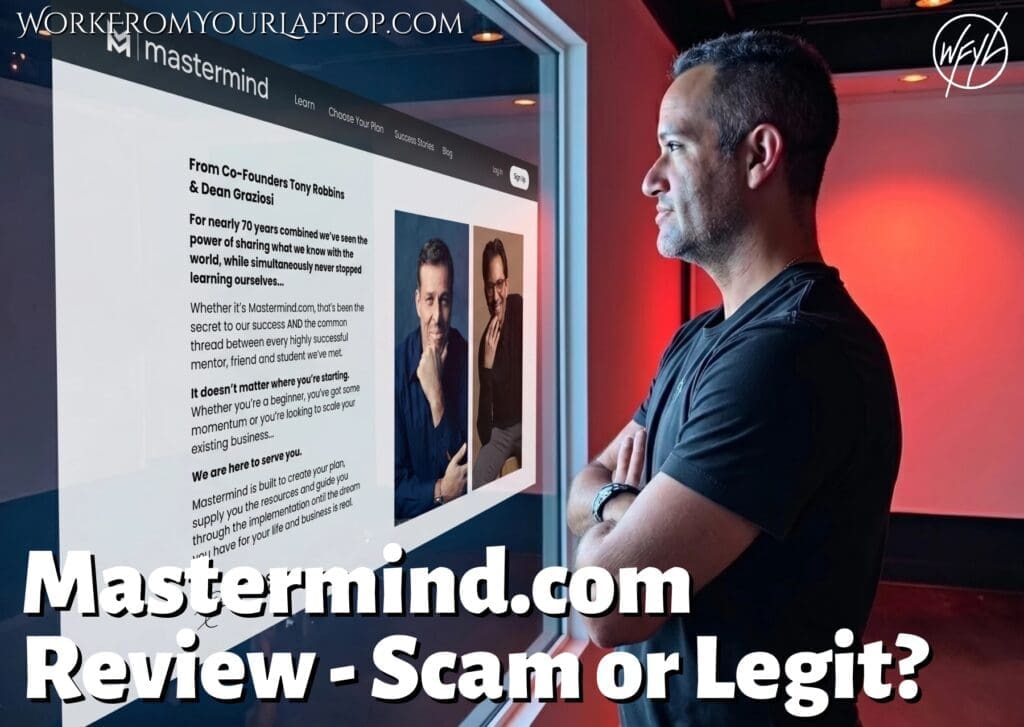
Mastermind.com Review

I keep seeing the Mastermind.com ads with Tony Robbins and Dean Graziosi on my Instagram promising to help you “turn what you know into a business.” Let’s see if it’s a legitimate path to freedom or just another expensive funnel, shall we?

TL;DR: Is Mastermind.com a Scam?

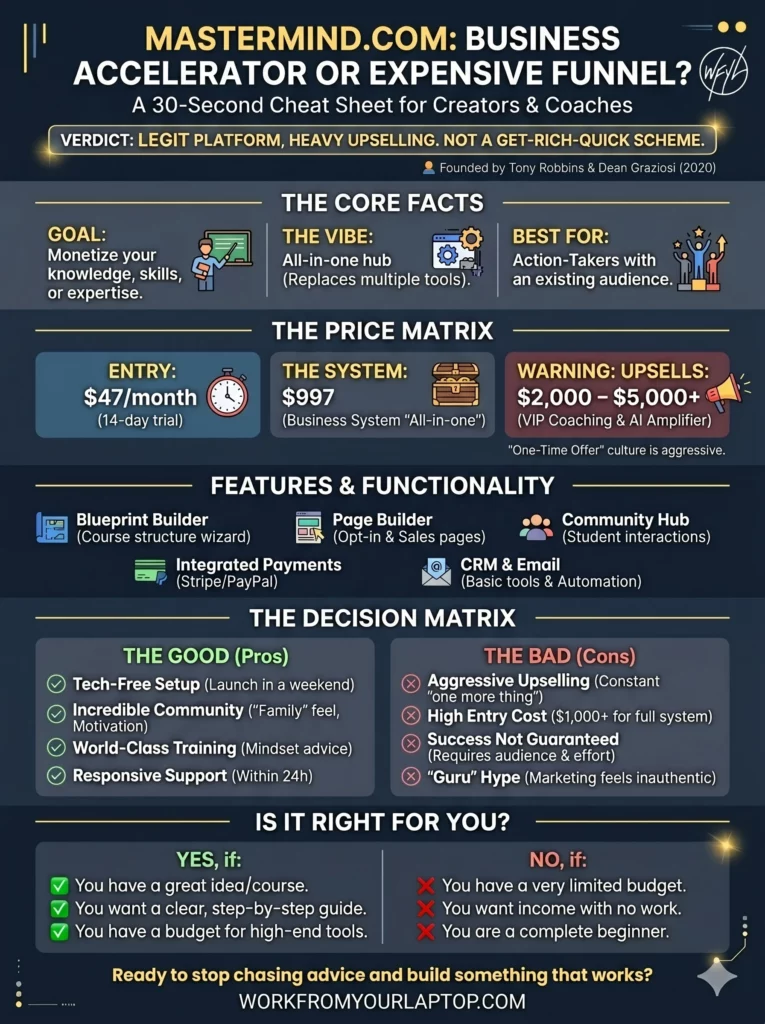
Mastermind.com is a legitimate platform for course creators and coaches, but its high price tag and aggressive upselling mean it is definitely not a “get rich quick” scheme for everyone.

  • Founded by Giants: Created by Tony Robbins and Dean Graziosi in 2020 to help experts monetize their skills.
  • Solid Tech Stack: The platform simplifies building landing pages, managing payments, and hosting communities in one place.
  • Pricing is Steep: While there is a $47/month base, most users are funneled into high-ticket “Business Systems” costing $1,000+.
  • Mixed Sentiment: Users love the motivational community but often complain about upsells and salesy tactics
  • Best for Action-Takers: It’s a powerful tool for those with an existing audience, but beginners may find the “all-in-one” upsell costs overwhelming compared to cheaper alternatives.
🔍 Have ChatGPT Summarize This Article

What’s In This Article? (Quick Jumps)

  • What is Mastermind.com?
  • How Much Does Mastermind.com Cost?
  • Mastermind Features and Functionality
  • My Experience with Mastermind.com
  • Mastermind.com Testimonials (Crowdsourced)
  • Final Thoughts
  • Frequently Asked Questions

What Is Mastermind.com?

Website: mastermind.com
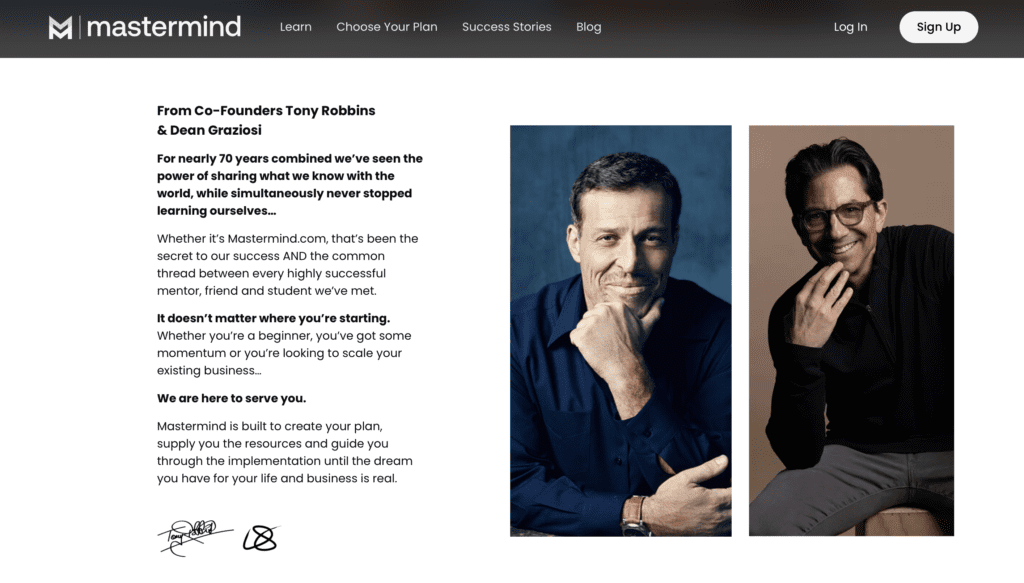

Mastermind.com review

Mastermind.com was created by Tony Robbins and Dean Graziosi as a platform to help you build and run your own groups or online classes. Instead of just being a site where you host your training courses and videos, this site is designed to help you turn what you know into an actual business.

Think of Mastermind as a middle ground between other popular tools:

  • Kajabi: This is a “pro” tool that does everything but can be very complicated.
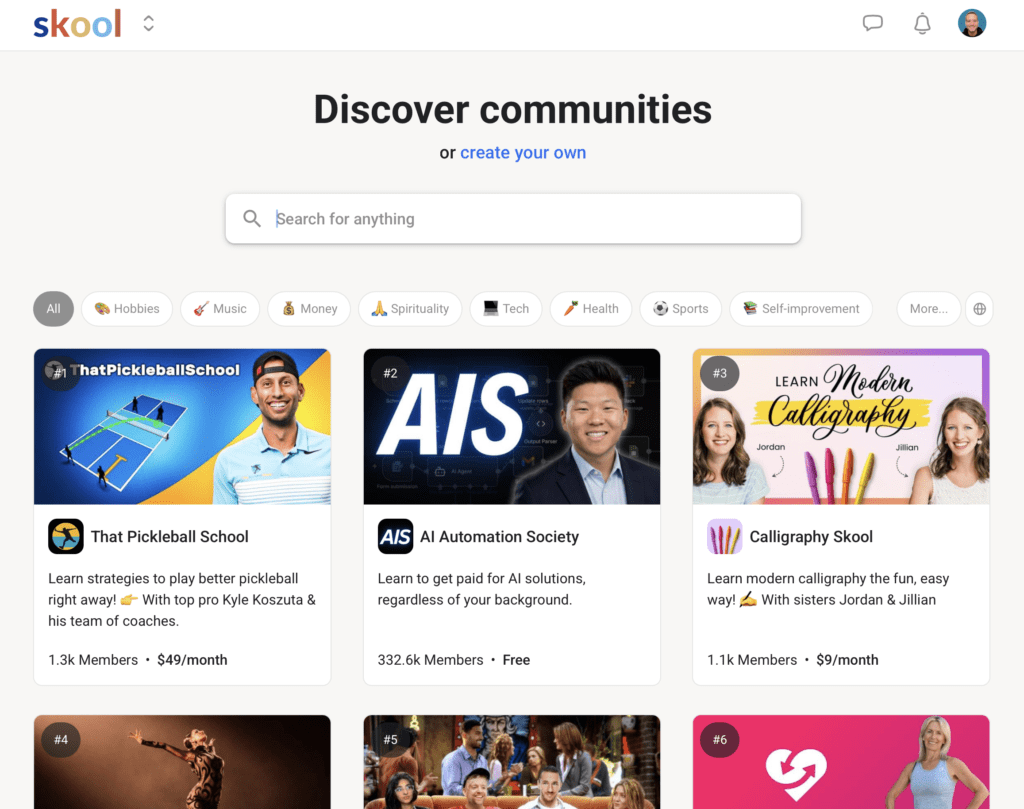
  • Skool: This tool focuses mostly on building a community.
  • Thinkific & Teachable: These websites focus on the technical side, like uploading your lessons.

Related articles: Check out my full guides on Skool for students and Skool for content creators!

Where Mastermind.com is different is it focuses on the marketing side, teaching you how to sell your skills and find the right people for your course.

Is It Right for You?

  • It’s for you if: You have a great idea for a course or a group and you want a clear, step-by-step guide to help you launch it.
  • It’s NOT for you if: You have a very limited budget or you are looking for a business that makes money without you having to do any work. This platform takes effort to make it successful!

How Much Does Mastermind.com Cost?

The pricing for Mastermind.com can be a bit of a moving target depending on which “challenge” or “webinar” you enter through.

  • Monthly Subscription: $47 per month after a 14-day free trial.
  • Yearly Plan: $423 per year, which usually includes “Marketing Secrets” bonuses.
  • Mastermind Business System (MBS): This is their premier “all-in-one” offer, often priced at $997 as a one-time entry fee that includes the software and extensive training.

Mastermind.com Upsells

Be prepared: Tony and Dean are the masters of the One-Time Offer (OTO).

  1. Inner Circle / VIP Coaching: Often presented as a high-ticket upsell (sometimes $2,000 – $5,000+) for those who want direct access to their top-tier coaches.
  2. The AI Amplifier: A newer add-on focusing on using AI to speed up content creation, often costing an additional monthly fee or a one-time upgrade.

Mastermind Features and Functionality

These features are designed to remove any “tech-headache” that stops most beginners from creating their own courses.

  • The Blueprint Builder: A step-by-step wizard that helps you structure your course or mastermind curriculum.
  • Built-in Page Builder: You don’t need a separate WordPress site or ClickFunnels; you can build your opt-in and sales pages directly in the dashboard.
  • Integrated Payments: Connect to Stripe or PayPal to handle transactions without needing any third-party integrations.
  • CRM & Email: Basic tools to manage your lead list and send automated follow-ups to your students.
  • Community Hub: A dedicated space for your students to interact, similar to a private Facebook group but hosted on your own platform.

My Experience With Mastermind.com

Ok, so when I first logged into the Mastermind dashboard, the first thing I noticed was how polished everything felt. Other Learning Management Systems I’ve used can sometimes feel clunky. The onboarding process guides you every step of the way and you’re immediately greeted by Dean Graziosi in a video walking you through your first steps.

The daily rhythm of using it is smooth. I found the page editor to be pretty intuitive, it’s a drag-and-drop system, pretty straightforward, especially for those who feel building a website is hard. I liked the “Marketing Vault” which is filled with templates for exactly what to say in your emails. That email automation sequence feature was a nice touch.

The Good: Intuitive and polished. I had a question that I reached out to their support team for and they answered within 24 hours without the usual runaround most platforms have.

The Bad: Tons of notifications to upgrade. Even after paying for the base system, you’re constantly reminded of what you’re “missing out on” by not being in the VIP tiers. It’s a little over the top and too salesy.
Work From Your Laptop YouTube Subscribe

Mastermind.com Testimonials (Crowdsourced)

Don’t take my word for it. Here are positive and negative reviews I was able to gather from online forums such as Reddit, Quora, and Trustpilot:

✅ Mastermind.com Positive Reviews

  • Incredible Community: Many users report that the “family” feel of the private groups keeps them motivated during the hard parts of building a business.
  • Simple Setup: Praise for the “tech-free” approach, allowing non-technical people to launch a site in a weekend.
  • World-Class Training: The actual business advice from Tony and Dean is often cited as “transformative” for mindset.
  • Responsive Support: Numerous 5-star reviews mention the support team going “above and beyond” to fix technical issues.
  • All-In-One Convenience: Users love not having to pay for multiple software subscriptions.
  • AI Integration: The new AI tools are helping users write copy faster than they ever could manually.
  • High-Quality Templates: Lots of reviews on the sales page templates being professional and designed to “convert like crazy.”
  • Mobile Friendly: The student experience on the mobile app is seamless.
  • Life-Changing Results: Several testimonials claim the 30-day challenge helped them launch their first business after years of “stalling”.

❌ Mastermind.com Complaints

  • Aggressive Upselling: Many find the constant “one more thing to buy” culture exhausting.
  • Cancellation Issues: Some users report being charged after canceling or finding it hard to find the “cancel” button.
  • High Entry Cost: The $1,000+ barrier for the full “system” is too high for many beginners.
  • “Guru” Hype: Critics on Reddit often point out that the marketing feels “inauthentic” or overly salesy.
  • Success Not Guaranteed: Despite the “proven system,” many users still struggle to make any money if they don’t have an audience.
  • Surprise Charges: Occasional reports of “automatic renewals” that users didn’t realize they agreed to.
  • Technical Glitches: Some reports of videos not loading or login issues during major “launch” events.
  • Email Spam: Complaints about a high volume of marketing emails after signing up for a free trial.
  • Feature Limits: The base plan has limits on how many attendees can be in a live session (e.g., 10 attendees).
  • Refund Friction: While they offer a guarantee, some users found the process of actually getting their money back to be tedious.

Final Thoughts

Mastermind.com is a polished platform for those ready to invest in their knowledge business. It removes the tech barriers but requires a significant financial and time commitment to see real ROI.

What Do You Think? I’ve seen these “guru” platforms come and go, but it looks like Tony and Dean have built something that doesn’t have the normal guru red flags and online business coaching scam cliches. But do you think the high-ticket price is worth it?

  • Have you ever tried any of Tony or Dean’s challenges?
  • Do you think an “all-in-one” platform is better than “stitching” together cheaper tools?
  • How do you think this compares with other course creators?

Drop your comments below! I love hearing your perspectives and I always respond!

Mastermind.com Review

Trying to make money online and still not seeing results? Create your FREE STARTER ACCOUNT with the same straightforward training I’ve used to create full time revenue online. No matter your experience, this step by step training delivers! Click here and get started NOW!


Frequently Asked Questions

Is Mastermind.com a scam?
No, it is not a scam. It is a legitimate SaaS platform and training program founded by well-known industry leaders. However, like any business tool, its effectiveness depends entirely on the user’s effort and ability to implement the marketing strategies provided.

How do I cancel my Mastermind.com subscription?
While there is no prominent “one-click” cancel button in some versions of the dashboard, you can cancel by contacting their support team at support@mastermind.com. It is recommended to do this several days before your next billing cycle to avoid unwanted charges.

Can I use Mastermind.com for free?
The platform usually offers a 14-day free trial that requires a credit card. Occasionally, they run “5-day challenges” where you can access certain training materials for free, but the full software suite is a paid service.


Want More Honest Reviews?

Check out these review on other make money online platforms! I do the research so you don’t have to!

  • Wordform AI review
    Wordform AI Review: What They Don’t Tell You About the $67 Price

  • Cash Tracking System Scam Review
    7 Red Flags That Prove Cash Tracking System Is a Scam
  • Keala Kanae Power Code Masterclass review scam
    Keala Kanae’s Power Code Masterclass Review: The Free Bait Before the $29K Hook
  • Genesis by Inspirean Keala Kanae Scam or Legit Review
    7 Reasons Why Keala Kanae’s Genesis by Inspirean Is a Bad Idea – Honest Review

  • 7 figure accelerator review
    7 Figure Accelerator Review
  • Mastermind.com Review
    Mastermind.com Review: Scam or the Ultimate Knowledge Business Tool?

Written by Eric Cantu · Categorized: Reviews & Comparisons

Apr 19 2026

What It’s Actually Like to Learn on Skool (A Student’s Perspective)

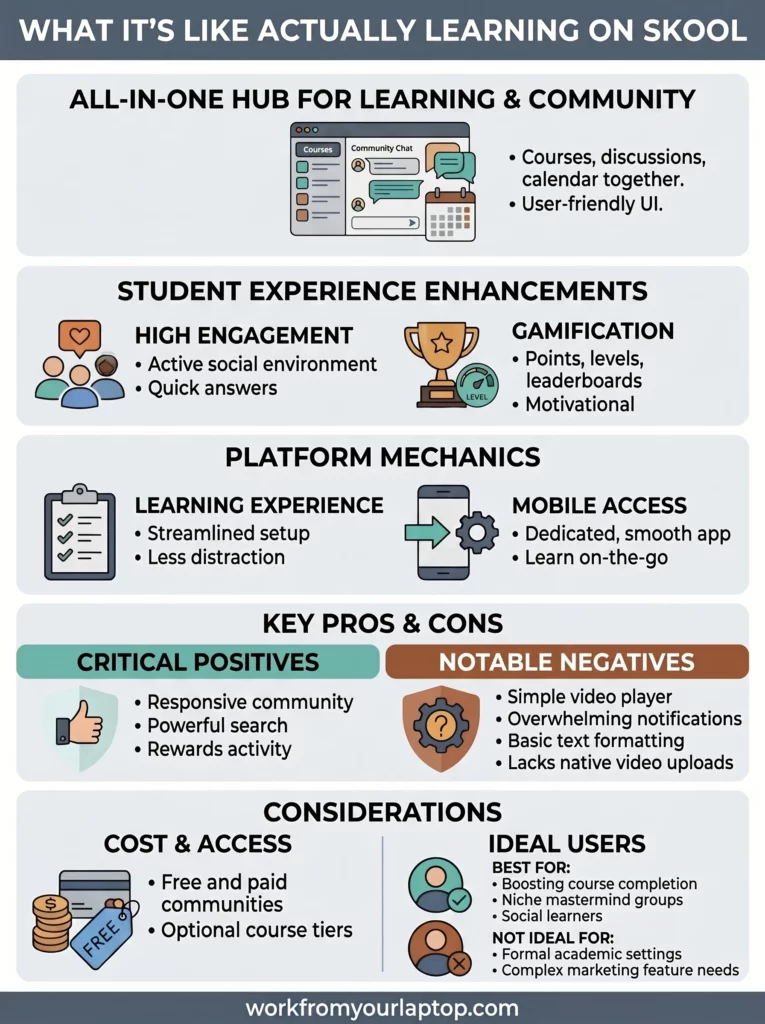
What its actually like to learn on Skool

If you’ve spent any time in the world of online business or digital creators, you’ve probably seen the clean, gamified interface of Skool. I recently did a full Skool review for content creators who are looking to get their course content out to their community. But what’s it actually like to learn on Skool from the student’s perspective?

Is Skool Worth It for Students?

Skool is a legitimate, high-quality social learning platform that combines courses, community, and gamification. For students, it offers a streamlined, “distraction-free” environment that significantly boosts course completion rates compared to traditional platforms.

  • Clean Interface: The minimalist design removes the “noise” of Facebook groups or complex LMS dashboards.
  • Built-in Gamification: Points, levels, and leaderboards make the learning process feel like a game.
  • All-in-One Hub: Courses, community discussions, and event calendars are all in one single location.
  • High Engagement: The “social-first” approach encourages students to actually talk to each other and the creator.
  • Mobile App: A dedicated app allows you to learn and participate in the community on the go.
🔍 Have ChatGPT Summarize This Article

What’s In This Article (Quick Jumps)

  • What Is Skool?
  • How Much Does Skool Cost For Students?
  • Skool Features and Functionality For Students
  • My Student Experience With Skool
  • Skool Student Testimonials
  • Final Thoughts
  • Frequently Asked Questions

What Is Skool?

Website: skool.com

Skool Review

Skool is a community-based platform designed for creators to host their courses and build an engaged audience in one centralized spot. It was founded in 2019 by Sam Ovens who wanted to solve what he called a “fragmentation” problem where students had to go to one site for videos and another (like Facebook) for the community.

In my experience you’d see this all the time. You’d go to teachable for the full course and as part of the package you’d get access to a separate “private Facebook group”. But this always seemed like a hassle. I’m not active on Facebook, so I always ignored the Facebook group.

Now with Skool, the class and the community are all under one roof.

Other options that are similar to Skool are platforms like Kajabi, Mighty Networks, and Circle. However, while Kajabi focuses on being a “Swiss Army Knife” for marketing, Skool’s main focus seems to be on the student experience and community engagement.

Who this is for: It’s perfect for students who struggle with “course abandonment” and want a social, interactive way to learn. It’s also great for hobbyists and professionals looking for niche “mastermind” groups.

Who it isn’t for: If you prefer a formal, academic setting or need complex features like built-in email marketing and advanced sales funnels, Skool might feel too simplified for you.


How Much Does Skool Cost For Students?

From a student’s perspective, the “cost” is usually determined by the creator whose community you’re joining.

  • Free Communities: Many creators offer free “entry-level” groups to get you into their ecosystem.
  • Paid Memberships: These typically range from $20/month to $200+/month, depending on the level of access and coaching provided.
  • Course-Based Access: Some creators charge a one-time fee for a course (e.g., $497 or $997) which then gives you lifetime access to their Skool group.

Any Upsells?

While Skool itself doesn’t have many “hidden” fees for students, you should be aware of Community Tiers. What this means is that a creator will have a basic community and then an optional “Elite” or “Mastermind” tier that is much more expensive. Not to worry though. From what I’ve seen, they’re usually not “essential”, they just offer more features and usually offer more direct access to the founder of the class.


Skool Features and Functionality For Students

The Skool user interface is intentionally thin to keep things fast and easy to use. I think it’s a plus.

  • The Classroom: This is where the video lessons live. It’s a very simple list of modules and lessons.
  • The Community Tab: This looks like a cleaner version of a Reddit feed. You can post questions, share your wins, and comment on others’ posts.
  • Leaderboards & Levels: They’ve managed to gamify the UI which keeps things feeling alive. You earn “points” when people like your posts. Higher points unlock new “levels,” and creators can even set it up so that reaching a certain level unlocks a bonus course.
  • Calendar: A built-in view of all upcoming live Zoom calls, workshops, or community events so you never miss a beat.
  • Universal Search: You can search a keyword and it will find every post, comment, and lesson related to that topic.

My Student Experience With Skool

Just arriving inside Skool it looks like a professional and established spot that is here to stay. I like the simplicity. There’s no confusion as to what it is. Whether you’re a student or a creator you fully understand exactly how to navigate the platform.

The setup process is the fastest I’ve ever experienced with joining an online course. I didn’t have to wait for a “welcome email” with a dozen links; I just logged in and everything was right there, from the videos, the people, the schedule. Done and done.

The daily rhythm of using it is what I surprisingly enjoyed the most. I found myself “checking in” on the community like I would check a social media app. And because you get notifications when people “like” your input, it creates this positive feedback loop that actually kept me coming back to finish the lessons. You’re incentivized to be active, and to be honest, it was fun.

Balanced Take:

  • Specific Positive: I once posted a pretty technical question about a WordPress detail at around 10 PM my time. Because the community was so active, I had three different students and a moderator jump in to answer it inside 15 minutes. That’s really responsive and a huge plus.
  • Specific Negative: If I have to find a negative (and it’s not a big one), it’s that the Classroom player is very basic. If you are used to the advanced playback features of something like YouTube or Vimeo (like specific speed adjustments or advanced captioning), Skool’s native player can feel a bit no-frills, but, honestly, I think it’s meant to be that way on purpose.
Work From Your Laptop YouTube Subscribe

Skool Student Testimonials

As always, don’t just take my word for it. Here are positive and negative reviews I was able to gather from online forums such as Reddit, Quora, and others.

✅ Skool Positive Student Reviews

  • “The first course I actually finished because the leaderboard made me want to ‘win’ the levels.” – Reddit
  • “No ads, no distractions, just learning. It’s so much better than Facebook Groups.” – Trustpilot
  • “The mobile app is surprisingly smooth. I watch lessons while on the treadmill easily.” – G2
  • “I love that I can see everyone else who is online; it makes the course feel ‘alive’.” – Quora
  • “Search actually works. I found an answer to a niche problem in a post from two years ago.” – Reddit
  • “The UI is so clean my grandma could use it without getting lost.” – Trustpilot
  • “I like that the creator can reward active members with secret content.” – YouTube Comment
  • “It feels like a private club rather than just a digital file folder of videos.” – Quora
  • “The ‘Daily Activity’ chart keeps me accountable to my own habits.” – Reddit
  • “Simple billing. I can see exactly what I’m paying for in my settings.” – Trustpilot

❌ Skool Student Complaints

  • “It’s almost too simple. I wish I could format my posts more like a blog.” – Reddit
  • “The ‘Gamification’ can feel a bit childish if you are in a very serious professional niche.” – G2
  • “No native way to host ‘live’ videos; creators still have to link out to Zoom or YouTube.” – Quora
  • “The notification system can get overwhelming if you are in a very large group.” – Reddit
  • “I wish there were more options for ‘Dark Mode’ across the whole platform.” – Trustpilot
  • “As a student, I can’t easily message people unless they message me first in some groups.” – Quora
  • “Sometimes the ‘Classroom’ videos take a second to load on slower connections.” – Reddit
  • “Not enough ‘sub-group’ options. Everything happens in one big feed.” – G2
  • “The mobile app lacks some of the administrative settings of the desktop version.” – Trustpilot
  • “It’s hard to find ‘small’ groups; the platform seems to favor the giant, noisy ones.” – Reddit

Final Thoughts

Skool is a game-changer for students who want everything under one roof with a focus on community and simplicity. While it doesn’t have the “bells and whistles” of older platforms, its focus on engagement makes learning much more fun.

What Do You Think? Have you tried learning on Skool yet, or do you prefer the traditional “video-only” course platforms? Do the leaderboards actually motivate you, or do they feel like a distraction? Let me know your experience in the comments below! I love hearing your perspectives and I always reply!

Check out my Skool review for content creators and see how this platform works from the other side!


What its actually like to learn on Skool
Try SKOOL FREE AND TRY IT OUT!

Trying to make money online and still not seeing results? Create your FREE STARTER ACCOUNT with the same straightforward training I’ve used to create full time revenue online. No matter your experience, this step by step training delivers! Click here and get started NOW!


Frequently Asked Questions

Is Skool better than a Facebook Group for learning?
Yes, Skool is generally superior for learning because it is a dedicated environment without the distractions of personal notifications, ads, and unrelated newsfeed content. It also organizes the actual “lessons” right next to the conversation, which Facebook cannot do effectively.

Do I need a credit card to join a Skool group? It depends on the group.
If the creator has made their community “Free,” you can join with just an email address. If the community is “Paid,” you will need to provide payment details through Skool’s secure checkout (powered by Stripe).

Can I use Skool on my phone?
Yes, Skool has a highly-rated mobile app available for both iOS and Android. It allows you to watch all classroom videos, post in the community, and receive push notifications for mentions or likes.


Want More Honest Reviews?

Don’t slow your roll! We’re just getting started! Check out my experience-first reviews on some of these platforms below! Don’t fall for the online hype machines looking to make a quick buck!

  • Wordform AI review
    Wordform AI Review: What They Don’t Tell You About the $67 Price
  • Cash Tracking System Scam Review
    7 Red Flags That Prove Cash Tracking System Is a Scam
  • Keala Kanae Power Code Masterclass review scam
    Keala Kanae’s Power Code Masterclass Review: The Free Bait Before the $29K Hook
  • Genesis by Inspirean Keala Kanae Scam or Legit Review
    7 Reasons Why Keala Kanae’s Genesis by Inspirean Is a Bad Idea – Honest Review
  • 7 figure accelerator review
    7 Figure Accelerator Review
  • Mastermind.com Review
    Mastermind.com Review: Scam or the Ultimate Knowledge Business Tool?
Written by Eric Cantu · Categorized: Reviews & Comparisons

Apr 17 2026

Skool Review for Creators – $99 Monthly Worth the Hype?

Skool Review

Out of nowhere I started seeing Skool ads everywhere. When I checked it out it looks like a centralized area for content creators and students alike to find communities to teach and learn just about anything. But how good is this for creators? Is it a legitimate game-changer or just another hype machine money-grab? If you want to see my Skool review for students, click here.

TL;DR: Is Skool a Good Deal for Creators?

Skool is a website that helps creators build online communities and sell online courses. At $99/month it can be a good fit if you already have an audience to monetize, but maybe not so much if you’re a brand new creator or need more technical features.

  • It’s Easy to Use: The design is very clean. It doesn’t have too many buttons or confusing menus, so your members can focus on what matters: the conversation.
  • Fun to Participate: Skool has a “game-like” system where members earn points and reach new levels by commenting and being helpful. This keeps people interested and coming back.
  • Everything in One Place: You can host your videos directly on the site, manage payments, and host live events without needing a bunch of other expensive tools.
  • Pricey for Beginners: At $99/month for the Pro plan, it’s a steep investment as a creator if you don’t already have an audience to monetize.
🔍 Have ChatGPT Summarize This Article

What’s In This Article? (Quick Jumps)

  • What is Skool?
  • What Type of Creator is Skool For?
  • What Type of Creator is Skool Not For?
  • How Much Does Skool Cost for Creators?
  • Skool Features and Functionality
  • My Experience: How Skool Compares to Teachable
  • Skool Testimonials
  • Final Thoughts
  • Frequently Asked Questions

What Is Skool?

Website: https://www.skool.com

Skool Review

Skool was started in 2019 by Sam Ovens. He wanted to create a centralized spot where teachers and students alike could find their “community” and exchange ideas and learn..

In early 2024, the platform got a big boost when Alex Hormozi invested in it and added some gamification which breathed new life into it. This helped start the “Skool Games,” where creators compete to see who can build the best, most active groups.

Today, Skool is a mix of an online school and a private social network. It’s built to keep your members coming back every day to talk, learn, and grow. It’s taken off really well and creators are making money from it.

So is Skool the right fit for you as a creator?

Related article: Check out my full review for a similar platform Mastermind.com. Which one provides the best tools and resources for you as an online marketer?

What Type of Creator is Skool For?

  • Coaches and Mentors: If you run group coaching calls or want to mentor people, Skool is perfect. It’s easy to organize your lessons and host live calls all in one spot.
  • Course Creators: If you have a course and want your students to be able to ask questions, share their progress, and help each other, Skool is much better than a static website.
  • Community Builders: If you want to create a space for people with a common interest (like painting, fitness, or coding) to hang out and learn together, this is the best place to do it.
  • People Tired of Social Media: If you want to move your audience away from the “noise” of Facebook or Instagram, Skool gives you a private, distraction-free “club” where you control the rules.

What Type of Creator is Skool Not For?

As a creator, Skool may not be the best fit if:

  • You’re Just Starting Out (Without an Audience): If you’re building your very first course and have no followers, no email list, and no customers, then paying $99/month for a “ghost town” community is a fast way to lose money. You’re better off starting on free platforms to prove people actually want what you are selling before you commit to a monthly bill.
  • You Need “White-Label” Branding: If it’s very important that your community looks exactly like your own custom website with your own colors and fonts, Skool might frustrate you. It always looks a bit like “Skool.”
  • You Need Complex Sales Funnels: If you need a site that automatically sends complex email series, tracks people across different pages, or creates “order bumps” and “upsells” at checkout, Skool isn’t the right tool. You will need a separate sales software for that.
  • You Need Deep Learning Tools: If you’re building a formal school that needs strict grading, fancy certificates, or complex quizzes to test students, Skool is probably too simple for you.
  • You Sell Physical Products: If your main business is shipping boxes of physical products to customers, Skool is not built for that. It is designed for digital knowledge, not store inventory.

How Much Does Skool Cost For Creators?

Skool has simplified its pricing model to keep things more straightforward. They previously had a Hobby Plan at $9/month, but that has been removed. Now you’re either on the sidelines watching or you’re all in.

  • The Plan: It is a flat $99/month.
  • What’s Included: This gives access to all community features, course hosting, events, payments, and analytics.
  • Transaction Fees: There is a processing fee of 2.9% + $0.30 per successful charge.

The “Multiple Community” Catch: It’s important to note that the $99/month price covers one community. If you want to start a second group for a different topic, or if you want a separate “VIP” group that is totally disconnected from your main one, you have to pay another $99/month for each new community you create.

There is no “unlimited” plan for power users.


Skool Features and Functionality

Skool’s design is simple on purpose. They want you to spend time with your members, not fiddling with tech.

  • Community Feed: This is your private forum. There are no ads, no fake news, and no annoying algorithms. You choose what people see, and your members can talk to each other without distractions.
  • Classroom: This is where your lessons live. You can upload your videos directly to Skool, so you don’t have to pay for other video hosting services anymore. This native hosting wasn’t available at first, so it’s a big win for creators.
  • Gamification: This is the secret sauce that has leveled up Skool’s user experience. Members earn points by posting and helping others. You can set it up so that when they reach a certain “level,” they unlock new lessons or special rewards. This means your own community is incentivized to help answer questions so you don’t have to.
  • Events Calendar: If you host live coaching calls, this feature is a lifesaver. It automatically tells your members what time the call is in their local time zone.
  • Freemium Model: This is a big one. You can now create multiple tiers within a single community, offering a “free” tier for entry-level engagement while locking specific courses or chat areas behind a “paid” tier.
  • No Complex Sales Pages: Skool doesn’t include a funnel builder. You don’t need to build custom sales pages, opt-in forms, or complex “order bumps.” Instead, it uses a simple, standard “Membership Page” where users see your community description and pricing, and then click to join.

My Experience: How Skool Compares to Teachable

Most creators start on Teachable because it’s the “traditional” way to sell a course. You build a library, focus on a structured lesson plan, and create a professional, “school-like” experience. Teachable has comment sections under each lesson, and many creators use these to answer student questions.

The difference, though, is these comments are “lesson-bound.” If a student has a question, they post it under that specific video. You answer, and that’s often the end of the conversation.

With Skool, the entire platform is built around the “feed.” Instead of the lesson being the center of the world, I feel like it’s the community discussion that takes center stage. If a student has a question, they post it to the main feed. And because of Skool’s gamification with leaderboards and levels, members aren’t just waiting for me to answer. They’re motivated to jump in, answer each other’s questions, and share their own tips to earn points. 

Skool’s workflow is what saved lots of time:

  • The Teachable Workflow: On Teachable, you’re managing a storefront. For every course you publish, you have to build a dedicated sales page, manage specific checkout settings, etc., to structure your school
  • The Skool Workflow: Skool is “community-first.” You set the price once for the entire group, not for every individual course. When you add a new module or a “Set” of training videos to the Classroom, your existing members automatically gain access to it. You don’t have to build a new sales page or worry about checkout links for each new course.
Work From Your Laptop YouTube Subscribe

Skool Testimonials

Don’t take my word for it. Here are positive and negative reviews creators working with Skool. I was able to gather from online forums such as Reddit, YouTube, and others:

✅ Skool Positive Reviews from Creators

  • “I found Skool to be the ultimate tech-stack killer; dumping my Vimeo, Circle, and scheduling subscriptions saved me $150+ monthly.” — Reddit
  • “Churn finally plummeted after moving here—the community feed gives members a social reason to stay subscribed.” — YouTube
  • “The gamification engine is my secret moderator; members fight to earn points helping each other, so I don’t have to be in the feed 24/7.” — Reddit
  • “Launching is lightning fast; I just dump modules into the Classroom and skip the funnel-builder headache entirely.” — YouTube
  • “The community directory is an underrated growth hack; it’s pulling in warm leads who are already hunting for my specific niche.” — Reddit
  • “The freemium model is a genius entry point; it’s so much easier to upsell people who are already active in the free community.” — Reddit
  • “No more ‘what time is the call?’ emails; the automatic time-zone conversion on the events calendar was worth the price alone.” — YouTube
  • “The Daily Digest is a total set-and-forget engagement tool; it drags members back to my content without me touching a newsletter.” — Reddit
  • “Converting is way smoother now; the unified checkout within the community feels way less jarring than external payment links.” — YouTube
  • “The app is actually fast; my members are checking in daily on mobile, which they never did on my old clunky platform.” — YouTube

❌ Skool Complaints from Creators

  • “It’s annoying that I still need a separate funnel tool; Skool can’t handle my custom upsells or order bumps.” — Reddit
  • “I’m genuinely concerned about being locked in; there’s no easy way to export my community’s full discussion history if I ever want to leave.” — Reddit
  • “The $99 monthly fee is a brutal barrier; it’s a lot of overhead to swallow when you’re still pre-revenue.” — Reddit
  • “It’s a non-starter for my coaching business; without proctored quizzes or certificates, it’s not professional enough for my certification program.” — YouTube
  • “The pricing is too rigid; I’m stuck paying $99 for every single sub-group instead of having one main account with cheaper private areas.” — Reddit
  • “The analytics are too basic; I’m flying blind because I can’t track student drop-off points in my videos.” — YouTube
  • “Evergreen training gets buried instantly; the feed-first design makes it impossible to keep important content visible for new members.” — Reddit
  • “I hate being forced into their payment processor; the transaction fees add up, and I’d rather use my own Stripe integration.” — Reddit
  • “It’s way too cookie-cutter; the lack of custom CSS makes my brand look identical to every other group on the platform.” — Reddit
  • “The signal-to-noise ratio is terrible at scale; my high-paying members are annoyed that the feed is flooded with basic questions from free-tier users.” — YouTube

Final Thoughts

Skool is the best choice for creators who want a “set it and forget it” community without paying for extra tools, but it isn’t for those who need complex features or have yet to find their audience.

What Do You Think? The second you arrive inside Skool is seems like it’s an established platform with staying power. I’ve seen dozens of these platforms come and go, but the gamification factor seems like the “game-changer” that keeps the community interested. As a creator, would you pay the $99/month?

Answer these 2 questions in the comments section for me:

  • If you’re using Skool, has it actually helped your course completion rates?
  • Are you someone who’s always wanted to create your own course, and now you see this as a much easier path than the traditional one using Teachable?
  • Are there any features lacking that make joining as a creator a no-go for your business?

Drop your comment below and let’s talk about it! I love hearing your perspective and I always reply! Want to check out the student experience and what it’s like to actually learn on Skool? Click here!


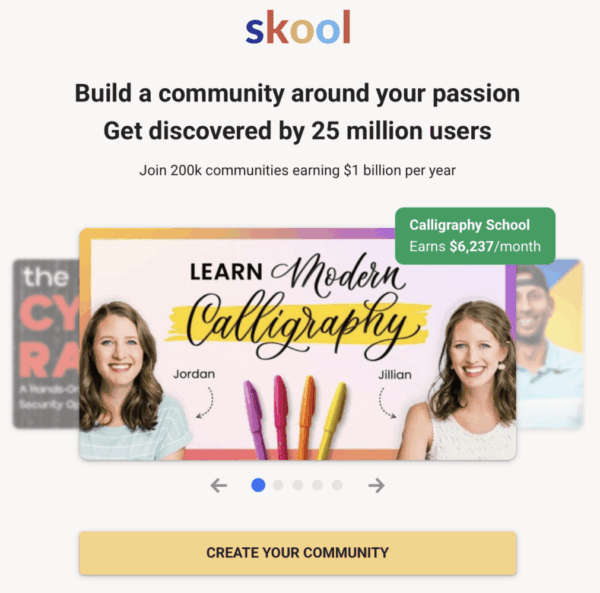
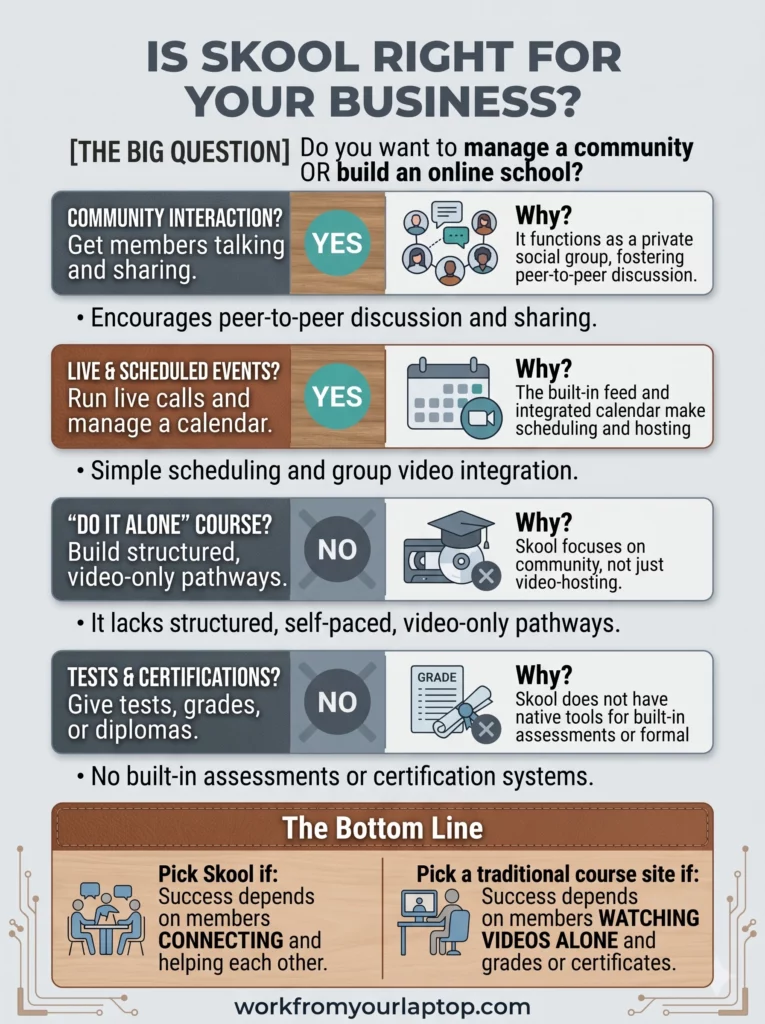
Skool review is Skool right for your business
join skool free and try it out!

Trying to make money online and still not seeing results? Create your FREE STARTER ACCOUNT with the same straightforward training I’ve used to create full time revenue online. No matter your experience, this step by step training delivers! Click here and get started NOW!


Frequently Asked Questions

Is Skool better than a Facebook Group?
For business, absolutely. Skool removes the distractions of social media, provides a structured Classroom for your content, and uses gamification to keep members active, which Facebook simply cannot match.

Is Skool worth the $99 monthly fee?
If you already have paying members, the price is a bargain because you can cancel other tools like video hosting and scheduling software. If you are just starting and have no income, it is a high cost to pay every month while you build your audience.

Is it good for formal online schools or certifications?
No. If your business needs to issue official certificates, grade quizzes, or track exactly how much of a video a student watched, Skool will not work for you because it lacks these specific professional academic features.


Want More Honest Reviews?

I search far and wide doing the research so you don’t have to! Check out these other honest reviews and see if they stack up!

  • Wordform AI review
    Wordform AI Review: What They Don’t Tell You About the $67 Price
  • Cash Tracking System Scam Review
    7 Red Flags That Prove Cash Tracking System Is a Scam
  • Keala Kanae Power Code Masterclass review scam
    Keala Kanae’s Power Code Masterclass Review: The Free Bait Before the $29K Hook
  • Genesis by Inspirean Keala Kanae Scam or Legit Review
    7 Reasons Why Keala Kanae’s Genesis by Inspirean Is a Bad Idea – Honest Review
  • 7 figure accelerator review
    7 Figure Accelerator Review
  • Mastermind.com Review
    Mastermind.com Review: Scam or the Ultimate Knowledge Business Tool?
Written by Eric Cantu · Categorized: Reviews & Comparisons

Apr 13 2026

Wealthy Affiliate Review 2026 – Why Their AI Tech Stack Is a Must Have for Content Creators

Wealthy Affiliate Review 2026

If you’ve followed me for a while, then you know that I’m one of the expert trainers inside Wealthy Affiliate. This is the exact training I found on my own back in 2017 when I had no idea how online business worked.

This is not a “done for you” system, and it’s not some “set it and forget it” platform where you don’t have to do any work. But if you want to build a real online business around your actual interests, let me show you why you’ve found what you’re looking for.

TL;DR: Is Wealthy Affiliate Legit?

Wealthy Affiliate is a comprehensive ecosystem designed to help you build, host, and grow an affiliate marketing business. With built-in AI tools for content, design, and SEO, it provides everything a beginner needs to start from scratch..

  • Comprehensive Ecosystem: Provides high-speed hosting, AI writing and design tools, keyword research tools, & step-by-step course lessons in one dashboard.
  • No-Cost Entry: The free starter membership allows you to build a website and start the first 10 lessons without adding any payment information.
  • AI-Powered Updates: Recent updates include Business Hubs, AI Article Designer to speed up content creation, DsgnPop logo designer, and a true stand out feature Image Studio.
  • Community Support: Features a 24/7 live chat and a community of over 2 million members for troubleshooting, asking questions, and more.
  • Long-Term Strategy: This is a marathon, not a sprint; those looking for “push-button” riches or first month revenue will likely be disappointed.
🔍 Have ChatGPT Summarize This Article

What’s In This Article? (Quick Jumps)

  • What is Wealthy Affiliate?
  • How Much Does Wealthy Affiliate Cost?
  • Wealthy Affiliate Features and Training
  • My 9 Years With Wealthy Affiliate
  • Wealthy Affiliate Testimonials
  • Feature Spotlight: Wealthy Affiliate Image Studio (Watch This Video!)
  • Final Thoughts
  • Frequently Asked Questions


What Is Wealthy Affiliate?

Website: wealthyaffliate.com

Wealthy Affiliate is an online training hub and community founded in 2005 by Kyle Loudon and Carson Lim. In my almost 10 years experience with Wealthy Affiliate, what makes it stand out is its straightforward, “non-guru”, “no flash” approach to its training.

WA is built for beginners. I was an absolute beginner when I started, and I appreciated the step by step training for a total newbie. I had never built a website before and knew zero about online business. I made a commitment to follow the training like a robot and I started seeing results.

The approach is a simplified, direct one. Let me break it down for you.

Wealthy Affiliate’s core philosophy is “Niche, Website, Content, Revenue.” 

  • Choose your niche around a passion or interest.
  • Build your niche website in seconds using the Business Hub website builder.
  • Create content with the AI Article Designer and Image Studio to drive targeted traffic to your site
  • Use affiliate programs and monetized traffic to turn those visitors into revenue.

You’re walked step by step through this process via

  • Step by step course lessons and 4 phases of Core Training
  • Weekly expert classes
  • Daily expert training vlogs
  • One-on-one training and mentorship

What you get with Wealthy Affiliate is full freedom of direction to build a real, profitable business based on your own interests. I’ve done a ton of reviews on “guru-led” competitors that charge $1,000+ to have you simply buy and then resell their product. Wealthy Affiliate teaches actual affiliate marketing. You never have to promote Wealthy Affiliate or take part in their affiliate program if it doesn’t fit your niche.


How Much Does Wealthy Affiliate Cost?

Wealthy Affiliate has 3 tiers of membership:

  • Free Starter Membership ($0): The purpose of the free starter account is to test drive the platform to see if it’s a good fit. It includes 1 website, Phase I of the Core Training (see below in “Features” section), 1500 AI credits and limited use of Business Hubs.
  • Premium Plus+ ($49 first month, $99/month thereafter, or $588/year): This is the “Pro” tier you upgrade to from your free starter account. It includes:
    • 100% of all the training and tools available inside Wealthy Affiliate
    • 10 websites with included hosting, 10 email accounts per site, Included SSL, 24/7 Site Support
    • 1 free .com domain
    • 60k AI credits per month for creating content with the AI Article Designer and creating images/graphics with DsgnPop and Image Studio
    • Bonus 100k AI Credits for upgrading to yearly membership
  • Premium ($49/month, $497/year): While you can’t upgrade directly to this Premium tier from the free starter membership, this tier is available if you want to downgrade from Premium Plus. It includes 3 websites and 10k monthly credits.

Additional costs:

  • Domain Registration: While your first .com is included with Premium Plus+ membership, additional domains cost anywhere from $20-$25/year

Wealthy Affiliate Features and Training

This is where I feel Wealthy Affiliate has made major strides over the last couple of years. When I got started with Wealthy Affiliate back in 2017, we didn’t have ANY of this.

This is what I call their “Tech Stack”. In my opinion, every content creator should get their hands on Wealthy Affiliate’s AI image creation tool called Image Studio. It’s worth the price of admission all by itself.

The “Tech Stack”

  • Business Hubs: This is your main “hub” for working on your site. It manages your niche research, website and branding, keyword research, affiliate programs, and content writing. You can create up to 10 business hubs.
  • AI Article Designer: This is your main writing tool to help you outline and draft posts. You can choose to write everything yourself, but using AI for the heavy lifting is a massive benefit in my opinion. Pro tip: Always make AI written content your own by adding your voice.
  • DsgnPop: Great AI tool for creating branded, professional logos.
  • Image Studio: I use Image Studio for everything. Click the link to my full YouTube video walkthrough in the Image Studio section further below to see it in action.
  • Jaaxy Keyword Tool: Helps you find “low-hanging fruit” keywords with low competition.
  • SiteRubix Builder: Built into Business Hubs, this will build your website in seconds.

Wealthy Affiliate’s Core Training

This is where you learn the basics and make your way to intermediate level principles of affiliate marketing and online business. Even if you have some experience, don’t sleep on these course lessons.

What I took away personally from these course lessons is the focus on delivering value to your audience if you want to rank and build traffic.

  • Phase I: Getting Started
    • Lesson 1: Welcome to Wealthy Affiliate
    • Lesson 2: How the Make Money Online Process works
    • Lesson 3: Setting Money Goals & Accessing Live Chat
    • Lesson 4: Creating a Hub for your Business (and Choosing Your Niche)
    • Lesson 5: Crafting Your First Niche Post Using Our Designer
    • Lesson 6: Choosing a Brand for Your Business
  • Phase II: Your Brand and Content
    • Lesson 1: Getting Your Branded Domain (and Moving Your Website To It)
    • Lesson 2: Creating a Professional Logo
    • Lesson 3: Keyword Research with Jaaxy
    • Lesson 4: Creating Helpful Content that Ranks
    • Lesson 5: Creating Images with AI
    • Lesson 6: Optimizing Your Design and User Experience
  • Phase III: Growth and Momentum
    • Lesson 1: Getting Your Website Set Up for SEO
    • Lesson 2: The Rules of SEO: Making Search Engines Love Your Site
    • Lesson 3: Harnessing Website Speed for Better User Engagement
    • Lesson 4: Integrating AI and ChatGPT In Your Business
    • Lesson 5: Perfecting On-Page SEO Elements
  • Phase IV: Making Money and Scaling
    • Lesson 1: Introduction to Affiliate Marketing
    • Lesson 2: Utilizing Affiliate Links and Disclaimers
    • Lesson 3: Introduction to the World of Social Media
    • Lesson 4: Setting Up Business Profiles on Social Media
    • Lesson 5: Generating Buzz with Shareable Content
    • Lesson 6: Understanding the Affiliate Marketing Financials
    • Lesson 7: Scaling and Building Out Your Thriving Business
    • Lesson 8: Leveraging Wealthy Affiliate’s Training Models

When you’ve mastered these 4 phases of training, you will have a business in your lap that delivers value, is profitable, and is finding its target audience. Period.

Now, to reach the expert level affiliate marketer, you have to learn from the experts who have walked the path before you. This is where we get into the expert classes. In my expert opinion, this is the secret sauce to Wealthy Affiliate.

Wealthy Affiliate’s Weekly Expert Classes

Wealthy Affiliate Review Expert Classes Jay Neill

These are weekly live hour-long classes taught by Wealthy Affiliate’s head trainer Jay Neill every Friday. They deep-dive into all aspects of affiliate marketing, from design and aesthetics, to Youtube, email marketing, social media specific marketing, Pay-Per-Click marketing, etc.

Jay is an absolute master affiliate marketer. Every year, Wealthy Affiliate sends its top earners to an all-expenses-paid, week-long Super Affiliate Conference in Las Vegas. I met him back in 2018 when I qualified for it after my first year. He is my friend and I trust 100% of the training and advice he teaches.

Jay and Eric WA Super Affiliate Vegas
Eric Cantu Headshot

If You’re Serious About Online Business

I coach my WA students personally through Jay’s GENIUS “0-10K Traffic Blueprint” training. It’s a 90 day, focused, algorithmic training that forces consistency and massive growth. Niche by niche, site by site, it delivers every time. Let’s do this!

Get Started Today!

Shortly after any live class has aired, the on-demand replay is available. I have learned so much from these classes that I still put in practice today. They are invaluable.

As an expert trainer myself, I’ve hosted countless expert class series on a wide variety of topics from YouTube growth, SEO, social media marketing, AI tools, and more.

Wealthy Affiliate’s Daily Expert Vlogs

Wealthy Affiliate Review Expert Vlogs Eric Cantu

These are bite-sized, short-form daily vlogs by experienced, expert members of the WA community. These 5-10 minute vlogs touch on training tips across all aspects of affiliate marketing. I post expert training vlogs almost daily.

Wealthy Affiliate Communities

WA communities started in 2025 and are like mini hubs so you don’t have to go looking all over for specifics about a certain element of affiliate marketing. WA communities currently include:

  • WordPress & Web Hosting
  • Artificial Intelligence
  • Social Media Marketing
  • YouTube
  • User Generated Content (UGC)
  • Search Engine Optimization
  • Pay Per Click Marketing (PPC)
  • Affiliate Marketing
  • Email Marketing
  • Facebook
  • Instagram
  • Pinterest

So, if you want to see training, questions, and posts about YouTube, you jump into the YouTube community. Want to learn more about PPC? Jump into the PPC community.

Wealthy Affiliate Activity Commissions

Wealthy Affiliate Activity Commissions

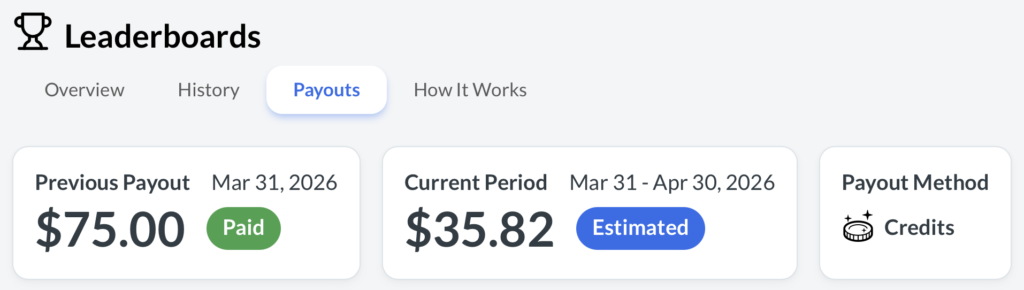
Starting last year in 2025, activity commissions are paid out on the first of the month based on your activity within the platform. They’re deposited either into your PayPal account or your WA credits account.

I consistently earn enough through activity commissions alone to pay for WA’s membership.


My 9 Years With Wealthy Affiliate

I’ve been with Wealthy Affiliate since 2017. As I said at the top, I had never built a website before, didn’t know how affiliate marketing worked, and I didn’t understand why bloggers blogged.

Now I feel like an expert at it.

The key metric to measure with any training platform is how much you learn and how quickly you learn it. This training just clicked. I got slightly addicted to it at the start and was spending every waking moment in the lessons for the first couple of weeks.

I think what helped me personally is that I didn’t focus on making money at the start. I knew I had to learn first. I gave myself 6 months to work at this like a robot to see how much I could pick up. My website looked super basic, my YouTube videos were cringe. But I was learning.

6 weeks in I had my first commission. Some random person from across the world had seen my content and clicked through on one of my affiliate links. I remember sitting at my kitchen counter and saying “It’s working” over and over again.

I had a huge month at my 12 month mark and it continued to grow. I grew my YouTube channel, exploded an Instagram following where I started sharing my solo travels, and now I’m happy to say that I’ve helped people from all over the world earn their first commissions from their own online business.

But my success means nothing to you though if this training isn’t a good fit for you. And you’re the only one who can decide that. I highly recommend creating a free starter account through any of my links on this page or on this website and giving it a try. You’ll get me as your support coach and I’ll be happy to help you reach your goals just like I have for so many people now from all over this world.

Hope to see you on the inside!

Eric Cantu Headshot

Hey, I’ll Be Your Support Coach!

Sign up for your FREE WA starter account and I’ll guide you one-on-one with daily messaging and support. You have an expert in your corner, and I can’t wait to see what we build together!

Get Started Now!

Wealthy Affiliate Testimonials

Don’t just take my word for it though. In all my reviews I scour the online forums like Reddit, Quora, YouTube, TrustPilot, and more to give you both positive and negative reviews left by real people online.

✅ Wealthy Affiliate Positive Reviews

  • “The hosting is top-tier; my site loads in under a second.” – Trustpilot
  • “Step-by-step videos make it impossible to get lost as a beginner.” – Quora
  • “The community is active 24/7; I never feel alone.” – Reddit
  • “I’m honestly PROUD of my website and that is something this mom of 4 never dreamed I’d say!.” – Reddit
  • “The AI tools have saved me hours on research and writing.” – G2
  • “No credit card needed to start is a huge plus for skeptics.” – YouTube Review
  • “Weekly live webinars are actually fun!” – Trustpilot
  • “The training teaches you how to build a real business, not a gimmick.” – Quora
  • “I’ve been a member for over a decade and the platform keeps evolving.” – G2

❌ Wealthy Affiliate Complaints

  • “The $99/month Premium Plus tier is too expensive for most beginners.” – Reddit
  • “Some of the older training videos feel a bit dated despite updates.” – Quora
  • “The community can be overwhelming with too many notifications.” – Trustpilot
  • “It takes a long time to see money; it’s definitely not for those in a rush.” – Reddit
  • “There is a lack of advanced training on paid ads (PPC).” – G2
  • “The free version is very limited; you have to upgrade to do anything real.” – YouTube Comment
  • “Site Support used to get back to you in minutes, now it’s usually 24 hours.” – Reddit

Feature Spotlight: Wealthy Affiliate Image Studio (Watch This Video!)

Wealthy Affiliate’s Image Studio is one of those things you just need to get your hands on and see to believe. From YouTube thumbnails to infographics to comparison tables to featured images for product reviews, this things is off the charts good.


WA Image Studio Review Thumb

Click here or the image above to watch my full Wealthy Affiliate Image Studio walkthrough video on YouTube. It’s well worth it and I promise your jaw is going to drop.

I. Love. Image. Studio.


Eric Cantu Headshot

This is How I Built Full-Time Income!

With training that has a real focus on you learning and me in your corner you can’t lose. Take the FREE test drive to see if this is a good fit. I look forward to helping you every step of the way!

Get Started FREE!

Final Thoughts

Wealthy Affiliate leveled up its game with its AI tech stack. With a focus on learning, a global community, and daily trainings with a straightforward focus to deliver value to your audience, you have a platform that can turn your passion into real monthly revenue.

What do you think? What questions do you have for me? Have you tried other platforms and been sold snake oil? Is there a question about a feature you don’t quite understand. Drop your comments down below! I look forward to hearing from you!

The truth of the matter is that I’ve made life-long friends from this platform. I found it as a newbie and now I’m an expert trainer inside it. My success means nothing to you if it’s not a good fit for you, so let’s give this a real effort to see what we can build together!

If you’re ready, let’s get started! I look forward to seeing you on the inside!


Kyle, Eric, Carson Super Affiliate Conference Vegas

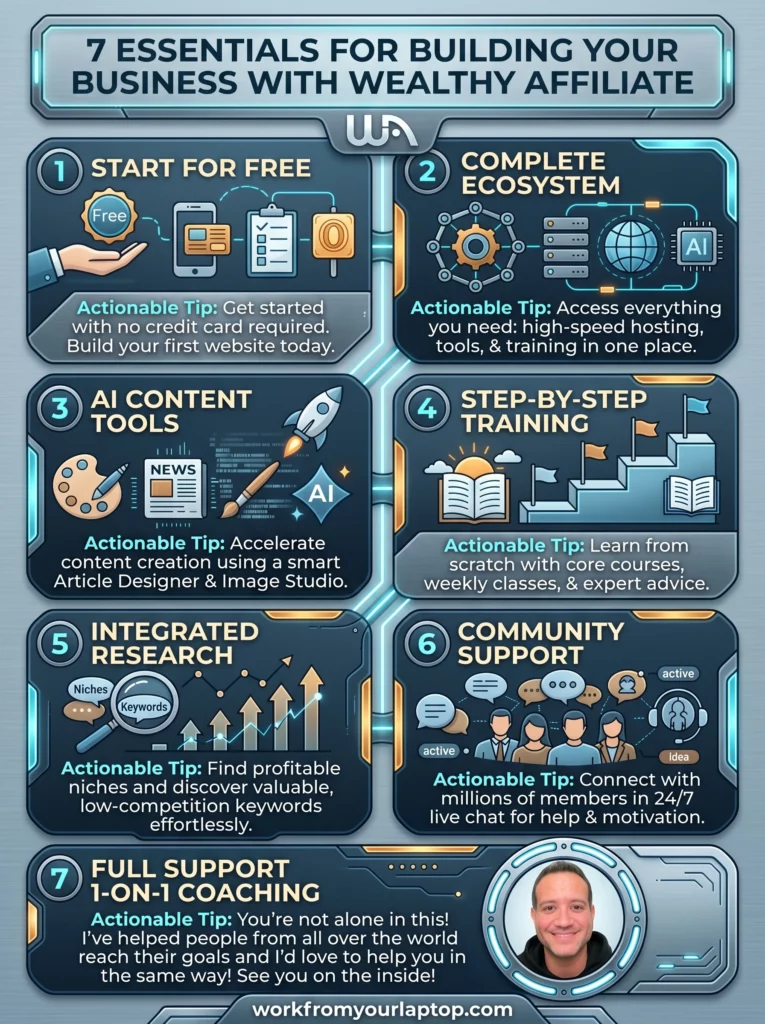
Wealthy Affiliate Review 2026 Infographic

Frequently Asked Questions

Is Wealthy Affiliate good for beginners?
Yes, it is specifically designed for beginners. The training modules start with the absolute basics, like how to choose a profitable niche and how to install a WordPress theme.

Can you really make money with Wealthy Affiliate?
Yes, but it is not a “money-making machine.” It is a training platform. You make money by applying the SEO and affiliate marketing techniques they teach to your own niche website.

How long does it take to see results?
Most users start seeing organic traffic within 3–6 months and consistent revenue within 6–12 months, provided they publish content regularly and follow the keyword research guidelines.

Written by Eric Cantu · Categorized: Featured, Essential Reads, Reviews & Comparisons

Apr 10 2026

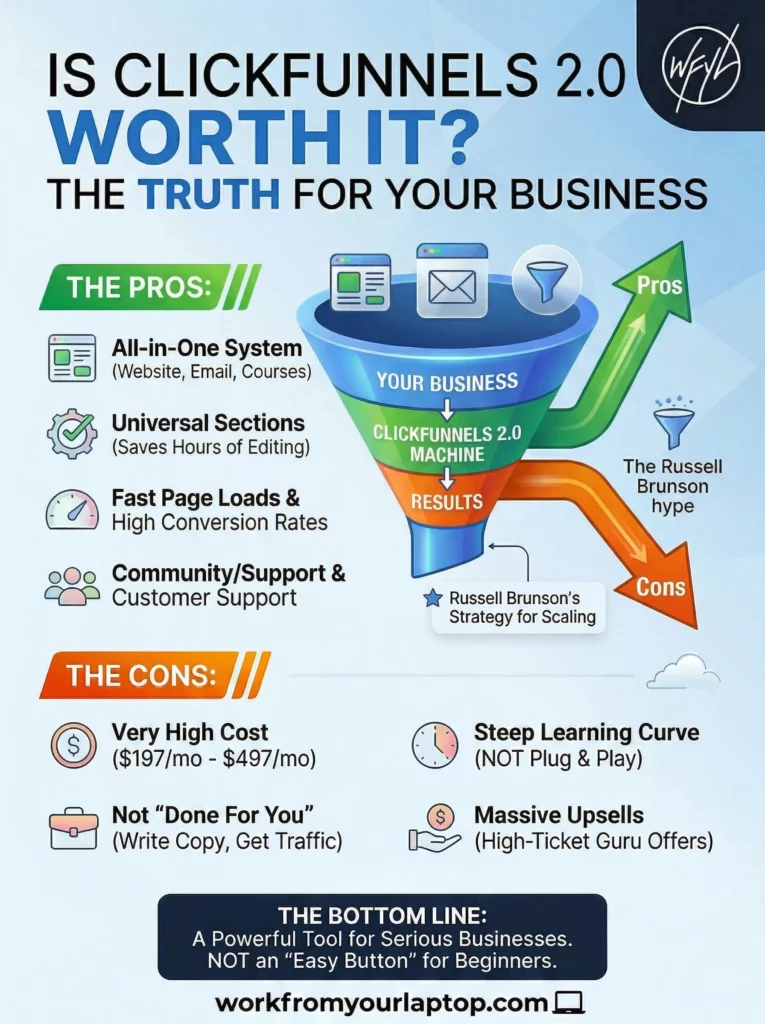
ClickFunnels 2.0 Review: Is the High Ticket Funnel Secret Worth It?

ClickFunnels 2.0 Review

Russell Brunson is everywhere right now promising that you’re “one funnel away” from a life-changing business. But should anyone ever rely so much on “Done-For-You” (DFY) systems and templates? I’ve done some digging into the actual costs and user feedback to see if ClickFunnels 2.0 lives up to the hype. Let’s dive in.

TL;DR: Is ClickFunnels 2.0 Worth It?

ClickFunnels 2.0 is a powerful, all-in-one marketing engine, but it comes with a steep learning curve and a premium price tag. It’s great for established businesses, but beginners should beware of the “easy button” promises.

  • The “One Funnel Away” Hype: Aggressive marketing makes it sound like a DFY goldmine; in reality, it’s a complex tool that requires real work.
  • Pricing Reality: It is significantly more expensive than basic website builders, starting at $197/mo.
  • The Feature Set: Full site hosting, email automation, e-commerce, and courses are now all under one roof.
  • The “Guru” Factor: Expect constant upsells and high-ticket coaching offers once you’re in the ecosystem.
🔍 Have ChatGPT Summarize This Article

What’s In This Article? (Quick Jumps)

  • What is ClickFunnels 2.0?
  • ClickFunnels 2.0 Pricing (Full Breakdown & Upsells)
  • Hands-On Take: My Experience and Workflow
  • ClickFunnels 2.0 Testimonials
  • Final Thoughts
  • Frequently Asked Questions

What Is ClickFunnels 2.0?

Website: clickfunnels.com

ClickFunnels 2.0 is designed to be a complete business operating system. You can build full websites, manage an e-commerce store, host online courses, and run your email marketing without leaving the dashboard.

The marketing doubles down on “Done-For-You” systems and templates that promise you can just “plug and play.” While the templates are high-quality, the “sketchy” part of the niche is the implying that the business is “done for you”.

If you know anything about me, this is a MASSIVE red flag. Any software you’re dealing with is just a tool. No successful business runs itself. To reach your goals you still have to provide the engine (the product) and the fuel (the traffic), and ClickFunnels 2.0 is no different.

Who it’s for: ClickFunnels 2.0 works best for serious entrepreneurs, course creators, and businesses already making sales who want to scale.

Who it’s not for: It is not a “get rich quick” tool for beginners with no budget.


ClickFunnels 2.0 Pricing (Full Breakdown & Upsells)

One thing the ads don’t always lead with is the total cost of ownership. Here are the current tiers as of the time of this article’s publishing:

  • Basic Plan: $197/mo (1 website, 20 funnels, limited admins).
  • Pro Plan: $297/mo (1 website, 100 funnels, affiliate program included).
  • Funnel Hacker Plan: $497/mo (3 websites, unlimited funnels, advanced analytics).

The Upsells (Watch Your Wallet):

Once you sign up, you’ll be hit with several high-ticket offers:

  1. The “Your First Funnel” Challenge ($0 but leads to $97-$197/mo subscription): A gateway to get you hooked on the software.
  2. Two Comma Club Live ($147+): A virtual conference focused on high-level strategy.
  3. Inner Circle / Mastermind ($25,000+): This is the ultimate “guru” upsell for high-ticket coaching.

I’m not a fan of high end upsells, especially when the base price is pretty expensive. Beginners beware!


Hands-On Take: My Experience & Workflow

I looked at ClickFunnels 2.0 as a content creator. This new version is a lot bigger than the old one. It doesn’t just build pages anymore. It tries to run your entire business in one place.

The new setup looks great, but takes time to learn. The biggest change is the “Visual Automation Builder.” Imagine a big map on your screen. It shows exactly where a customer goes, from the moment they click your ad to the moment they get your final email.

  • The Good Part: They have something called “Universal Sections.” In the past, if you wanted to change the menu at the top of ten different pages, you had to open every single page and change it manually. Now, you change it once, and it updates everywhere instantly. This saves a massive amount of time.
  • The Hard Part: This takes a while to pick up. You should expect to spend a few days just figuring out where the buttons are. The way they organized the menus is a bit confusing. I spent a lot of time clicking around just to find a simple page I had already built.

Let’s talk about their Done For You kits. These are templates that are supposed to be ready to go. While they look very professional, “Done-For-You” is a bit of an exaggeration.

  • The Work You Still Do: The software gives you the layout, but you still have to write all the words, set up the emails, and connect your bank account so you can get paid. If you think the software will do the hard work of selling for you, you’ll be disappointed. I know I sound like a broken record but there’s really no such thing as a “done for you” business.
  • The Monthly Cost: Ok, any tool, no matter how good, that costs between $97 and $297 every month is expensive. Some people find that the built-in email tool is too simplified. If you want to do advanced things, you might have to pay for another email service on top of what you’re already paying ClickFunnels.

Now let’s talk about the blogging experience inside ClickFunnels 2.0. If you’re just starting out, it’s nice to have your blog and your store in the same place, but unlike other sites like WordPress, you can’t easily change how it looks or add special features.

It starts to feel like because ClickFunnels tries to do everything, it isn’t actually the best at any one thing. It’s great for selling a single product, but it’s not the best for writing a long term blog.

Work From Your Laptop YouTube Subscribe

ClickFunnels 2.0 Testimonials

That was my experience, but don’t just take my word for it. As with all my reviews, I’ve pulled these testimonials from actual user discussions on Reddit, Trustpilot, and G2 to give you as well rounded a view as possible.

✅ ClickFunnels 2.0 Positive Reviews

  • “The speed of the 2.0 pages is night and day compared to the old version. My conversion rates increased just because the pages load instantly.”
  • “Having the course hosting and the funnel builder in one place saved me $150/month on separate subscriptions.”
  • “The ‘Styles’ feature lets me change the branding across my entire site in one click. Massive time saver.”
  • “The community is incredible. If you get stuck, there are thousands of people ready to help.”
  • “Their customer support has improved significantly with 2.0; I usually get a response in under 20 minutes.”
  • “A/B testing is built right into the workflow, making it easy to see which headline is winning.”

❌ ClickFunnels 2.0 Complaints

  • “The pricing is predatory for beginners. $197/mo is a huge hurdle when you haven’t made your first dollar.”
  • “I signed up for a ‘free challenge’ and ended up in a funnel that tried to sell me $5,000 worth of coaching before I even saw the software.”
  • “The ‘Done-For-You’ claim is a lie. You still need to be a copywriter and a tech-savvy marketer to make this work.”
  • “Migrating my funnels from 1.0 to 2.0 was a nightmare. Many things didn’t transfer correctly.”
  • “The dashboard is cluttered with ‘Guru’ training videos that are basically just long-form ads for their other products.”
  • “Too many bugs in the email automation (Workflows). Sometimes emails just don’t fire.”
  • “They make it very difficult to cancel. You have to go through multiple ‘Are you sure?’ screens and video pleas.”
  • “The software is ‘bloated.’ It has so many features that it’s overwhelming for a simple business.”
  • “Customer support is fast, but they often don’t have the technical depth to fix 2.0-specific bugs yet.”
  • “The ‘all-in-one’ approach means if ClickFunnels goes down, your entire business—site, email, and store—goes down with it.”

Final Thoughts

ClickFunnels 2.0 is a beast of a program if you’re an established marketer. $197/mo is steep for any beginner, and the “Done-For-You” systems aren’t so “done for you”. There is no such thing as an automated money machine. ClickFunnels is a tool (an expensive one) and like any tool, it only works if you do.

What do you think?
Are you considering the “One Funnel Away” challenge, or does the price tag scare you off? Are you a ClickFunnels loyalist? How do you like the new approach and upgrades? Do you agree with the complaints? Share your experience below! I love hearing your experience and I always reply.

Is ClickFunnels 2.0 Worth It Review

Trying to make money online and still not seeing results? Create your FREE STARTER ACCOUNT with the same straightforward training I’ve used to create full time revenue online. No matter your experience, this step by step training delivers! Click here and get started NOW!


Frequently Asked Questions

Can ClickFunnels 2.0 really replace my WordPress website?
It can host your entire site, but it is much more rigid than WordPress when it comes to custom designs. It is perfect for a simple business site focused on selling, but it lacks the advanced SEO tools that WordPress offers.

Is ClickFunnels 2.0 good for beginners who aren’t “techy”?
The drag-and-drop editor makes it easy to build pages without knowing how to code. However, the many new features for email marketing automation create a steep learning curve that takes time to master.

How does ClickFunnels 2.0 help improve my sales?
It uses tools like A/B testing and upsells to help increase your overall conversion rates. The visual funnel builder also lets you see exactly where customers are dropping off so you can fix your strategy.


Want More Honest Reviews?

Have a product or service in the Make Money Online niche that you think I should review? Drop it in the comments!

  • Wordform AI review
    Wordform AI Review: What They Don’t Tell You About the $67 Price
  • Cash Tracking System Scam Review
    7 Red Flags That Prove Cash Tracking System Is a Scam
  • Keala Kanae Power Code Masterclass review scam
    Keala Kanae’s Power Code Masterclass Review: The Free Bait Before the $29K Hook
  • Genesis by Inspirean Keala Kanae Scam or Legit Review
    7 Reasons Why Keala Kanae’s Genesis by Inspirean Is a Bad Idea – Honest Review
  • 7 figure accelerator review
    7 Figure Accelerator Review
  • Mastermind.com Review
    Mastermind.com Review: Scam or the Ultimate Knowledge Business Tool?

Written by Eric Cantu · Categorized: Reviews & Comparisons

  • « Go to Previous Page
  • Page 1
  • Page 2
  • Page 3
  • Page 4
  • Interim pages omitted …
  • Page 14
  • Go to Next Page »
  • Home
  • Sign Up
  • Blog & Search
  • Privacy Policy
  • Affiliate Disclosure

Copyright © 2026 · Work From Your Laptop · Eric J. Cantu · All Rights Reserved